
인쇄! 이미지 없는 버튼
Extension Actions
- Extension status: Featured
모든 이미지를 흰색 상자로 바꿉니다.
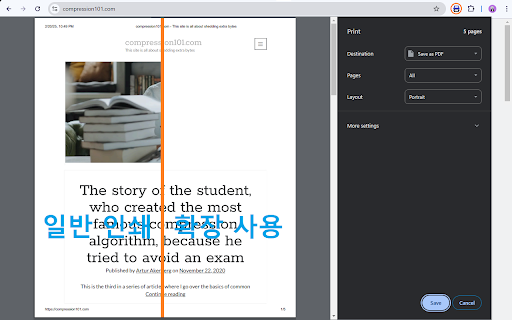
잉크를 절약하세요! 인쇄하기 전에 모든 이미지를 빈칸으로 바꾸세요.
이 확장 프로그램은 빠르게 사용하도록 설계되었습니다. 사용자 정의 옵션이 없는 간단한 버튼이 특징입니다. 이 확장 프로그램은 웹페이지의 모든 이미지를 완전히 제거하는 대신 빈 자리 표시자로 바꿉니다. 이렇게 하면 인쇄할 때 잉크를 절약하는 동시에 레이아웃 문제를 방지할 수 있습니다.
#제한 사항:
모든 확장 프로그램은 웹사이트에서만 작동할 수 있습니다. 이 확장 프로그램은 pdf 파일에서는 작동하지 않습니다.
모든 확장 프로그램은 Chrome 웹 스토어에서 작동할 수 없습니다.
이 확장 프로그램은 페이지가 완전히 로드된 후 몇 분 후에 활성화됩니다.
제거할 이미지를 선택할 수 없습니다.
#설정 방법:
주소 표시줄 근처의 퍼즐 아이콘을 누른 다음 확장 프로그램 옆에 있는 핀을 누릅니다.
______________________________________________________
Save ink! replace all images with blanks before printing.
This extension is designed for quick use. It features a simple button with no customization options. The extension replaces all images on a web page with blank placeholders, rather than removing them entirely. This prevents layout issues while saving ink when printing.
#Limitations:
All extensions can work on web sites ONLY - The extension will NOT work on pdf files.
All extensions can't work on the Chrome web store.
The extension activates a few moments after the page fully loads.
You cannot select which images to remove.
#How to set up:
Press the puzzle icon near the address bar and then press the pin next to the extension.
Latest reviews
- NCmountaingal Private
- I have been using the "print without images" extension on Chrome. I sometimes copy articles to read when convenient and appreciate the option of using far less printer ink to do so by excluding the images. It has worked as intended for me.