
Zoom Video - UltraWide Video
Extension Actions
- Extension status: Featured
Zoom video and change aspect ratio of any video, removing black bars on Netflix, Amazon Prime, YouTube and more.
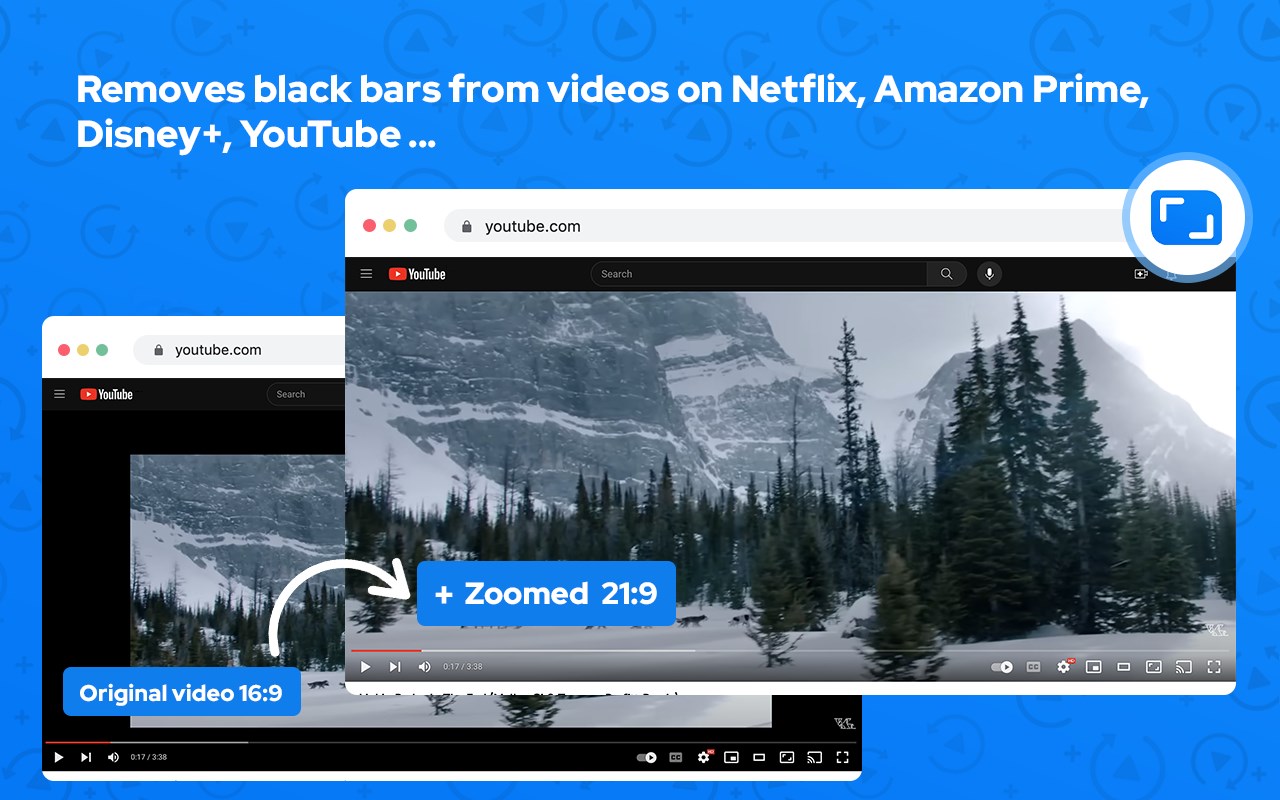
Zoom Video Edge extension is designed to eliminate black bars from videos across popular streaming platforms like Netflix, Amazon Prime, Disney+, HBO Max, YouTube, and more. Additionally, it provides the option to adjust the aspect ratio of any video, enabling you to enjoy content in full screen on your ultrawide monitor.
Why do you need Ultrawide Video extension?
It's for everyone who wants power over the video aspect ratio. This extension is primarily for Ultrawide Video monitors, but that does not mean it's only good for it. You can manipulate the video's size that contains horizontal or vertical black bars and let the video fill your entire screen for a better experience.
Here's how to utilize it:
1. Install the extension from the Edge Store.
2. Navigate to a website containing videos.
3. Click the extension icon located in the upper right corner of your browser.
4. Choose your desired aspect ratio.
The video will be resized to fit the chosen aspect ratio.
Although primarily intended for ultrawide screens (21:9, 32:9), this extension is compatible with any resolution and video. It proves particularly beneficial for 16:9 screens, enhancing the experience with 4:3 videos. Select a predefined aspect ratio (16:9, 18:9, 21:9, 32:9). Selecting it again will reset the video aspect ratio to the original size.
This extension enables the support for 21:9 monitors on YouTube, Netflix and others video sites full screen mode.
It is great for wide aspect ratio videos, that have black bars at the top and bottom and don't scale correctly.
Automatic aspect ratio detection
This feature ensures that video will be cropped without you having to lift a finger. It runs continuously and will even detect aspect ratio changes that happen in the middle of the video.
You can also use shortcut keys to do everything, they can be customized on Settings page. Define single keys for multiples aspect ratios or define multiple keyboard combos separately also.
▸ Works on all video streaming platforms
▸ Works on all embedded videos
Notable features include:
Elimination of black bars from videos on various websites.
Ability to modify the aspect ratio of any video.
Compatibility with ultrawide monitors.
Your support is appreciated; if you find the extension valuable, kindly consider rating it with 5 stars on the Zoom to Fill extension.
Latest reviews
- AVEEK
- Nice
- Ravi
- nice
- Christoffer
- Just needs auto standard-size when in standard-view. So when going from theatre or fullscreen-mode it resizes. Update for new youtube ui?
- Christoffer
- Just needs auto standard-size when in standard-view. So when going from theatre or fullscreen-mode it resizes.
- Fábio
- É necessário uma atualização, pois na nova interface dos vídeos do YouTube o controle de ajuste de zoom fica em cima dos outros botões do player de vídeo.
- Sandro
- ottima
- richard
- 100% working install now
- Михаил
- Вы просто нажимаете на одну кнопку и он растягивает видео по высоте/ширине в зависимости от монитора. Но присутствуют баги.
- Михаил
- Вы просто нажимаете на одну кнопку и он растягивает видео по высоте/ширине в зависимости от монитора.
- Kasper
- I have an ultrawide monitor, and this adjusts the ratio on the streaming service , one button and it fixed my issues thx
- JONGGEUN
- 21:9모니터 영상 볼때 잘 사용하고 있습니다.
- pedro
- there is a massive bug were increasing the volume or pressing shift zooms in... and it just keeps zooming in and in and in. please fix. Mutiple buttons are functioning as a zoom in button (even if nothing is assigned - yes i did remove the key binds in extension settings). for reference the computer I'm using is Lenovo IdeaPad s145 on Windows 11 Pro Version 24H2 OS builds 26100.3476 Experience Windows Feature Experience Pack 1000.26100.54.0 Processor Intel(R) Core (TM) i7-8565U CPU @ 1.80GHz 1.99 GHz Installed RAM 20.0 GB (19.9 GB usable) with an LG 29wq500b-b.awz. the keyboard is a dell KM5221W
- Hakeem
- It works fine, but it adds visual clutter with an icon that appears at the bottom right of videos that are playing. Pressing the icon does nothing, and the tooltip that popups is incorrect, saying that the zoom can be adjusted with a mouse scroll wheel. While the extension works fine with keyboard shortcuts that are assigned in its settings, there is no setting to remove the functionless clutter that attaches itself to every video. Make extensions minimalist or make the clutter optional.
- jasmine
- no detected video????????
- Carsten
- Funktioniert nur bei YT Prime Disney Netflix und co. keine Funktion. Schade....
- JL
- Bla
- Jeremy
- Does not work with YouTube.
- Donald
- doesnt work on Disney+
- 乾龙
- 特别好作者能不能做一个双指缩放地
- Nathan
- Stupid extension thinks my headset volume wheel is a zoom key.
- Luca
- Not working with so many sites
- Tobias
- works fine for my vertical monitor, but for some reason the volume knob on my keyboard makes the video zoom in and the hotkey remapping doesn't really work
- PUTU
- This is verry verry awesome apps,thx for developer whos create this apps.
- Vineet
- Doesn't work in Youtube. I get black bar on Youtube video in full screen mode only and this extension cannot be used once you are in the fullscreen mode. In a smaller YT window it doesn't identify black bar 'cos there aren't any (since not a fullscreen), so not sure when this extension works.
- Brandon
- doesn't work for me
- Alef
- funcionou!
- Christopher
- Funktioniert in den meisten Fällen, aber leider nicht immer...
- Leonel
- Funciona muy bien, una cosa que estaria bueno agregar seria que una vez que realizo zoom pueda desplazarme por el largo del video, asi como se puede hacer en la nativamente en la app de YouTube
- Diego
- I love it
- Everton
- Perfeito, me ajudou bastante
- Ilja
- It works fine. One drawback, my keyboard volume keys also change the zoom level of the plugin. I can't seem to turn that off in the hotkeys.
- Алекс
- Отличное, настраиваемоё под различные размеры, расширение. Спасибо
- carlos
- really nice easy and very good application
- Muhammad
- good