
Captura de pantalla - Anotación de pantalla
Extension Actions
- Live on Store
Graba y captura fácilmente toda tu pantalla con nuestra potente herramienta de captura de pantalla. Anota, edita y comparte tus…
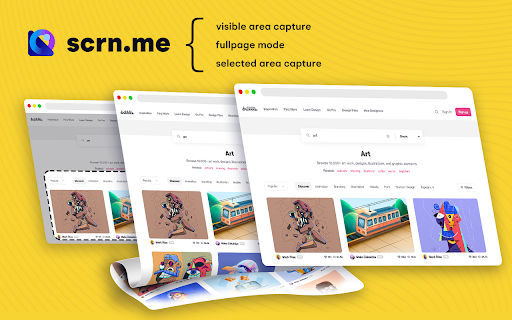
Scrn.me is the most popular tool for your day to day. Whole page screenshot, sharing and much more.
All the missing features of Google Chrome™
Are you looking for the fastest way to share and save screenshots?
Entire page screenshot, or just the visible area?
Screen Capture
▸ Capture a screenshot of the page you visit, full page, selected area or visible part
▸ Capture a screenshot of your entire screen or a specific application window
▸ Capture visible part, entire screen or app window
Annotate Screenshot
▸ Resize or crop a screenshot to the size you need
▸ Annotate your screenshot with rectangles, circles, arrows, lines, etc.
▸ Add text to your screenshot with or without background color, change text font and font size
▸ Blur sensitive information on your screenshot
▸ Highlight important part on your screenshot
▸ Select a local image or paste a copied image from your clipboard to annotate
Save & Share Screenshot
▸ Save screenshot as image in PNG or JPG format, or download screenshot as PDF
This is a free extension for taking screenshots.
Best for
# Full page screenshot
# Desktop screenshot
# Screenshot editor
# Crop
# Highlight and paint
# Save local or share online
It is powerful and simple. It has more features than you can imagine in one place
This extension is able to capture 100% of both the vertical and horizontal content appearing on any webpage on the Internet.
It is very easy to save the captured file onto your computer or print it / or share it to any social network.
Latest reviews
- Martin
- Removing search results and injecting ads in google search!!!
- Alexander Pardon
- capture selected area is not working
- Amy Flyyn
- Although it functioned well in the past, it might not support mv3. For people like me who are searching for an alternative to MV3, give CocoShot a try. You're welcome 😌.
- Tahir Taous
- Cant see any option to record screen or take screenshot, Show following error: Sorry, This website is not accessible! There are a few websites that has restrictions to run chrome extensions. Please try another website.
- David
- Nice, easy UI extension with good features. Only reason I can't give 5 stars is that when you select "Capture Selected area", it does NOT capture the actual box you draw out. Instead, it literally shifts like 25% to the right of what you actually select when you click the download button :/
- Benjamin Philipp
- - Does not manage to figure out full page contents outside of trivial cases - Has no settings/customizations whatsoever (and thus no way to skip annotating and directly download a screenshot)
- WJ C
- 截图个屏把图变的极小极小,你们的程序员是不是眼睛只能看到针尖这么大??
- barry fleharty
- Works great
- barry fleharty
- Works great
- Alan Dias
- Fast, intuitive, and with more FREE options than I'll probably ever need. This was my 5th long-screenshot Chrome extension. The first four didn't work at all. Fifth time's the charm I guess! Thanks!
- Alan Dias
- Fast, intuitive, and with more FREE options than I'll probably ever need. This was my 5th long-screenshot Chrome extension. The first four didn't work at all. Fifth time's the charm I guess! Thanks!
- Eduardo dos Santos Fiedler
- A useful app that does what it says on the tin, as it were.
- Eduardo dos Santos Fiedler
- A useful app that does what it says on the tin, as it were.
- Patrick Bastos
- I absolutely love this extension! I highly recommend I just know you will love it. u003c3
- Patrick Bastos
- I absolutely love this extension! I highly recommend I just know you will love it. u003c3
- yuki
- Excellent Plugin. Simple to use with multi facilities to save images . I love this
- yuki
- Excellent Plugin. Simple to use with multi facilities to save images . I love this
- Rodrigo Gomes
- a real life saver.exactly the functionality ,i had been looking such as save as image or pdf and edit. some time it is enable to capture some web pages. i cant imagine using my web browser without this cool extension.Thanks a lot
- Rodrigo Gomes
- a real life saver.exactly the functionality ,i had been looking such as save as image or pdf and edit. some time it is enable to capture some web pages. i cant imagine using my web browser without this cool extension.Thanks a lot
- Peyton
- What a timesaver! Very useful tool for capturing entire webpages!
- Peyton
- What a timesaver! Very useful tool for capturing entire webpages!
- Anonymous
- Great and useful in all circumstance.....
- Florencia Greising
- Absolutely great extension. Cross browser support, intuitive, and full featured. One of its greatest strengths for me is the full page capture. It does not add weird page breaks, does not duplicate parts of pages and works with single page app SPA websites. You can define hotkeys, email clients, etc. Very clean interface. Rivals desktop screenshot programs like Greenshot!
- Florencia Greising
- Absolutely great extension. Cross browser support, intuitive, and full featured. One of its greatest strengths for me is the full page capture. It does not add weird page breaks, does not duplicate parts of pages and works with single page app SPA websites. You can define hotkeys, email clients, etc. Very clean interface. Rivals desktop screenshot programs like Greenshot!
- Wilson Bispo
- I love it, it is easy to use and has lots of different option which makes it top.
- Wilson Bispo
- I love it, it is easy to use and has lots of different option which makes it top.
- Roo T
- Easy to use, great for sending thoughts, reviews,changes. If it does access all my data I would not be happy at all.
- Roo T
- Easy to use, great for sending thoughts, reviews,changes. If it does access all my data I would not be happy at all.
- Ruy Richard
- Simple u0026 get the job donen* Ideally could be integrated w/ OCR or text extraction
- Ruy Richard
- Simple u0026 get the job donen* Ideally could be integrated w/ OCR or text extraction
- Carlos Eduardo Machado
- One of the best screenshot for web browser around , it better than snagit , and other desktop software , it quick and easy.
- Carlos Eduardo Machado
- One of the best screenshot for web browser around , it better than snagit , and other desktop software , it quick and easy.
- DARTZ (ORIGINAL VIOLENCE)
- I loved this tool - it is so easy to use, and a really effective tool.
- DARTZ (ORIGINAL VIOLENCE)
- I loved this tool - it is so easy to use, and a really effective tool.
- 목화이
- By far the best screenshot tool. Super simple to use and works perfectly every time.
- 목화이
- By far the best screenshot tool. Super simple to use and works perfectly every time.
- Renata Nery
- This extension is a must have tool. After a quick configuration I have my screenshots downloaded in my desktop with 2 clicks.... Awesome
- Renata Nery
- This extension is a must have tool. After a quick configuration I have my screenshots downloaded in my desktop with 2 clicks.... Awesome
- Rodrigo Prado
- Useful tool. But no option for highlight/mark the part of the SS.
- Rodrigo Prado
- Useful tool. But no option for highlight/mark the part of the SS.
- Mario Jorge
- Simple, reliable, effective.
- Mario Jorge
- Simple, reliable, effective.
- Zeus Adiz
- I have no complaints with this extension. It works to all my needs. I haven't had any problems with it not responding, or crashing unexpectedly. This is probably my #1 screenshot extension out of all the one's I have tried so far.
- Zeus Adiz
- I have no complaints with this extension. It works to all my needs. I haven't had any problems with it not responding, or crashing unexpectedly. This is probably my #1 screenshot extension out of all the one's I have tried so far.
- 木場弘樹
- I use this every day - personal, study, work! Awesome.
- 木場弘樹
- I use this every day - personal, study, work! Awesome.
- Riccardo Riglietti
- I rly loved it!! nThis APP IS rly good, no bugs so far!! nnWin7, Chrome 18
- Riccardo Riglietti
- I rly loved it!! nThis APP IS rly good, no bugs so far!! nnWin7, Chrome 18
- 동아고등학교
- Awesome productivity app. Highly recommended. Willing to pay for it if the cost is between 0-0. Agree with Karen 0 is a bit much for occasional users, but may be affordable for biz users.
- 동아고등학교
- Awesome productivity app. Highly recommended. Willing to pay for it if the cost is between 0-0. Agree with Karen 0 is a bit much for occasional users, but may be affordable for biz users.