
Save Multiple Bookmarks
Extension Actions
CRX ID
caghbainnkeifhfokfhmnbhfjbnadaok
Description from extension meta
Save multiple bookmarks effortlessly in Chrome
Image from store
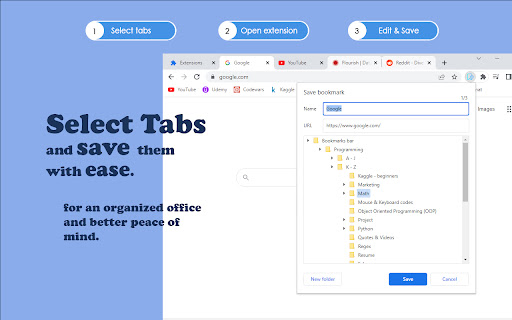
Description from store
Use this extension to:
• Save multiple bookmarks simultaneously and edit them as you save.
• Create new bookmark folders.
How to use:
• Select the tabs you want to save with 'Ctrl + Left Mouse Click'.
• Activate the extension, edit the Title or URL of the shown bookmark, and choose a folder to save it to.
• Click save or press 'Enter'.
• Next selected bookmark will appear.
Full keyboard accessibility is supported.
Happy organizing!
Latest reviews
- Chuck Baggett ChuckBaggettWeb (ChuckBaggett web)
- I made a page on my local drive with some bookmarks, selected some, clicked the extension, and the extension saves a bookmark to the local file instead of saving the links in a folder.
- G P
- Perfect! Exactly what I was looking for!!
- Dan Redzic
- Very convenient productivity boost, would recommend.
- Marios Filippides
- Thanks, very useful to have as an extension. Great for my workspace!
- karambadodox
- Very awesome. This extension allows you to select multiple tabs from the tab bar, and then save them to a new or to an existing bookmarks folder. You can also just save the tab you are on.
- karambadodox
- Very awesome. This extension allows you to select multiple tabs from the tab bar, and then save them to a new or to an existing bookmarks folder. You can also just save the tab you are on.
- Max Payne
- thank you, I was looking for this!
- Max Payne
- thank you, I was looking for this!