
Keyboard Copy
Extension Delisted
This extension is no longer available in the official store. Delisted on 2025-09-17.
Extension Actions
- Unpublished Long Ago
Quickly copy any text on the page with just your keyboard.
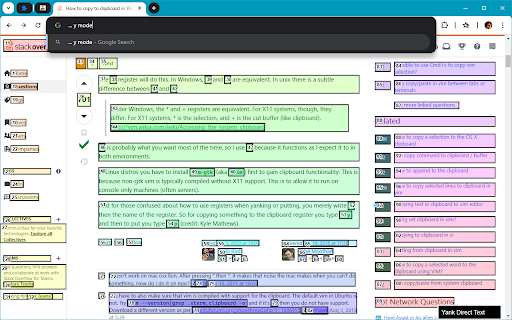
Quickly copy (yank) any text on the page with just your keyboard. The extension aims to only show copy hints for elements visible within the viewport.
How to use:
Activate yank mode by pressing Y (copy all text within an element) or y (copy only the text directly within the element, excluding any child elements).
To copy, type in the corresponding number for the box overlaid on the element.
To hide the top layer of hints, you can press space.
Pressing Shift + Space does the same but in the opposite direction.
To exit yank mode, press Y/y again or press Escape.
For feature requests or bug reports, feel free to send me an email: [email protected]