
Macro
Extension Delisted
This extension is no longer available in the official store. Delisted on 2025-10-17.
Extension Actions
- Extension status: Featured
A Chrome extension that enhances PDF viewing with Macro integration for a unified document experience.
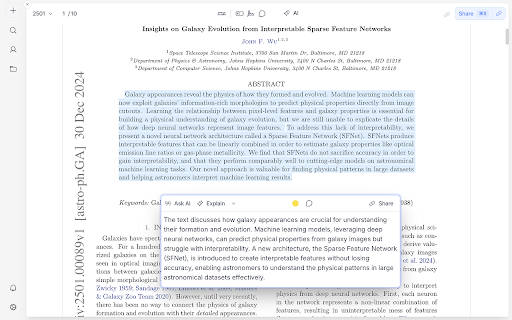
Macro lets you open any PDF with a click, no install necessary.
Macro is a PDF viewer and editor that lets you chat with your documents using all of the biggest AI models. Don't like GPT? Use Claude instead. Want to summarize that PDF so you can edit it? Done with a click. Imagine ChatGPT, but you can do all of your work in it, too.
Once the PDF opens in Macro, you can highlight any phrase to get an AI-powered explanation right on top of the document or click a button to distill the most important parts into an editable set of notes.
Macro is used by some of the biggest companies, from automotive manufacturers to law firms, and by students and researchers around the world.
And yes, it's free.*
Features:
1. Open PDFs instantly in your browser
2. Access your most recent files anywhere
3. Open Macro with a click
Macro:
1. View and store PDFs, images, word files and more
2. Use AI to talk to any your uploaded files
3. Choose your AI model (Claude, GPT, and more)
4. Summarize PDFs into editable notes files with a click
5. AI-powered explanation pop ups on top of PDFs
6. Use AI to understand or reformat documents
7. Organize and view all your files in one place
8. Share AI chats and files with anyone
9. Embed files within files for fast navigation
10. More!
Security
With major law firms and banks using Macro, you can trust we take security seriously! We can't view or train on any of your data, and none of our AI providers can either.
*Pricing
We offer a free version of Macro, which includes this extension, as well as a free trial of our Pro version. For more details, visit macro.com/#pricing.
Latest reviews
- Peter Chinman
- Building your own library of PDFs? This is the tool you need. Easily and automatically keep track of every PDF you come across.
- Daniel Kweon
- I love how the Macro Chrome Extension has transformed my document life! The PDF integration is seamless, and I'm constantly impressed by the AI features that seem to know what I need before I do. The interface just makes sense - no more hunting for files or struggling with organization. Honestly, it's become my go-to tool for everything from research papers to client documents, and I can't imagine working without it now.
- Paul Batchelor
- Completely changed my workflow. I'm finally understanding research papers now with built-in AI!
- Abbe Busoni
- i like to open textbooks with macro and ask questions with ai
- Teo Nys
- Really good for chatting with pdfs.
- Eric Hayes
- The AI helps me understand any pdf
- Mary Snyder
- Don't need Adobe anymore, plus this is free and has better AI.
- SeihakRithy Muth (Rithy)
- Absolutely Game-Changing for PDF Reading! The Macro Chrome Extension has completely transformed the way I read PDFs. It’s sleek, seamless, and incredibly powerful. The integration with my Macro account means every PDF I open is instantly saved and accessible across devices—no more downloading, re-uploading, or losing track of important documents. I love how effortlessly I can manage and revisit my Macro files, including files other than PDF. It's perfect for someone who constantly works with research papers and client documents. The security and privacy measures give me total peace of mind knowing my sensitive files are protected. Whether you're a student, professional, or just someone who deals with PDFs often, this extension is a must-have. Highly recommend it!
- Eric Xie
- Wow! Their software is crazy. I can have all my files in one place and have it all interact with AI
- Will Hutchinson
- Really great to quickly get documents into a place where I can utilize AI on them!
- Jacob Beckerman
- Very good for opening PDFs from e.g. arXiv into Macro to use Claude to talk to PDFs and to use the inline AI explainers.