
Trend Micro Toolbar for Mac
Extension Actions
- Extension status: Unlisted
See links to risky websites at a glance. Enhance your protection from Trend Micro security software.
TRICKY NEW THREATS NEVER CEASE
Criminals can hide spyware that downloads automatically when you open what seems like a harmless website. Sometimes they put up fraudulent pages in place of legitimate ones to steal sensitive information. Good friends on Facebook, LinkedIn, or Twitter might sometimes share links to untrustworthy sites without even knowing it.
CLICK WITH CONFIDENCE
After installing the Trend Micro Privacy Scanner, you can easily spot links to risky websites and avoid opening them by mistake. What you don’t click can’t hurt you.
HOW DOES IT WORK?
Intuitive color-coded safety ratings integrate seamlessly and effortlessly into the results from popular search engines like Google, Bing, Yahoo, and Baidu. The same ratings apply to hyperlinks appearing in messages that you open in Gmail, as well as web-based email services from Yahoo.
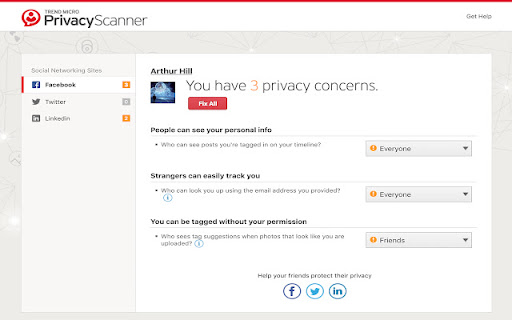
No matter whether you prefer Facebook, LinkedIn, or Twitter, links posted to all of them automatically receive ratings too. You can also easily audit the privacy settings for your favorite social networks directly from the browser window.
The toolbar can even check the settings of the web browser itself to help make sure that you do not reveal too much to untrustworthy websites.
If you want to know more about the safety of almost any website linked in a browser window, just hold the cursor still over the hyperlink for a couple of seconds.
BY THE WAY
Please note that most of these features work only if you have already installed Trend Micro security software to protect the computer.
HAVE QUESTIONS?
Get in touch by visiting our support website:
http://esupport.trendmicro.com/en-us/home/pages/about-support.aspx
Latest reviews
- Ralph.
- Basically a good function. I hope they are wirking on the dark mode.
- Nige F
- The Chrome extension works well enough checking links from search and it highlights which links are safe. Unfortunately, the highlighting doesn't work well in dark mode as the green highlighting makes the links unreadable.
- Marronnier
- This is awesome tool as the function, but not good as the looks. The green highlight covers the links, and it makes difficult to read ones during using dark mode. I want to improve it; for example, enable to customize the color etc.
- Louisa Jackson
- Why are there no reviews? This basically shows you if a link is safe or not and it keeps your computer safe.
- Kenneth
- I like it but why is there no reviews