
MECNTEC – WhatsApp Bulk Sender (CSV & Auto Message)
Extension Actions
- Live on Store
Bulk WhatsApp sender with CSV import, media sharing, placeholders, scheduling & retry logic. Great for marketing & outreach
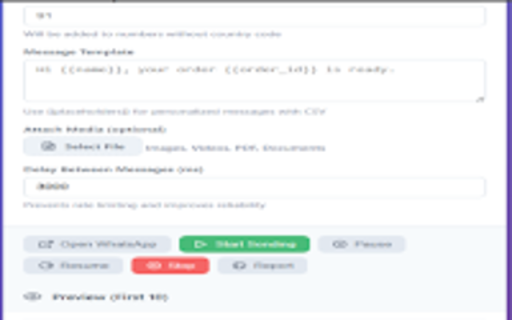
Send personalized WhatsApp messages in bulk from CSV or manual numbers. Attach media, use {{placeholders}} for personalization, and download per-run reports.
MECNTEC – WhatsApp Bulk Sender helps small businesses, support teams and marketers send personalized WhatsApp messages at scale — directly from your browser.
Import contacts using a CSV (headers like name, phone, order_id) or paste manual numbers. Use template placeholders (e.g. {{name}}, {{order_id}}) to personalize every message. Attach images, videos, PDFs and documents, control the delay between messages to avoid rate limits, and get a downloadable report after the run.
FEATURES
• CSV import with placeholder substitution ({{name}}, {{order_id}})
• Manual numbers mode for single-message broadcasts
• Attach media: images, videos, PDFs and documents
• Adjustable delay and retry logic to improve deliverability
• Live sending progress with per-number status
• Downloadable CSV report (sent / failed / timestamp / error info)
• Privacy-first — data stays in your browser; no cloud storage by default
HOW IT WORKS
1. Prepare a CSV with headers (name, phone, order_id, ...).
2. Select CSV import or paste manual numbers.
3. Create a message template using placeholders ({{name}}).
4. Optionally attach media and set a delay between sends.
5. Open WhatsApp Web and start sending — monitor live progress and download the report.
USE CASES
• Order & shipping updates
• Appointment reminders
• Event invites and RSVPs
• Customer support follow-ups
• Marketing and promotional broadcasts
PRIVACY & SAFETY
MECNTEC runs in your browser and does not upload your contact list to our servers. If you export a report, that file is created locally. Automated sending is subject to WhatsApp's Terms of Service — use responsibly.
GET SUPPORT
Visit our homepage for setup instructions, sample CSV, screenshots and FAQs: https://mecntech.com/contact
Privacy Policy: https://mnts.in/privacy-policy.html
DOWNLOAD & INSTALL
Install the extension and open WhatsApp Web. We recommend testing with a small number of contacts before sending large broadcasts.
If you have questions or need help, contact [email protected].
Latest reviews
- Awang Iskandar Bin Awang Hassim Counselor
- file is sent but text didn't send