
Super Video Speed Controller
Extension Actions
- Extension status: Featured
- Live on Store
Adjust playback speed for any video. Video speed controller for your videos
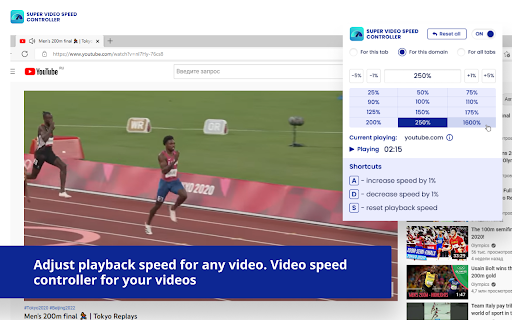
Super Video Speed Controller allows to increase or decrease playback sped on any web site.
Features:
🎥 Work almost anywhere
🎥 You can adjust with presets or set a custom speed in percents
🎥 Use shortcuts
Quick start: find "Super Video Speed Controller" icon by opened a menu under the "puzzle" icon in the toolbar.
Super Video Speed Controller lar deg øke eller minske avspillingshastigheten på hvilken som helst nettside!
Funksjoner:
🎥 Fungerer nesten overalt
🎥 Du kan justere med forhåndsinnstillinger eller angi en egendefinert hastighet i prosent
🎥 Bruk hurtigtaster
Komme i gang: Finn ikonet "Super Video Speed Controller" ved å åpne en meny under ikonet "puslespill" i verktøylinjen.
Med Super Video Speed Controller kan du ta kontrollen over avspillingen og få den opplevelsen du ønsker. Du kan justere hastigheten med forhåndsinnstillinger eller angi en egendefinert hastighet i prosent. Det er ikke nødvendig å åpne flere vinduer. Det er bare å klikke på ikonet "Super Video Speed Controller" under ikonet "puslespill" i verktøylinjen.
Du kan også bruke hurtigtaster til å justere avspillingen. Dette gjør det lettere og mer praktisk å justere avspillingen. Det er også mulig å låse avspillingshastigheten slik at den ikke endres når du navigerer mellom sider.
Med Super Video Speed Controller kan du få helt nye opplevelser når du ser på videoer. Du kan se dem i raskere eller langsommere tempo, eller eksperimentere med forskjellige hastigheter for å få mest mulig ut av opplevelsen. Det er enkelt å komme i gang, så prøv det nå!
Latest reviews
- Joel Smith
- Just works.
- Aron Apostolis
- Finally! I needed an extension to help me get through the countless training slides and presentations on various sites. I normally watch YT videos at 2x speed anyway so this extension let me achieve this. I tried about 10 others before finding this one.
- Ali Asghar
- Best extension i have saw in my career
- Bruno
- Works well, but why can I not change the shortcut keys? A S D keys do not work unless I disable the extension...
- no u
- ive been using this for about two years however i have a big complaint that whenever i want to type an a d or s i have to turn off the extension because that is shortcuts and theres no way i saw to change it
- Mark
- Perfect, does what it should
- אבי סימן
- really helps
- Tristan Chapin
- This is the only speed controller extension I've found that works on customized, in-website video players. The buttons and hot keys work as intended, but there is no customization for them. Also, the pop up window is far too large.
- Haaris S
- Only if the dropdown window was smaller (with an option to make it larger when needed) and with a dark background. Currently, its an eye sore with the huge size of the dropdown window... and distracting from the video, coz of the bright window background. Such a miss. Loosing 2 stars for that. Hope you got those feature... even as an option, if not default
- Guilherme Chaves
- IT ACTUALLY WORKS MERRY CHRISTMAS
- James Kimg
- amazing app!
- Krishna Chaitanya
- Does my job with perfection
- Acc Magazi
- very good
- Zunnoorain Qureshi
- GOOD
- Jacob 31
- Works with all sites
- Robert
- Watching youtube with this extension and having another window to browse causes chrome to freeze and the youtube window needs to be clsoed and reopened.
- IIT Jee 2026
- best extension ever found for playback speed
- Amr Al-Omari
- works 🥳
- Nguyễn Lê Minh Trí
- Speed up all ads
- deen
- Needs an option to change keyboard shortcuts
- Jon Gee
- got through my norcat training way faster thank you!
- brian belle
- cant customize keyboard shortcut
- Jason Aldeen
- Did the dev sell the old one to some crooks and remake it?
- yilin
- it's great,thanks for developing this plugin
- Pseudomus Lanius
- Works well, surpisingly works for Youtube ads too..?
- Leny Bobouski
- does not work. i can change the playback speed and it doesn't work. i can change it for all sites and it still doesn't do anything. it should work for youtube and crunchyroll and it is really hit and miss whether it decides to do anything. even registering inputs is spotty. i would like the design of having an extension in the tool bar which handles playback speed, as opposed to a key logger, if it worked.
- Fengrong Ye
- It works suprising well for ChatGPT
- thunder god
- W speed controller even works on hianime
- nurulhuda
- finally! the speed controller that actually works! thank you.
- Jarif Samad
- The experience with this product has so far been good .It is nothing special but do exactly what it promises to do .
- Maciej B
- Clear and useful extension
- Andy Jiang
- Best!
- Mathanraj S
- works perfect
- Yume Natsume
- works well ! like that theres a interface controller so i can always go back and add speed or decrease anytime and know the speed. hope it works on netflix too (not tried yet) i cant stand the 1.5x hope i can stack it up haha. Only tried on youtube and seems good !! thank you so much, keep up the nice work ! update: down 1 star, after sometime maybe 30min or 1hr keep going back to speed 1x, keep resetting i have to adjust back to lie back down... anyway to set fix at least it reset back to a faster speed update: 12/2/25 - wish can adjust the remote to remove 25-50-75 so i can set them to 275, 300, 315 xD or can adjust A button to +5 instead of 1 for easy adjusting on FULLScREEN XD but so far this is the best speeder i used !! other than current tab settings after awhile keep going back 100. other than this the rest best so far ! n even works on netflix, wonder if for disney and others too haha but i have no disney so cant try
- Volvox
- The best one I've ever used.
- Jinannafis
- W speed controller. The others don't work as well but this one works perfectly.
- Osama Tamimi
- 10 out of 10 experience
- Learning Buddy
- I found another working one try this : ClearView for YouTube - Speed Control & Focus Mode.
- Andrea Jones
- La última actualización cambia todo el rato la velocidad seleccionada, es muy molesto. Si seleccionas 2x a los 5 minutos te la cambia por otra. Le daría 5 estrellas si lo arreglasen. Actualización: Ya no funciona con Disney+. Espero que se pueda arreglar. Actualización 2024: Vuelve a funcionar con Disney+, pero ahora al usar la extensión, el video que estés viendo en cualquier página se para cada 5 minutos.
- junes lee
- used to use Netflix Speeder and YouTube Speed Controls ( https://chromewebstore.google.com/detail/youtube-speed-controls/naalfmaaomhjpbndelnlijacdniggpjn ). But Netflix Speeder changed its UI recently, and i changed to this add-on. This one works fine.
- Ulf Leis
- tried a couple of speed controllers. This one is the only which works with linked learn videos. the only downside ist the bad customisability...I'd like to put some more breakpoints or my own in- / decrease steps. Would be nice if the dev would add a settings page for this. Beside all of that, this extension works good 🙌
- Rajiv Kumar
- Just Amazing
- Adriano
- Best SUPER Video Speed controller on earth 10/5
- lantoto l
- great app, but would be awsome to have a slider
- Christopher Bernard
- Useful if some player doesnt have speed controller. Can speed up ads
- Trung Đức
- First one that works
- Hồ Lâm
- I wish this ext could have functionality to be disabled on specific sites, not on all sites only like present. If possible that would be great!
- Vikram Prashar
- Its the best one I have found so far.
- Michael
- It was not working today when the new updated logo appeared as the version may have updated. I reinstalled it and then it started showing the features, otherwise it was showing all gray today.
- 李昂
- Fantastic app