
CRX id
cigoepmifjncnjdfldgmpbaekhfeiani
cigoepmifjncnjdfldgmpbaekhfeiani
Description from extension meta
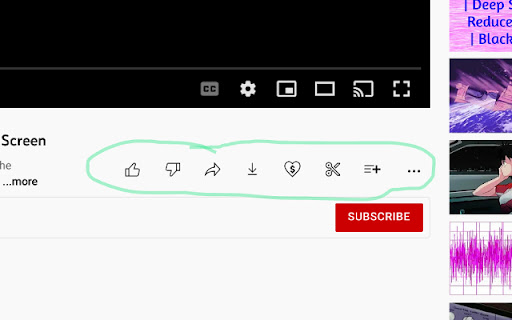
Hides the button text (including number of Likes) on Youtube videos using a CSS rule.
Image from store
Description from store
You know all those extensions that slightly alter a website? Well this is another one. It removes the text next to the main buttons under a Youtube video. The buttons stay there, just not the text. So you can still like, dislike, share, etc the video, you just click the button. It saves some screen space, you know?
Also, it hides the number of Likes a video has. Maybe this is a deal-breaker for you, I don't know. I personally don't like seeing how many Likes or Dislikes a video has, so I like it. You can always make your own extension if you want to, Google's tutorial is pretty clear about how to do it, although you'll need to learn a little CSS.
Latest reviews
- (2023-10-25) Henry Ozolins: It did not work for me (Oct 2023).
- (2023-10-25) Henry Ozolins: It did not work for me (Oct 2023).
- (2022-08-25) ARatQuiRit: Doesn’t work anymore ? That is exactly what I need :’( ^^
- (2022-08-25) ARatQuiRit: Doesn’t work anymore ? That is exactly what I need :’( ^^