
YouTube™ Chat Helper
Extension Actions
Display YouTube™ live chat messages as scrolling danmaku on the video player.
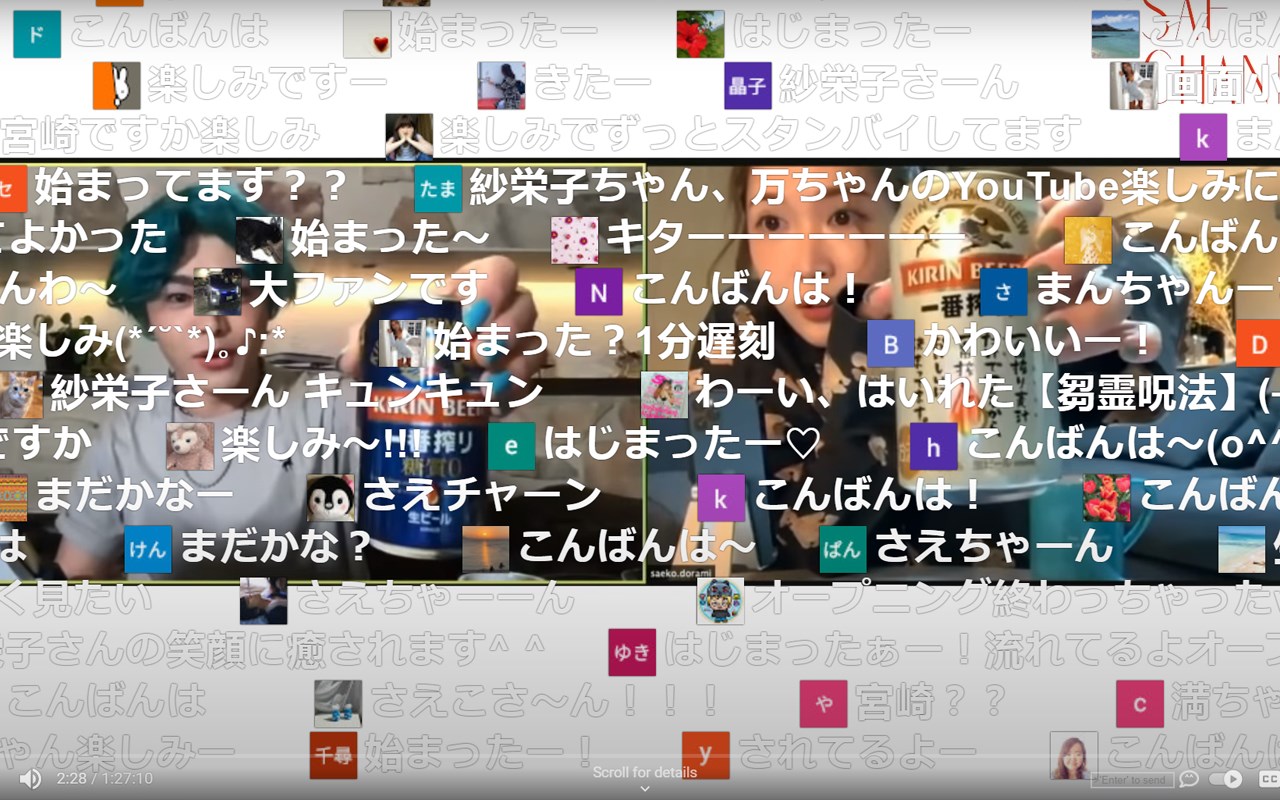
Danmaku Chat for YouTube: Enhance Your Live Chat Experience
Danmaku Chat for YouTube revolutionizes the way you engage with live streams by adding vibrant, real-time comment overlays—known as “danmaku,” a popular feature in East Asian streaming culture—directly onto YouTube videos. This extension transforms ordinary live chats into dynamic, animated comment streams that float across the video in vivid colors and customizable styles. It adds a visually immersive layer of interaction, making live events more engaging and memorable for viewers by displaying animated chat messages that glide over the content.
Designed with seamless integration, Danmaku Overlay reads live chat messages from YouTube in real time, intelligently parsing text and emojis to ensure faithful representation within the danmaku display. Users can easily toggle the overlay on or off via a button integrated into the YouTube player controls, enabling quick access and control without disrupting the viewing experience. A comprehensive settings panel gives full customization options, allowing you to adjust font size, message speed, opacity, avatar visibility, and more, so you can tailor the appearance to suit your preferences. The extension supports both live broadcasts and live chat replays, so you never miss the animated chat experience whether you watch streams live or later.
This extension appeals to live stream fans, content creators, and viewers seeking a fresh social viewing experience akin to popular platforms like Bilibili, NicoNico, and Twitch, where danmaku-style commenting is an integral part of community interaction. By leveraging an efficient rendering engine alongside smart track management for orderly, non-overlapping comment display, Danmaku Overlay maintains smooth video playback without taxing system resources, delivering a fluid and polished user experience.
Key Features:
- Real-time Danmaku Overlay: Animates YouTube live chat messages as colorful, moving comment streams overlaid on the video, providing vivid visual interaction.
- Intelligent Parsing: Decodes all forms of chat content, including text and emojis, ensuring messages are accurately expressed in the danmaku format.
- Customizable Appearance: Offers flexible options to modify danmaku font size, speed, opacity, and avatar display, allowing personalized visuals for maximum enjoyment.
- Player Integration: Adds an intuitive toggle button directly to YouTube’s video controls for immediate activation or deactivation of the overlay without interrupting playback.
- Overlay Control: Enables switching between different overlay modes, chat visibility options, and manages multiple danmaku tracks to prevent clutter or overlapping.
- Support for Live & Replay Chats: Automatically detects live chat and chat replay modes, applying danmaku animation seamlessly in both cases.
- Chrome Storage Support: Saves your customized settings locally to retain preferences across viewing sessions and devices.
- Minimal Resource Usage: Optimized rendering and smart management ensure smooth video playback with minimal performance impact.
How It Works:
1. Install Danmaku Overlay for YouTube from your Chrome browser’s extension store.
2. Navigate to any YouTube live stream or video that has live chat enabled.
3. Use the new toggle button located on the video player controls to turn the danmaku overlay on or off.
4. Watch as live chat messages animate fluidly across the video in real time, creating an immersive chat experience.
5. Access the settings panel via the overlay interface or player controls to customize font size, animation speed, opacity, avatar display, and other style options.
6. Switch between overlay modes or pause/resume the danmaku stream as needed to manage the visual flow and balance with the video content.
7. Your customized preferences are automatically saved in Chrome’s local storage and persist across streams and devices for consistent experiences.
Privacy: - No personal data collected. Danmaku Overlay does not gather, transmit, or share any user information or browsing data. All chat message parsing happens locally in your browser by reading YouTube’s chat feed. Settings are stored only on your device to protect your privacy fully. For complete details, please refer to our privacy policy.
Latest reviews
- 乃佳
- 字体太大了,不知道在哪里可以调整
- .LEONARD
- NICE