
Better Sidebar for Gemini & AI Studio
Extension Actions
- Live on Store
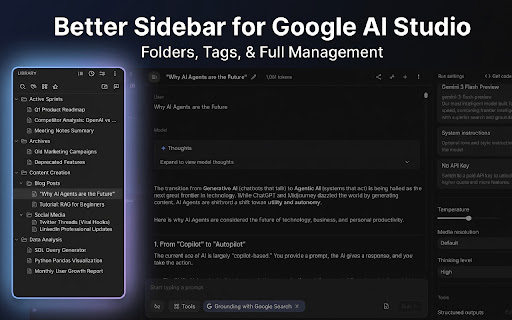
Better sidebar with folders, tags, favorites, prompt library, deep search, conversation export, and library scanning.
Is your Google AI Studio prompt history becoming a mess?
Struggling to find that one perfect prompt you wrote last week?
Meet BETTER SIDEBAR FOR GEMINI & AI STUDIO — the ultimate workflow booster for developers, prompt engineers, and AI enthusiasts.
We transform the default AI Studio interface into a powerful, organized knowledge base. Stop scrolling endlessly and start organizing your ideas efficiently.
🔥 WHAT'S NEW (v2.4.0)
• ✏️ True Rename: Rename conversations directly — changes sync to Google's servers in real time.
• 🗑️ True Delete & Batch Delete: Delete or batch-delete conversations with real server-side removal. No more ghost chats.
• 🔐 Persistent Login: Stay logged in across sessions. No more frequent re-authorization. Includes a smart merge option.
• 💎 Create Gem Conversations (Gemini): Start a new Gem conversation directly from the Gem tab.
---
🚀 KEY FEATURES
🌟 Multi-Platform Support
Manage conversations across both Gemini and Google AI Studio seamlessly in one unified sidebar.
👥 Multi-Account Profiles
Create separate profiles for work or personal use. Each maintains its own independent database.
🔍 Chained Search
Filter conversations by combining multiple conditions — title, tag, and type — for laser-precise results.
💎 Gem Management
Full Gem integration — browse, filter, create, and start conversations with your Gems right from the sidebar.
📜 Smart Scrollbar
A visual scrollbar for Gemini conversations. Jump directly to any message in long chats — no more endless scrolling.
🤖 Default Model
Set a default model for Gemini and every new conversation will automatically use it.
✏️ True Rename (NEW)
Rename conversations directly — changes are synced to Google's servers in real time.
🗑️ True Delete & Batch Delete (NEW)
Delete or batch-delete conversations with real server-side removal. No more ghost chats.
🔐 Persistent Login (NEW)
Stay logged in across sessions with smart merge for synced data.
📂 Folders & Colors
Drag and drop your chats into nested folders. Assign custom colors to folders and tags.
📝 Prompt Library
Build your personal library of reusable prompts. Supports option variables, prompt composition, and system prompt imports.
🔍 Precision Search
Perform full-text searches across every message in your history. Limit search to the active chat for immediate context.
☁️ Google Drive Sync
Manually backup and sync your settings, prompts, and config data via Google Drive.
🎨 UI Customization
Advanced layout controls for Gemini, including width adjustments and Focus Mode.
⚙️ Platform Manager
Use the extension popup to quickly jump between platforms or enable/disable them on the fly.
🏷️ Smart Tagging System
Assign custom tags to your conversations, now visible directly in the chat header.
⭐ Favorites & Pinning
Keep your most frequently used chats or specific prompts at the top for quick access.
🔄 Automatic Sync
Your latest conversations are automatically synced behind the scenes when you visit the page.
📊 Timeline View
Visualize your workflow with a "Today", "Yesterday", and "Last Week" timeline.
🖼️ Watermark-Free Image Downloads
Automatically remove watermarks when downloading generated images in Gemini, including Pro HD images.
📥 Conversation Export
Export your conversations as Markdown, Plain Text, or JSON for documentation or backup.
🌗 Seamless Integration
Automatically matches the platform's light/dark mode.
💾 Secure Data Backup
Your data is yours. Export your organization structure (SQL dump) for backup.
🔒 PRIVACY FIRST
We take your privacy seriously.
• 100% Local: We use an embedded SQLite database running entirely within your browser.
• No Cloud Sync: Your folders, tags, and notes are NOT sent to our servers.
• No Training: We do not read your conversations to train any AI models.
WHY DOES THE EXTENSION NEED PERMISSIONS?
We require access to aistudio.google.com and gemini.google.com solely to inject the enhanced sidebar interface and read chat titles for organization. We do not access your other browsing history.
---
Disclaimer: This extension is an independent project and is not affiliated with, endorsed by, or sponsored by Google.
🔗 LINKS
• GitHub: https://github.com/Paper-Crane-Devteam/better-sidebar-for-google-gemini-and-ai-studio
• Discord: https://discord.gg/uqT72XYh
Latest reviews
- A_ren
- Everything about this is exceptional! Would really love to see this integrate with Gemini's new "Notebooks" feature, though besides that - this is everything I really wanted.
- Sine Waves
- I am always cautious about installing browser extensions for AI, but this one does it perfectly. I love that it is open-source and uses a local database so my folders and tags never leave my computer. It asks for minimal permissions and completely respects user privacy. Highly recommend for anyone who wants to organize Gemini without giving up their data!
- Md sAKIBUL hASAN
- Really good extension. Have some problems. 1: Unable to delete actual selected chat. It only removes from the Extension only not from Gemini, if I exit from the extension, the chats still showed up. 2. Can't detect all the gems
- Vera Dixon
- Hello, this extension is excellent and loved by me. However, when using it in google ai studio, I find that it can't go and retrieve the content of the description part attached to the title, can this be fixed please?
- Md sAKIBUL hASAN
- It works really well, though it doesn't support Perplexity, ChatGPT, Claude, or Grok. However, hats off for the deep thinking feature. A requested feature: Gemini allows you to delete all chats, but there is no option to uncheck specific ones. Please add an option to multi-select and delete chats. Also, add an option to place new chats into a default folder. It doesn't show all the gems available.
- Antonio Montesinos
- Really good and useful extension
- harry he
- Very useful !!
- Dhysiskshdy gshsksodudhdj
- This is the best folder extension I found for Gemini! so many advanced features!
- Anonymous
- oh my god, so useful! always want this!
- NOCauseEffect
- That's great, thanks a lot. It's recommended for everyone. I hope the developer of this excellent extension will also write an extension for the right sidebar, because it has many issues too—for example, when you refresh, the values revert to default.
- CL Fan
- Nice