
Gemini & AI Studio 增强侧边栏
Extension Actions
- Live on Store
更好的侧边栏:文件夹、标签、收藏、提示词库、深度搜索、对话导出与库扫描。
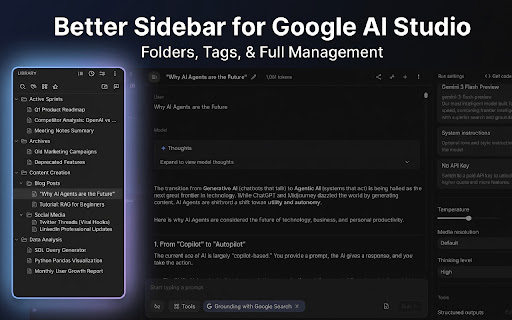
你的 Google AI Studio 历史记录是否杂乱无章?
想找回上周写的那个完美 Prompt 却无从下手?
BETTER SIDEBAR FOR GEMINI & AI STUDIO 专为开发者和提示词工程师打造,旨在大幅提升你的工作效率。我们将原本简单的列表转化为一个功能强大的知识库,让你的 AI 工作流井井有条。
🔥 最新更新 (v2.4.0)
• ✏️ 真正的重命名:重命名对话后直接同步到 Google 服务器,不再只是本地修改。
• 🗑️ 真正的删除与批量删除:删除和批量删除对话时同步修改 Google 端数据,彻底告别"幽灵对话"。
• 🔐 登录状态保持:账号登录状态持久化,无需频繁重新授权登录。新增智能合并选项,同步数据更省心。
• 💎 Gem 对话创建(Gemini):在 Gem 标签页中直接创建并发起 Gem 对话。
---
🚀 核心功能
🌟 双平台终极支持
在统一的侧边栏中无缝管理 Gemini 和 Google AI Studio 这两个平台的历史对话。
👥 多账号配置
支持工作或个人的多个 Profile 配置,每个 Profile 拥有独立的数据库,完美对齐你的 Google 账号。
🔍 链式搜索
支持同时按标题、标签、类型等多个条件组合筛选对话,精准定位目标内容。
💎 Gem 管理与集成
完整的 Gem 集成体验 — 在侧边栏中浏览、筛选、创建 Gem 并直接发起 Gem 对话。
📜 智能滚动条
可视化滚动条,支持快速跳转到长对话中的任意消息,告别无尽滚动。
🤖 默认模型
设置默认模型后,每次新建对话将自动选择该模型,无需重复选择。
✏️ 真正的重命名 (NEW)
重命名对话后直接同步到 Google 服务器,不再只是本地修改。
🗑️ 真正的删除与批量删除 (NEW)
删除和批量删除对话时同步修改 Google 端数据,彻底告别"幽灵对话"。
🔐 登录状态保持 (NEW)
账号登录状态持久化,无需频繁重新授权。新增智能合并选项。
📂 文件夹与自定义颜色
创建多级文件夹来分类对话。通过拖拽即可整理,更支持自定义文件夹和标签的颜色。
📝 强大提示词库
构建私人的 Prompts 库。支持选项型变量、提示词嵌套组合,以及系统提示词一键导入。
☁️ Google Drive 云同步
支持通过 Google Drive 手动同步和备份配置及提示词数据。
🔍 精确深度搜索
告别无尽的滚动。支持对所有历史消息进行全文检索。可限定"在当前会话中搜索",精准定位。
🎨 UI 高级自定义
全方位掌控 Gemini 布局外观,提供宽度调整、专注模式和按需隐藏各种多余界面元素的功能。
⚙️ 平台管理器
随时通过插件弹出菜单控制扩展状态,并可在不同平台之间一键快速跳转。
🏷️ 智能标签系统
为对话添加自定义标签,支持实时过滤,现在更可以直接在对话标题处展现。
⭐ 收藏与置顶
将最常用的 Prompt 或重要对话置顶,随时高效调用。
🔄 自动静默同步
只需访问相关页面,扩展就会在后台自动同步抓取最新的历史对话记录。
📊 时间轴视图
通过"今天"、"昨天"、"上周"的时间轴视图回顾你的工作轨迹。
🖼️ 高清无水印下载
支持在 Gemini 页面内下载去除了附加水印的生成图片,包括 Pro 账号高清图片。
📥 对话灵活导出
将你的对话内容导出为 Markdown、纯文本或 JSON 格式,方便分享或存档。
🌗 完美原生融合
原生级的设计体验,自动跟随双平台的深色/浅色模式无缝切换。
💾 数据本地可控
支持将个人数据(SQL 归档)随时进行导出备份,全面掌控。
🔒 隐私优先承诺
• 完全本地化:我们使用浏览器内置的 SQLite 数据库存储你的文件夹结构。
• 无云端同步:你的文件夹、标签和备注"不会"发送到我们的服务器。
• 无数据训练:我们绝不会使用你的对话内容来训练 AI 模型。
---
免责声明:本插件为独立项目,与 Google 公司无隶属、认可或赞助关系。
🔗 相关链接
• GitHub: https://github.com/Paper-Crane-Devteam/better-sidebar-for-google-gemini-and-ai-studio
• Discord: https://discord.gg/uqT72XYh
Latest reviews
- A_ren
- Everything about this is exceptional! Would really love to see this integrate with Gemini's new "Notebooks" feature, though besides that - this is everything I really wanted.
- Sine Waves
- I am always cautious about installing browser extensions for AI, but this one does it perfectly. I love that it is open-source and uses a local database so my folders and tags never leave my computer. It asks for minimal permissions and completely respects user privacy. Highly recommend for anyone who wants to organize Gemini without giving up their data!
- Md sAKIBUL hASAN
- Really good extension. Have some problems. 1: Unable to delete actual selected chat. It only removes from the Extension only not from Gemini, if I exit from the extension, the chats still showed up. 2. Can't detect all the gems
- Vera Dixon
- Hello, this extension is excellent and loved by me. However, when using it in google ai studio, I find that it can't go and retrieve the content of the description part attached to the title, can this be fixed please?
- Md sAKIBUL hASAN
- It works really well, though it doesn't support Perplexity, ChatGPT, Claude, or Grok. However, hats off for the deep thinking feature. A requested feature: Gemini allows you to delete all chats, but there is no option to uncheck specific ones. Please add an option to multi-select and delete chats. Also, add an option to place new chats into a default folder. It doesn't show all the gems available.
- Antonio Montesinos
- Really good and useful extension
- harry he
- Very useful !!
- Dhysiskshdy gshsksodudhdj
- This is the best folder extension I found for Gemini! so many advanced features!
- Anonymous
- oh my god, so useful! always want this!
- NOCauseEffect
- That's great, thanks a lot. It's recommended for everyone. I hope the developer of this excellent extension will also write an extension for the right sidebar, because it has many issues too—for example, when you refresh, the values revert to default.
- CL Fan
- Nice