
Google Navigation
Extension Actions
Navigate through Google Search with a set of hotkeys.
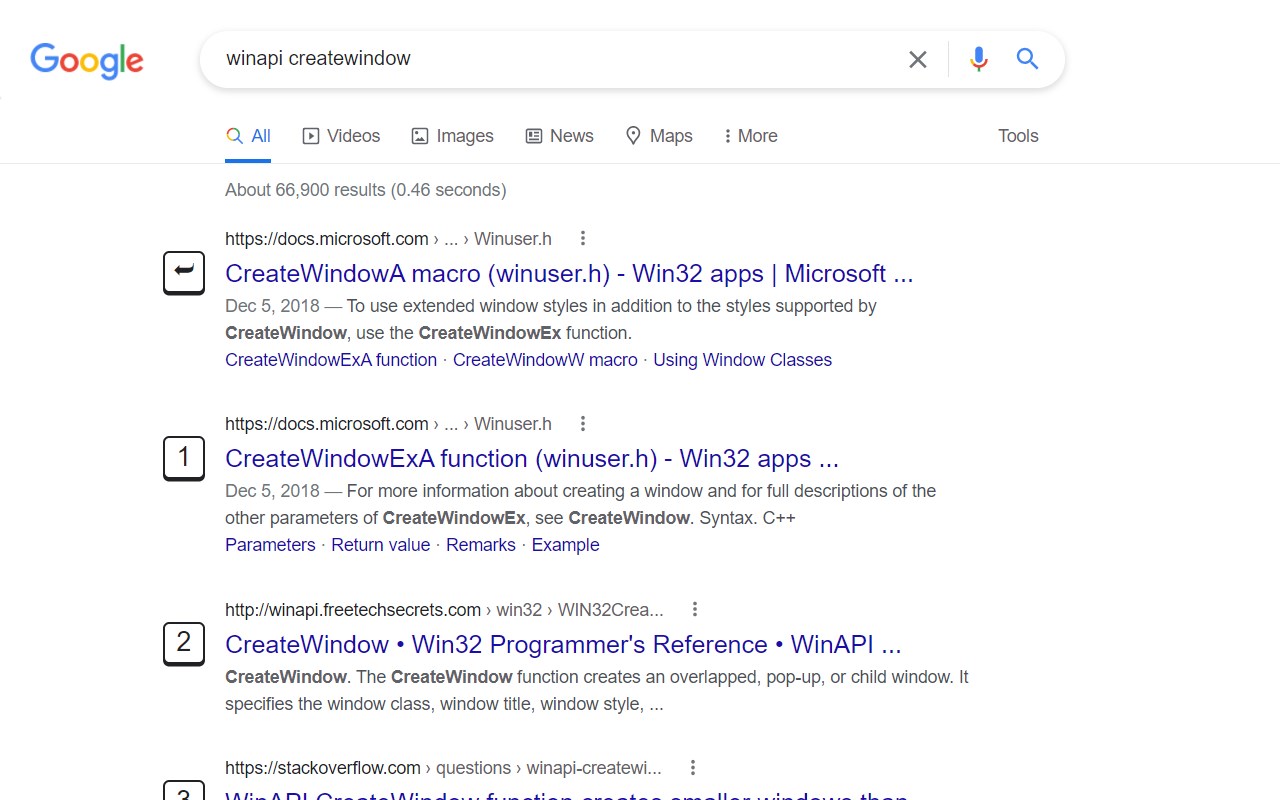
Google Navigation is a Microsoft Edge extension which brings a set of hotkeys for users to navigate through Google Search page.
In general, hotkeys added by this extension can be recognized by their corresponding icons. When the key is down, the page will scroll to where the result locates, and the result link will be opened when the key is up. To cancel an action, you can keep the key down for a period until the icon bounce back.
For general search results, use 0 to 9. The first will be assigned with ⮨ Enter key when no element is focused.
Press . for next page; , for previous page.
P for Wikipeida widget on the right hand if available.
T to get focus to the translator widget or calculator widget.
When CTRL is pressed, an icon will show up in press-down status, after that, all links will be opened in new tab, until this mode is deactivated by pressing CTRL again.
To learn more about usage and source code, see: https://github.com/veringsek/google-navigation
Latest reviews
- Damian
- Well made and pleasant to use