
时间戳工具 - Timestamp Tool
Extension Actions
强大的时间戳转换工具,支持生成、转换、计算、时区转换、倒计时等功能
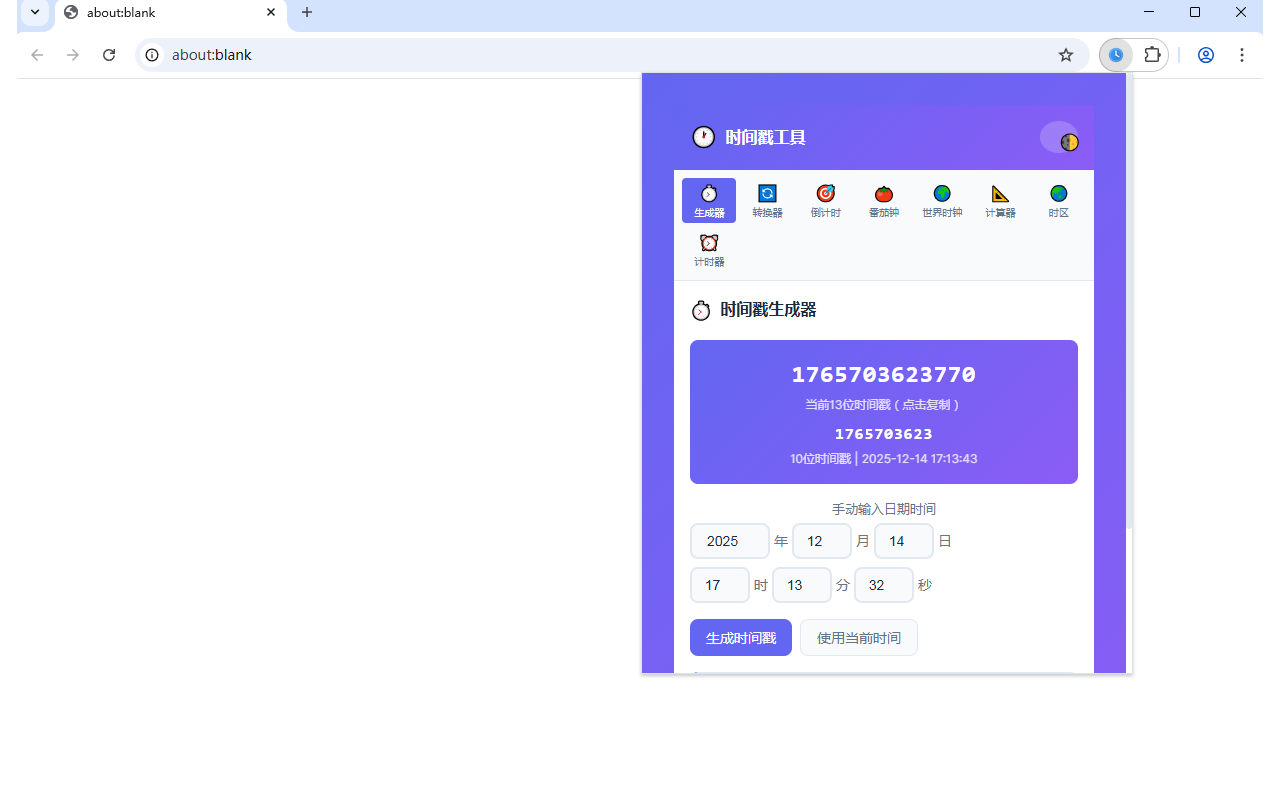
- **Name**: Timestamp & Time Tools Pro (时间戳助手专业版)
- **Summary**: The ultimate developer utility for timestamps, countdowns, and world time. 开发者必备的时间戳转换、倒计时与世界时钟工具。
- **Category**: Developer Tools (开发者工具) / Productivity (生产力)
## 2. 详细描述 (Description)
**English:**
Timestamp & Time Tools Pro is an all-in-one time management and utility extension designed for developers and power users. It simplifies working with timestamps, tracking deadlines, and managing time across different zones.
**Key Features:**
* **⚡ Smart Timestamp Generator**: Quickly generate current timestamps in seconds/milliseconds. custom date input supported.
* **🔄 Instant Conversion**: Convert between Unix timestamps and human-readable dates effortlessly.
* **⏲️ Advanced Countdown Timer**: Track important events or deadlines. Features a "Sticky" countdown mode that keeps the remaining time visible at the top.
* **⏱️ Precision Stopwatch**: Integrated stopwatch with lap recording functionality.
* **🍅 Pomodoro Timer**: Stay focused with a built-in Pomodoro timer (25/5 intervals) and browser notifications.
* **🌍 World Clock**: Add and monitor time across multiple cities worldwide. Real-time offset calculation.
* **🎨 10+ Modern Themes**: Customize the look with themes like Cyan, Indigo, Rose, Amber, and Dark Mode.
* **💾 Auto-Save**: Your settings, countdowns, and selected cities are automatically saved locally.
**中文:**
时间戳助手专业版(Timestamp Pro)是一款为开发者和高效人士打造的全能时间工具箱。它集成了时间戳处理、倒计时管理、番茄工作法等多项功能,助您高效掌控时间。
**核心功能:**
* **⚡ 智能时间戳生成**:一键生成当前秒/毫秒级时间戳,支持自定义日期转换。
* **🔄 快速转换**:自动识别并转换时间戳与日期格式,支持多种格式输出。
* **⏲️ 目标倒计时**:设置重要截止日期(如发版日、节假日),支持置顶显示剩余天数/时/分/秒。
* **⏱️ 多功能秒表**:支持毫秒级计时与计圈(Lap)功能。
* **🍅 专注番茄钟**:内置标准番茄工作法(25分钟工作/5分钟休息),带桌面通知提醒。
* **🌍 世界时钟**:自定义添加全球城市,实时显示当地时间与时差。
* **🎨 个性化主题**:提供青色、靛蓝、玫瑰红、暗黑模式等 10+ 种精美主题。
* **💾 自动保存**:所有配置、倒计时目标及城市列表均自动保存到本地。
---
---
## 3. 单一用途 (Single Purpose)
**本扩展程序的单一用途是:时间管理与转换工具 (Time Management & Conversion Utility)**。
它专注于帮助用户处理与时间相关的任务,具体包括:
1. Unix 时间戳与人类可读日期的相互转换。
2. 管理基于特定时间点的倒计时和秒表。
3. 通过番茄钟(Pomodoro)技术管理时间段。
4. 查看和计算不同时区的时间。
**The single purpose of this extension is: Time Management & Conversion Utility.**
It focuses specifically on helping users handle time-related tasks, including:
1. Converting between Unix timestamps and human-readable dates.
2. Managing countdowns and stopwatches based on specific time points.
3. Managing time intervals via the Pomodoro technique.
4. Viewing and calculating time across different time zones.
## 4. 权限理由 (Permission Justification)
本扩展程序仅请求实现功能所必需的**最小权限**:
| 权限 (Permission) | 理由 (Justification) |
| :--- | :--- |
| **`storage`** | **Essential**. Used to save user preferences (e.g., theme selection, last used tab) and user-created data (e.g., countdown targets, world clock cities) locally within the browser. No data is sent to external servers.<br>**必要权限**。用于在本地保存用户偏好(如主题、上次标签页)和用户创建的数据(如倒计时目标、世界时钟列表)。不上传任何数据。 |
> **Note**: We have removed `contextMenus`, `activeTab`, and `clipboardWrite` permissions as they are not strictly essential for the core popup functionality.
---
## 5. 测试说明 (Testing Instructions)
### 3.1 安装与启动
1. 确保已加载扩展程序。
2. 点击浏览器工具栏中的扩展图标打开弹窗。
### 3.2 验证功能
1. **时间戳生成/转换**:
* 在首页查看当前时间戳是否跳动。
* 点击“停止”应暂停更新。
* 在输入框输入 `2025-01-01`,检查是否生成对应时间戳。
2. **倒计时 (Countdown)**:
* 切换到“倒计时”标签。
* 输入未来时间(如今晚 23:59:59)并回车。
* 验证倒计时大字是否置顶显示。
* 验证关闭弹窗再打开,倒计时是否仍在继续。
3. **番茄钟 (Pomodoro)**:
* 切换到“番茄钟”标签。
* 点击“开始专注”,倒计时应开始。
* 验证时间结束后是否有浏览器通知弹出。
4. **世界时钟 (World Clock)**:
* 切换到“世界时钟”标签。
* 点击“添加城市”,选择一个新时区(如 New York)。
* 检查显示的时间和时差是否正确。
5. **主题切换**:
* 点击右上角的主题图标(🌓)。
* 尝试选择 "Cyan" 或 "Indigo" 等新主题,检查界面颜色是否变为对应的渐变色。
### 3.3 卸载/清除数据
* 扩展的所有数据存储在本地 `localStorage` 中。移除扩展程序即可彻底清除所有数据。
---
## 6. 隐私权政策 (Privacy Policy)
**本扩展程序不收集、传输或分享任何用户数据。**
1. **数据存储**: 所有数据(包括用户偏好设置、自定义倒计时、世界时钟列表等)均仅存储在您的浏览器本地 (`chrome.storage.local` 或 `localStorage`)。
2. **数据使用**: 存储的数据仅用于保存您的个性化设置,以便您下次打开扩展时能恢复状态。
3. **第三方共享**: 我们不会将任何数据发送给任何第三方服务器或服务。
**This extension does not collect, transmit, or share any user data.**
1. **Data Storage**: All data (including preferences, custom countdowns, world clock lists, etc.) is stored strictly locally on your browser/device.
2. **Data Usage**: The stored data is used solely to persist your personalized settings for your convenience.
3. **Third-Party Sharing**: No data is sent to any third-party servers or services.