
Subtítulos Dobles para HBO Max por MovieLingo
Extension Actions
- Live on Store
La extensión permite mostrar subtítulos adicionales sobre los estándar de HBO.
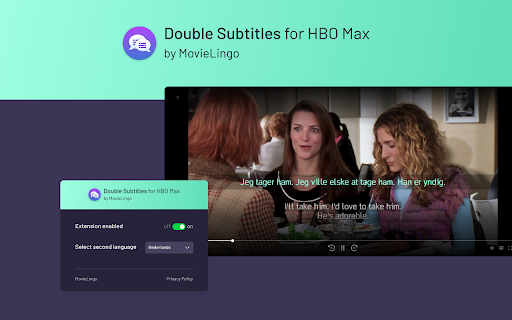
¡Mejora tu experiencia en HBO Max con "Subtítulos Dobles para HBO Max" de Movielingo! 🎬🌐 Disfruta de lo que te encanta mientras aprendes idiomas de forma fácil y divertida. 🎓🌟
La extensión Subtítulos Dobles te permite mostrar subtítulos adicionales junto a los estándar de HBO Max. Solo selecciona el idioma de los subtítulos adicionales desde la ventana emergente de la extensión. 📝🔀
¡Diversión, sencillez y eficacia, todo en una sola extensión! 😁🚀 Sin importar tu nivel, "Subtítulos Dobles para HBO Max" se convertirá en tu tutor personal de idiomas al alcance de un clic. 👨🏫🌍
¿Cómo empezar? ¡Es muy fácil! 😊
1️⃣ Haz clic en la extensión.
2️⃣ Agrégala a tu navegador Chrome. 🔀🖱️
3️⃣ Actualiza la página de HBO Max. 🔄
¡Eso es todo! Ahora, solo selecciona el idioma que deseas aprender en la ventana emergente de la extensión y empieza a disfrutar tu aprendizaje. 🎉🗣️
¡Únete a nosotros y comienza hoy tu viaje multilingüe! 🚀🌍
📌 También funciona con el servicio Max en Estados Unidos.
Atención: Esta extensión no está afiliada, respaldada ni relacionada con ninguna de las empresas o productos mencionados. Todas las marcas comerciales y marcas registradas pertenecen a sus respectivos propietarios.
Latest reviews
- Yeraldine Rojas
- I’d like to have subtitles in both English and Spanish, but I need both of them to work properly—that is, to be synced with the audio of the movie/series. I also need the subtitles not to disappear, because sometimes they drop out for moments or simply don’t show up. Please help me with this!
- Szymon Pulut
- It looks like it doesn't work very well with Max? Lots of subtitles are missed (just the original version displayed). I observed this most common (not always though) when original subtitles are 2 lines or off center of the screen. For reference: original language ENG, second language SPA, movie: Harry Potter 1.
- Anna Vijlbrief
- Using it on HBO max and it works pretty well! Only disadvantages are that there is a slight delay between audio and the subtitles so you run a bit behind, and you can't turn of the primary subtitles from HBO or the subtitles from MovieLingo will turn of as well.
- Demon Tifus
- Add Thai support please
- Alex
- It was great, but now the second subtitles simply don't appear
- Dragan Maric
- It was good, but recently it doesn't work anymore. Edit: It works now, thanks!
- Tanapat Makkadham
- I need Thai language
- kingZ Zzz3
- dont have thai language
- 十一旦
- Only Chinese subtitles, not traditional Chinese subtitles. And Englsih subtitles is not working.
- ChangJin
- dont have asian sub so racist
- Mango Bellini
- It is still not working for me. The second language display will be displayed according to the first language setting. ** Because i wanna display Thai language, and this extension is not supported
- Mateusz Piekarski
- I was gladly using the extension but it seems it doesn't work anymore. Shame.
- K-led BERRAHO
- It doesn't work well at all !!
- Arya H
- I’m really enjoying watching Swedish shows with English subtitles using your product—it’s very easy to use! However, I wish I could save words or make notes on HBO (I see that you have this feature for Netflix). Thank you!
- D L
- Doesn't work on Max
- Alexandar Gyurov
- How do you change the subtitles size? They are huge
- Yuxin Liu
- hey can you add note feature for the HBO max app too?
- Adam Yeh
- If it works for the HBO GO , it will be perfect~~~!
- John C
- The subtitles are shifted to the left side of the screen. Can you solve the problem by placing the subtitles in the middle? Thank you very much.