
Notebook Web Clipper – Sticky Notes & Save Articles
Extension Actions
- Extension status: Featured
- Live on Store
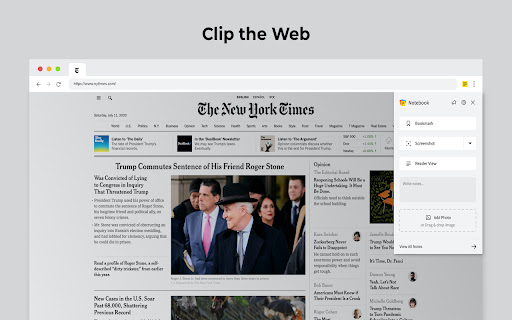
Clear the clutter. Clip the web. Save to Notebook.
What's New:
Introducing 'Meeting Notes'. Taking notes during an online meeting is now a breeze with Notebook extension on Chrome. When you're on an online meeting using Zoom, Cisco Webex , Zoho Meeting, and Zoho Showtime, you can see a a popped out Notebook icon which helps you to take quick notes. If you have not logged into your Zoho account in the browser, you can export your meeting notes as a .txt file. You can choose a notebook and associate tags before you save your meeting notes to Zoho Notebook.
Notebook Web Clipper
Clip content from the web to your Notebook with Web Clipper. Clipped content, saved as Note Cards, are immediately synced across your devices. Please download Notebook apps from Google PlayStore(https://play.google.com/store/apps/details?id=com.zoho.notebook) or Apple AppStore(https://itunes.apple.com/us/app/notebook-take-notes-sync-across-devices/id973801089?ls=1&mt=8). You can also view your notes from https://notebook.zoho.com.
What can you clip?
* Be it a new recipe you want to try or the next place you want to visit, clip text, images, or links into a note card, and save to a specific notebook.
* Want to save an article for future reference? With Clean View, you can save the entire article as a note card, minus the ads.
* Need to quickly grab a screenshot of a web page? The 'Screenshot’ option quickly saves the screenshot as a Photo Card.
* Convert any link to Smart Cards. Refer https://www.zoho.com/notebook/smart-card.html for more details on Smart Cards.
* Annotate images / screenshots before you add those in Notebook. We've added a complete annotation tool to edit your images.
* Use Meeting Notes to take quick notes on an online meeting using Zoom, Cisco Webex, Zoho Meeting and Zoho Showtime.
Web Clipper can also be used to create note cards.
Have a quick thought you want to note without leaving your browser? Create a quick note from scratch right from your browser. You can also add photos directly from your computer to Web Clipper.
Write your feedback to [email protected]
zoho.com/notebook
Latest reviews
- Amen Teshome
- it lages just buy book
- Sankalp
- Useful tool! As a long-time user of Notebook, this definitely streamlines capturing and recording important things while I'm browsing.
- Nik Lav
- Seems the web clipper extension is broken and you have to repair it. I tried that which meant uninstalling it and reinstalling it from the Zoho website and now it works. 1 star off for me having to repair it.
- Kimberly Mcfarlane
- Hey everyone I have been using the notebook web clipper for several years and I love it. Zoho is ahead of it time and with all tech apps they will have issues here and there but with the raise of AI all of the tech companies are improving at an alarming rate. If you are looking for an all in one business software 45 integrated business applications designed to streamline various business operations, including sales, marketing, finance, and human resources look into zohoone $45 a month price plan, scaleable and funcitionality on point. Here's a link if you are intersted in signing up for a free 30 test drive of all the business tools with no credit card sign up. https://go.zoho.com/Pzf
- Mateusz Strociak
- Well, unfortunately I cannot test and work with the extension since it's logging out every moment and it's always logged out on seperate/new tabs. Tried reinstalling several times, allowing all cookies, fresh chrome instalment and the issue stays. Hope a fix will come soon and I can change the review.
- Joey
- The main reason I chose Zoho Notebook was because of the web clipper. I installed it. I did absolutely nothing. I toggled it on and off and on again. Still does nothing. I uninstalled and reinstalled. Still nothing. As others are reporting, it is non-functional. I guess the developers don't care since this is apparently and ongoing issue.
- Rex Noel
- Been looking for a replacement for Evernote, and read some good reviews for Zoho web clipper. I signed up for an account and ran the import from Evernote function overnight (Windows 10). It worked, but the results are very clunky. Formatting is way off on many notes. It did bring over my notebooks, and the contents appear to be there. But only PDFs look normal. Web pages are broken up and missing all of the original pictures. And there are blank duplicates of many pages. Worst of all, I downloaded and added the Web Clipper, which is the point of all this. It is totally non-functional. Click on the extension (in Chrome) and nothing happens. Right click on the extension and get a menu, click on any of the choices and nothing happens. Seems like a piece of junk software to me.
- Nils Bongarts
- At Tooltivity.com, we manually test productivity browser extensions and provide honest and detailed reviews. Notebook Web Clipper received an impressive rating of 8.8 in our tests. In our evaluation, we considered the categories of features, design, ease of use, security & privacy, value for money and performance. You can find the full test report here: https://tooltivity.com/extensions/notebook-web-clipper
- Anand Ranjan
- Nor working as an extension
- Major Dude
- Very robust functionality. Does what it says it does, consistently, every time.
- Mohamed Fazrin
- This extension may soon no longer be supported because it doesn't follow best practices for Chrome extensions. Why?
- Kirk Brocas
- So much potential...if only the developer used the Chrome developer tools to see the error messages when trying to sign in after clicking the sign in link. So only three stars.
- Christy King
- I've used this for years. It's often glitchy, but I have the free version, so I've dealt with it. HOWEVER I have now have a little sticky note icon that stays on my screen all the time and I cannot figure out how to make it go away. I don't have the Zoho sticky note extension and there appears to be no setting to disable it. If I can't make it go away somehow, I will have to switch from using Notebook all together.
- Jason Ure
- Keeps on poping up when using chatgpt right were the send button is. Super annoying. Wasting alot of my time. Other than that it works, but I havent used it.
- Master Psychic Rachel
- The functionality of this app is highly inconsistent, often not working as expected. Despite having a yearly subscription and storing a significant amount of my personal data within it, I'm facing persistent issues with its operation and synchronization. The customer support has been quite disappointing. In hindsight, I regret dedicating so much time and entrusting my documents to this application.
- Master Psychic Rachel
- The functionality of this app is highly inconsistent, often not working as expected. Despite having a yearly subscription and storing a significant amount of my personal data within it, I'm facing persistent issues with its operation and synchronization. The customer support has been quite disappointing. In hindsight, I regret dedicating so much time and entrusting my documents to this application.
- Dee Cheerokee
- Szóval. Nem értem, hogy miért kell bejelentkeznem egy másik honlapon, hogy használhassam!? Egyáltalán nem lehet úgy simán használni, mint ahogy a bemutatóban. Erről egy sor sincs írva, hogy előbb regisztrálnom kell. Pediglen tényleg hasznos lenne...
- Benis Fabrics
- Web page sync not working
- Benis Fabrics
- Web page sync not working
- Alex Dryagin
- So far so good. Where do I set my hotkeys?!
- Alex Dryagin
- So far so good. Where do I set my hotkeys?!
- Shafer Hart
- You need to stop opening a webpage EVERY TIME YOU UPDATE. So annoying. I don't really care. Just update in the background and LEAVE THE USER ALONE.
- Shafer Hart
- You need to stop opening a webpage EVERY TIME YOU UPDATE. So annoying. I don't really care. Just update in the background and LEAVE THE USER ALONE.
- Meglen Hadzhitsanchev
- Whit update since 11.05.2023 I have an issue with web site gmail.com - a wide gray line on top of the gmail content. When i stop this extension - everything is OK. I am waiting the next update.
- Meglen Hadzhitsanchev
- Whit update since 11.05.2023 I have an issue with web site gmail.com - a wide gray line on top of the gmail content. When i stop this extension - everything is OK. I am waiting the next update.
- Belay Mulat
- great!
- Belay Mulat
- great!
- Catherine Delumpa
- I love it! So neat... Very helpful... Love love it
- Catherine Delumpa
- I love it! So neat... Very helpful... Love love it
- Jorge Alexandre
- It helps me in many different ways. I tent to use reader view to save different web pages that i'm using for research. Also, copying and writing down notes helps me fixate the information better. I use it to take screenshots of online presentations and organizing them all in just one file. I can take a screen shot of a whole web page, and then annotate, write comments, highlight stuff, etc. I can save and bookmark videos to watch later. As a suggestion, i would like to be able to highlight text while on the read viewer mode
- Jorge Alexandre
- It helps me in many different ways. I tent to use reader view to save different web pages that i'm using for research. Also, copying and writing down notes helps me fixate the information better. I use it to take screenshots of online presentations and organizing them all in just one file. I can take a screen shot of a whole web page, and then annotate, write comments, highlight stuff, etc. I can save and bookmark videos to watch later. As a suggestion, i would like to be able to highlight text while on the read viewer mode
- Muslim Gore
- this app is a life doctor, it saves people. I love it and I could write a lot about it but I'm going to keep it short and authentic. it's the best app I have ever used. easy to stay organized and easy to use.
- Muslim Gore
- this app is a life doctor, it saves people. I love it and I could write a lot about it but I'm going to keep it short and authentic. it's the best app I have ever used. easy to stay organized and easy to use.
- Vanessa T (Vanessence)
- I really love this app and have been using it for quite some time now. One thing I miss, however, is the notebook option sorting in the clipper. A couple of years ago, they used to be sorted alphabetically, but now they are in order by creation date, and as I have several notebooks, it means I have to scroll quite a bit to find the notebook I'd like to save a link to as they are no longer in alphabetical order. I would love it if that could be changed, or made into an option. Other than that, I love this app and it's now my go-to for saving information. :)
- Vanessa T (Vanessence)
- I really love this app and have been using it for quite some time now. One thing I miss, however, is the notebook option sorting in the clipper. A couple of years ago, they used to be sorted alphabetically, but now they are in order by creation date, and as I have several notebooks, it means I have to scroll quite a bit to find the notebook I'd like to save a link to as they are no longer in alphabetical order. I would love it if that could be changed, or made into an option. Other than that, I love this app and it's now my go-to for saving information. :)
- Lisa F
- PDF Clipper covers download dialog. Lost entire filled document as a result
- Lisa F
- PDF Clipper covers download dialog. Lost entire filled document as a result
- ANGELA STELLA
- Trovo questa estensione eccezionale! Posso copiare di tutto, da testo a immagini.Io poi, sono una grande appassionata di poesia,quindi amo l’idea di poter racchiudere tutte le mie poesie e citazioni e le immagini d’amore che mi piacciono di più li. Per poi trasferirli nel mio instagram. E anche delle immagini inerenti ad essi. Questa funzione quindi mi piace moltissimo,forse poi perchè e anche l’unica che lo fa. E mi piace anche l’idea di potervi anche mettere un password.Un po' come se fosse un diario segreto. E un estensione anche molto personalizzabile. Inoltre c e anche un app per android,solo che ha dei problemi di sincronizzazione, purtroppo non salva bene tutto.E non si possono aggiungere più di 19 note a biglietto. Che peccato! Ma complimenti, lo stesso,e ancora grazie,grazie ancora allo sviluppatore,per questa bellissima estensione! 👏👏👏😀 Aggiornamento: Amo sempre di più questa applicazione...❤️Però sarebbe bello se fosse data la possibilità di trasferire cartelle di immagini senza limiti qui su notebook web clip.Però mi piace veramente tanto questa estensione.
- Bahey Saied
- Very Handy Tool :) ,, Really makes my day :)
- Bahey Saied
- Very Handy Tool :) ,, Really makes my day :)
- Romana Cvn
- het plaatsen van plaatjes gaat niet
- JJ MR
- Simplemente excelente, llevo mucho tiempo usándola y no he tenido ningún problema, felicidades.
- Si Paling
- i love this notes. this apps also available in playstore
- Si Paling
- i love this notes. this apps also available in playstore
- Estonian Language
- Hello, if i had money i would donate you, this extension is necessary because it´s useful, thank you.
- Estonian Language
- Hello, if i had money i would donate you, this extension is necessary because it´s useful, thank you.
- Jacob Bar
- Zoho Notebooks is a good alternative to Google keep. Like it. Jacob Bar
- Jacob Bar
- Zoho Notebooks is a good alternative to Google keep. Like it. Jacob Bar
- Uri Naor
- Notebook is my favorite app. I still can't believe this is free. Thank you!! <3
- Uri Naor
- Notebook is my favorite app. I still can't believe this is free. Thank you!! <3