
Paint Tool and Font finder
Extension Actions
- Extension status: Featured
- Live on Store
Web paint to draw rectangle, circle, lines and others shapes or add text on any web pages, then screenshot the result. Screenshot…
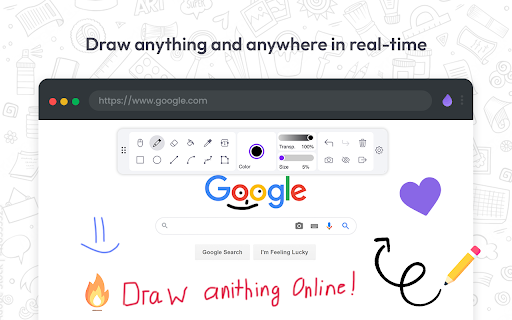
Paint Tool - draw on any website, add text, add lines, and highlight! With Web Paint, you can use your mouse or touchscreen to draw on the web or on PDFs and save it to your computer. Paint, draw, and mark on any webpage or website.
Accustomed to reading books and highlighting important texts or just wanted to draw on any website in real time in the comfort of your browser? This Paint will help you on it!
Easy to set up Paint Tool
1. Install the Web Paint extension, and reload the page to let the extension work.
2. Click on the extension whenever you need to draw or highlight something.
3. Drawings are automatically saved.
4. Take Screenshot.
5. Reload the page to exit the draw mode from the browser.
Want to share your screen for cases like reporting technical issues, making product demos or how-to tutorials? Here are reasons to choose Paint Tool for Chrome
1. Has all the features of MS Paint.
2. Adjustable thickness, transparency, and preset color.
3. Take a screenshot of the page.
The classic Paint program has received an updated look and several new tools. Also, it's now possible to add text, draw different shapes, lines, and arrows to live web pages in real time, and take a screenshot to share with your friends!
Paint Online has a simple and easy-to-use design. It is not confusing, and easily recognizable icons are used in the app, which makes it easy for everyone to use.
Paint Online is lite weight and a free extension for Chrome that can be used for educational purposes and introduce anyone to drawing right from your browser. In addition, it can practice the alphabet, numbers, and paintings while educating.
Perform full page screen capture. Save image screenshot to PDF or images. Instant screenshots are stored locally, and produce no traffic. Screenshot tool can work offline.
The creation of a screen capture is easy as it ever could be. Choose from the full-screen or partial area and take it in a click. Then you can fully customize screenshots like add text, drawing lines, arrows, and shapes.
Why Paint - draw online - better than competitors?
✓ Copy to clipboard
✓ Print images
✓ E-Mail
✓ Export captures to external editor
✓ Add page information to screenshots (URL, title, time, domain, etc)
You can share your images on Pinterest board.
It also contains the functions you need:
- Hot-keys to each tool
- Save drawing with a screenshot option
- Save image to your PC or Print
- Crop the necessary area of an image and save it
Important Notice - Web Paint
After installation / update, please reload the active tabs in your browser for the Web Paint to work.
Features:
Pencil tool - draw a custom line with the selected line width and color.
Eyedropper tool - pick a color from the web page or your drawings and use it for drawing.
Text tool - insert text into the web page with the selected color and transparency.
Line tool - paint a straight line with the selected line width, transparency and color.
Arrow tool - paint a straight line with an arrow on the end the selected line width, transparency and color.
Quadratic curve - draw a quadratic curve with the selected line width, transparency and color.
Bezier curve - paint a bezier curve with the selected line width, transparency and color.
Polygon tool - paint a polygon with the selected line width, transparency and color.
Ellipse tool - draw an ellipse or a circle with the selected line width, transparency and color.
Paint bucket tool - fill an area with selected color and transparency.
Color picker - select a color for the text and line.
Transparency slider - select a transparency for the text and line. (Drag the slider to the left to decrease the value and to the right to increase the value)
Line width slider - select a line width. (Drag the slider to the left to decrease the value and to the right to increase the value)
Rectangle tool - draw a rectangle with the selected line width, transparency and color.
Cursor tool - interact with the web page.
Eraser tool - erase part of your drawings.
Screenshot tool - take a screenshot of the current web page with your drawings.
Exit button - clear your drawings and disable the tools.
✔️ Screenshot maker ( use it rhat screenshot tool)!
✔️ All extension "Paint Tool - Marker for Chrome" tools with adjustable thickness and preset color!
✔️ Current drawings are automatically saved!
✔️ Change transparency using the watch face in the toolbar!
✔️ Convenient hotkey settings for quick tool use.
Capture screenshots
▸ Make a full page screenshot, screen cast, or a specific section of the page through scrolling screenshot using our screenshot software (screenshot capture).
▸ Supports scrolling when capturing from web pages.
▸ Capture & edit the entire browser window.
▸ Quickly capture & edit a section of the webpage.
▸ On a blank canvas, create your own simple drawing or model.
Paint tool chrome extension absolutely free and will definitely improve your chrome browser. Paint Tool allows you to draw!
Latest reviews
- Amar Nath
- good but can be improved
- rizz ligma
- good but i thought that u could save for pdf but still useful
- bleostafa
- good for hobby
- Trung Ly
- Amazing little tool that doesn't come with a predatory "premium/pro" version with a monthly subscription and has everything you need and it's great at what it does. The ability to draw arrows would be a really GREAT enhancement to have. Great job dev!
- Dipesh Khadka
- good
- Lucas Alessandri
- GOOD
- Amy Tai
- very good and useful
- James mallett
- It is fun!
- John Lagoutaris
- Very, very cool!
- Thùy Linh Vũ
- toots
- Hoang-Phuc Tran
- Pls add full page cupture
- giovanna penna
- very good
- Dário Marcos Emanuel De Paula Garcia
- brabooo
- Sóstenes Tadeu
- awsm helpful! very easy! I like this is software! kkkkk
- Build 2Trade
- awsm helpful....easy to use and effective
- Cauã
- ok
- Mohul Chakraborty
- NIce app
- 35- C. Prajit Reddy
- nice
- marcos vinicius
- legal
- Felipe F Silva
- FFE
- Joanna Lester
- Like it so far!
- user unkwon
- good
- Fatma
- Really it delete everything that I answer in my sheets!!?????????
- Melodie
- I like it! It's easy to use and simple.
- Kristin Zientek
- I love that you can now scroll and the screen doesn't have to stay on a particular frame!!!!
- Ansel Orsini
- Dumbass begging fpr reviews
- Especialista - 3 - Anita Nacionalnet
- ok
- sc c
- this is so useful!
- π
- Too desperate for reviews.
- Falon Fleeger
- it was great and i did not have to pay for it it was free.
- Ian Cardoso
- top
- Mr. Lucifer
- great tool
- Raju Ahmed
- this is a useful tool, love it
- mcanelinha
- bommm
- Toaster
- USE FUL BUT SOME cONTENT ADD REQUIRED
- Afsa
- USE FUL BUT SOME cONTENT ADD REQUIRED
- Ace Player
- Bugs all the time, crashes sometimes. Becomes unusable.
- Sarah Paul
- Helpful visual tool for teachers teaching digitally!
- Tim Ngai
- Easy to use and effective
- Diễm Phạm Thị Quế
- quite good
- Bakdaulet Temirkhan
- great
- Kartik Bhatt
- This is a great Paint Tool Loving It Great
- Black Boy
- super good
- Claudio Kinzel
- Good!
- Eric
- really nice
- SM Eftakharul Alam
- Satisfied with what I wanted
- Eduardo Godoy Scarpellini
- interesting
- Brenno Ferreira
- Very good and very simple
- Amit Kumar Sah
- Awesome
- Christen Alvarez
- It was great until every time I went to use it, it would pop up in the middle of class asking for a review. I really like it but got turned off by the constant request for a review.