
SpeechAgent - Live Voice Typing
Extension Actions
Speech to text converter to fill active text area with your voice using the built-in speech recognition engine of your browser
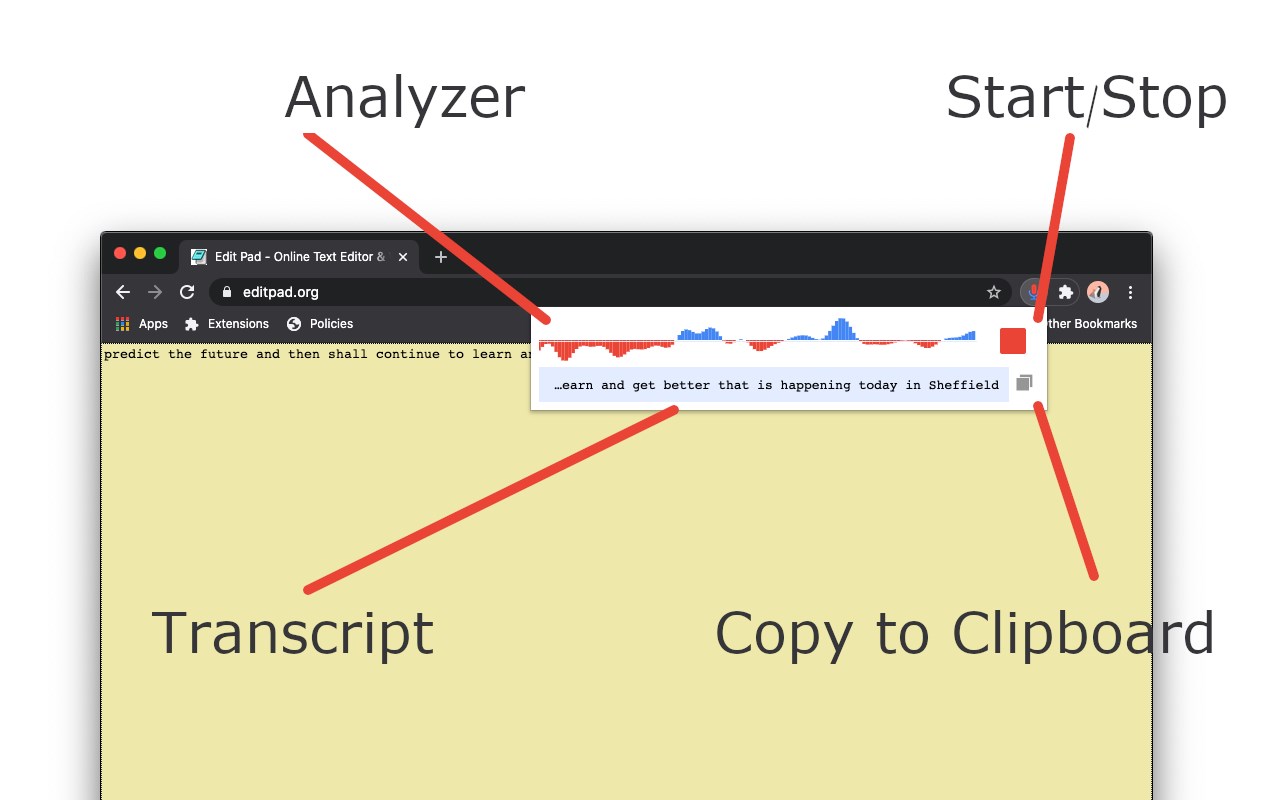
This browser extension brings native speech-to-text recognition to any webpage. Select a text area or input box and click on the toolbar button to open the interface. The extension converts your speech to a transcript that is inserted directly into the input box. This extension uses the built-in API for speech recognition. There is no server related to this extension. It is also possible to copy the recognized text to the clipboard to use outside of the browser.
Features:
Recognizes speech with one click
Uses the built-in engine (no server code related to this extension)
No background activities whatsoever (only works when the interface is open)
Select the preferred language for the recognition engine
Select the maximum number of alternative results used during text recognition
Shortcuts:
Open the interface: chrome://extensions/shortcuts
Close the interface: Escape
Select the next language: Ctrl + K or Command + K
Select the previous language: Ctrl + J or Command + J
Search for a language: Ctrl + F or Command + F
Latest reviews
- Sandesh
- why this is not capture system audio properly
- Derek
- does not work. edge dissapears and crashes which is very rare for me.
- digital
- this saved me so much time! thank you so much