
Google Docs Strikethrough Button
Extension Actions
- Extension status: Featured
Add a one-click strikethrough button to Google Docs. Select text and toggle strikethrough instantly—no shortcuts to remember.
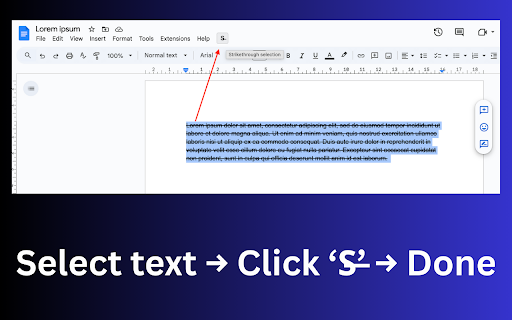
Docs Strikethrough Selection adds a simple toolbar button to Google Docs that lets you toggle google docs strikethrough on selected text with one click.
No menus. No formatting panels. No Docs API access.
Just select text and click the button.
This extension uses Google Docs’ native strikethrough shortcut, so formatting behaves exactly as if you pressed the shortcut yourself.
How It Works (Quick Start)
Open a Google Doc.
Select the text you want to cross out.
Click the “S̶” button in the Docs top toolbar.
Strikethrough toggles instantly.
That’s it.
Key Features
Toolbar button for strikethrough in Google Docs
Uses native keyboard shortcut (no document parsing)
Works on macOS, Windows, Linux, and ChromeOS
Lightweight, on-demand script injection (Docs only)
Visual feedback (OK / ERR badge after each action)
Why Use This Extension?
This extension is for people who:
Regularly edit text in Google Docs
Don’t want to memorize or reach for keyboard shortcuts
Want a single-purpose formatting button, not a full editor suite
Not for:
Users looking for Docs tutorials
Markdown or export workflows
Advanced formatting or styling tools
If you just want a faster way to cross out text—this does exactly that.
Permissions & Privacy
Runs only on docs.google.com
No access to document content
No tracking, analytics, or external requests
No Google account access or OAuth
FAQ
Does this change how Google Docs formats text?
No. It triggers Google Docs’ built-in strikethrough shortcut—nothing more.
Which shortcut does it use?
macOS: Cmd + Shift + X
Windows / Linux / ChromeOS: Alt + Shift + 5
Why not just use the shortcut?
If you forget shortcuts or prefer clicking, the toolbar button is faster and more visible.
Does it work on all documents?
Yes—any editable Google Doc where text selection is active.