
Translator for Telegram
Extension Actions
Auto-translate messages on Telegram Web
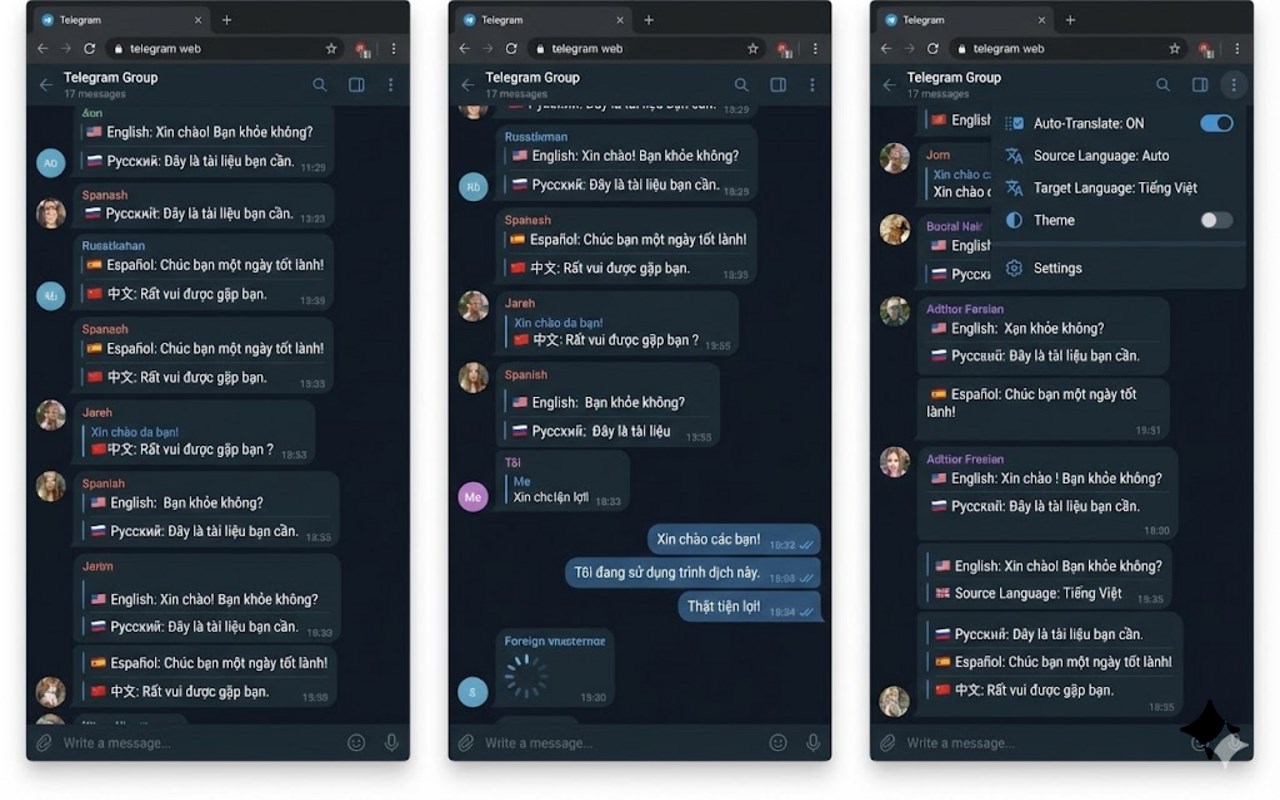
Telegram Translator Extension – Instantly Translate Messages in Telegram Web
Telegram Translator is a sophisticated browser extension tailored specifically for Telegram Web users to overcome language obstacles and facilitate smooth multilingual communication. Designed to function seamlessly within the Telegram Web interface, this extension leverages Google Translate’s Free API to deliver rapid and accurate translation of messages in real time. Whether you are engaging in casual chats with friends, collaborating with colleagues, or participating in global community discussions, Telegram Translator enables effortless understanding and responses in your preferred language, regardless of the original message language.
The extension supports all major variants of Telegram Web—including Web K, Web A, Web Z, and WebA2—ensuring broad compatibility. It intelligently detects incoming messages using MutationObservers and immediately translates them, presenting the translated text inline for an uninterrupted messaging experience. Outgoing messages benefit from a “translate before sending” feature where the input text is automatically translated and previewed before you send it, helping to maintain clarity and accuracy—especially helpful for international business communications or cross-cultural family chats.
Performance optimization is a key strength of Telegram Translator. It utilizes a smart caching mechanism powered by an LRU (Least Recently Used) algorithm, storing recent translations locally to provide instant retrieval and minimize repetitive API calls, resulting in faster translations and reduced network load. Moreover, a built-in task queue manages the rate of translation requests to the Google Translate API, avoiding rate limits and preserving browser responsiveness even during high message activity.
Customization and user control are straightforward via the extension’s popup settings interface. Users can toggle translations on or off, select source and target languages with ease (including automatic source language detection), enable or disable translation previews for outgoing messages, and manage the translation cache—viewing its status or clearing it entirely when needed. All these configurations are applied instantly to ensure a fluid user experience throughout your Telegram Web sessions.
Telegram Translator strengthens cross-cultural communication by enhancing comprehension and dialogue flow across languages within the Telegram Web environment. Its unobtrusive design and plug-and-play functionality make it accessible for users of all levels—from casual messengers to professionals who rely on precise translations without interrupting their workflow.
Key Features:
- Real-Time Incoming Message Translation: Automatically translates received Telegram messages into your chosen language without delay, ensuring you never miss critical details.
- Outgoing Message Translation Preview: The input translator lets you preview how your message will appear in the target language before sending, promoting clear and accurate communication.
- Flexible Language Selection: Easily pick both source and target languages using the popup, with support for automatic source detection and a comprehensive list of commonly used languages.
- Smart Automatic Caching: Employs a local Least Recently Used cache to store translations, enabling near-instant retrieval of repeated messages and reducing the frequency of API requests.
- Efficient Task Queue Management: An embedded queue system regulates Google Translate API calls, preventing rate limits and sustaining smooth extension performance.
- Multi-Platform Telegram Web Compatibility: Supports all principal Telegram Web domains—Web K, Web A, Web Z, and WebA2—with automatic detection and adaptation for consistent functionality.
- Intuitive User Controls: Provides easy access to enable/disable translation, clear cached translations, and modify language and preview settings directly from the extension popup, with real-time feedback.
How It Works:
1. Install the Telegram Translator extension and open Telegram Web on any supported domain.
2. Open the extension popup and select your preferred source and target languages; activate translation features as desired.
3. Incoming messages are automatically monitored, detected, and translated, with translated text displayed inline inside your Telegram chats.
4. When enabled, the “translate before sending” feature translates the message you type, offering a real-time preview before you send it.
5. Translations are cached locally for efficient re-use and quick access; you can view or clear this cache anytime via the popup controls.
6. The extension manages outgoing translation requests through an intelligent queue system to avoid overwhelming the translation API and maintain performance.
7. Adjust extension settings anytime—changes take immediate effect during your Telegram Web usage.
Privacy: - No personal data collected. This extension strictly uses Google Translate API endpoints for translations and stores translation cache locally within your browser for optimal performance. No personal chat content, messages, or sensitive data is transmitted to external servers apart from necessary translation requests. For more information, please review our privacy policy.