
CRX id
djfjonmmnneonibhjipdlhcgkfonojhc
djfjonmmnneonibhjipdlhcgkfonojhc
Description from extension meta
This is a very secure light weight password manager for personal use.
Image from store
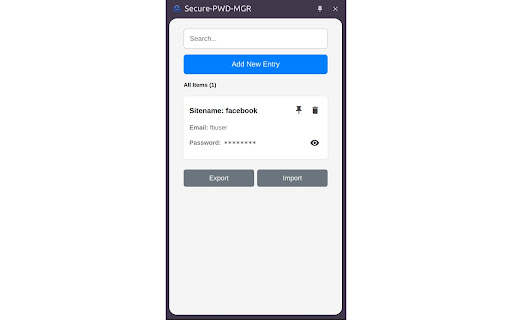
Description from store
A fast, secure, and offline-first password manager built as a Chrome extension. Designed for personal use with a clean UI and powerful features, it stores your credentials securely using AES encryption and local browser storage.
🧩 Key Features:
✅ Add, Edit, Delete Credentials
Manage login URL, site name, username/email, and password entries easily.
🔒 Encrypt/Decrypt Passwords
AES-GCM encryption with a master password for secure, local-only storage.
👁️ Hide/Unhide Passwords
Toggle password visibility — prompts for master key each time to view.
📌 Pin/Unpin Important Items
Group important entries at the top of your list for quick access.
🔍 Search Functionality
Quickly filter stored passwords by site name.
💾 Local Storage with IndexedDB
All data is stored offline in your browser using IndexedDB — no cloud dependency.
📤 Export & 📥 Import Support
Backup or restore your entire password list with secure JSON files.
📊 Counts & Grouping
See total pinned and unpinned items clearly grouped.
Latest reviews
- (2025-04-15) Ajay Kumar: Best simple password manager with no overloaded features