
ShadyVault - Encrypted storage for Chrome OS
Extension Actions
CRX ID
djicjdfediokekikonchokdpahljllgp
Status
- Live on Store
Description from extension meta
Provides an encrypted storage for Chrome OS
Image from store
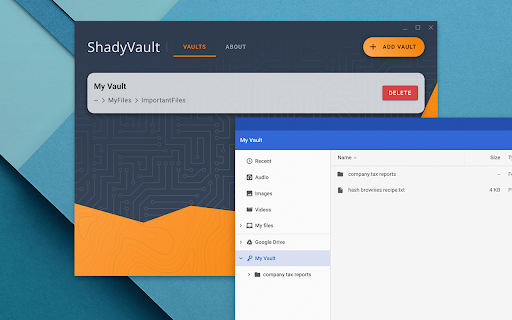
Description from store
Ever wanted to encrypt files on your chromebook? Now is the time!
With ShadyVault, you can easily open an encrypted folder just like a regular one.
However, the decrypted files only exist in-memory! This means, that they are automatically wiped as soon as you close the folder or shutdown the system.
-> Built-in security without the hassle of manually encrypting every file.
Have fun with it!
Latest reviews
- Rhonda Clark
- it does NOT work it lets you add it but you cant open it to read it at all so whats the point to get peoples files and you encypt it yourself and see there secrets seems to me like a peeping tom
- Jessica Holcim
- yall are the worst
- Gavin Herbert
- Sorry guys, It doesn't work If you copy something into it and it ask for the password just click cancel and you can get access to the files. And for all i know it took a copy of my files
- Leandro Felipe
- App is great, iam still novice level !!
- Javier Zamora
- awesome Mr. I wish you the very best in the future I just started using it and it seems like its really helpful , I love the UI, has a nice looking.
- cel burke
- Was unable to load vault with one file in it. Working from Chromebook on experiment to be if it can work with Chromebook and aligning Google drive. Can see the names vault, cannot open to include an additional file. Wondering if I exceeded the limit, or it doesn't play nice with Chromebook? Thanks for any clarification.
- frtrick hikf
- Honestly an amazing app. saved my life
- Joseph Lombardo
- shadyvault helps encrypt your files
- T L
- Appreciate the effort but didn't work on my ASUS ChromeBox 3. Trying to use on an SD-CARD. Doesn't seem to like to do that. Is there a maximum recommended size file? Also, filenames are stored in the clear so beware.
- David Fowler
- Unfortunately it doesn't work on my Chromebook (Acer Chromebook Spin 311). The app installs, I can create a vault and see it in file manager but never prompts for a password when accessing and files placed in the folder are not encrypted. Chrome OS version is 83.0.4103.112 (Official Build) (64-bit).
- Alex Troxel
- Works well for most things. Definitely worth using if looking to store sensitive data on a MicroSD or USB stick. Was really hoping to be able to use it to "Backup Linux apps and files" to, but it doesn't appear as an option when when selecting a location for the Crostini backup.
- ONLY ENTROPY
- I was skeptical, it's not for everyone but if you need to keep some thing locked up tight (for any # of private reasons), THIS IS THE APP. Unlike most apps, this is simple, easy to understand, install and use! It totally works as advertised.
- Isaiah Kno
- Does not work with Chrome Book