
URL Navigator
Extension Actions
- Live on Store
Save and manage URLs with aliases for quick navigation.
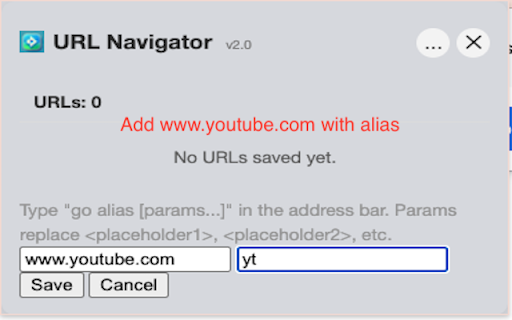
Navigate to your favorite URLs in seconds — just type "go" + your alias in the address bar. No more bookmarks clutter!
Tired of digging through endless bookmarks or typing long URLs? URL Navigator lets you create short, memorable aliases for any URL and access them instantly from Chrome's address bar. It's like custom shortcuts for the web!
How It Works
1️⃣ Save a URL with a custom alias (e.g., "github" for https://github.com/yourname)
2️⃣ Type "go" in the address bar, press Space, then type your alias
3️⃣ Hit Enter — you're there!
Dynamic URLs with Parameters
Need flexible URLs? Use placeholders for dynamic navigation:
Example: https://github.com/<placeholder1>/<placeholder2>
Type: go github microsoft vscode
Result: Opens https://github.com/microsoft/vscode
Smart Fuzzy Search
Made a typo? No problem! URL Navigator finds the closest match automatically.
Type "githbu" → Still navigates to your "github" alias!
Who Can Benefit?
✅ Developers – Quick access to repos, docs, dashboards, and CI/CD pipelines
✅ Power Users – Navigate complex internal tools with simple aliases
✅ Researchers – Jump to journals, databases, and reference sites instantly
✅ Anyone – who wants faster, smarter web navigation
Why You'll Love URL Navigator
🔹 Lightning Fast – Type and go, no mouse needed
🔹 Smart Matching – Typo-tolerant fuzzy search
🔹 Dynamic URLs – Parameters for flexible navigation
🔹 Drag & Drop – Reorder your URLs easily
🔹 Import/Export – Backup and sync your aliases (Pro)
🔹 Privacy First – All data stored locally
Get Started
Install URL Navigator, add your first alias, and experience the fastest way to navigate the web!
Changelog
v2.0
- New omnibox keyword: "go" (previously "as")
- New placeholder format: <placeholder1>, <placeholder2>, <placeholder3>
- Added fuzzy search with typo tolerance
- Version number now displayed in popup
Latest reviews
- Mimi Hsu
- it is a great extension, it allows me dynamically go to URLs with patterns, saved me a lot of time. Its smart fuzzy match also works really well. Really recommend it!!
- fenger zhou
- very useful tool to me
- Balu Andhavarapu
- Not working on Microsoft Edge (it's Chromium based too)
- Luca L
- You must register for more than 5 bookmark aliases
- dschwegler
- Pretty helpful for navigating to sites with specific url patterns like git. Suggestion: I'd like to be able to customize (or even better, remove) the `as ` prefix.
- Lei Zheng
- Really useful, especially you have lots of frequently visited websites.