
Web Time Tracker
Extension Actions
- Live on Store
Take control of your online time with beautiful, insightful analytics
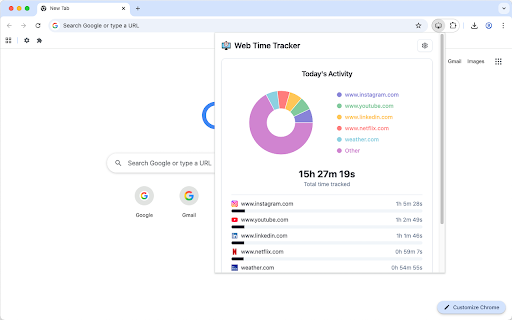
Ever wondered how much time you actually spend on different websites? Web Time Tracker automatically monitors your browsing habits and presents your digital activity in clear, easy-to-understand visuals.
✨ What it does:
• Effortless tracking: Automatically records time spent on every website while you browse normally
• Smart detection: Knows when you're away from your computer and pauses tracking
• Beautiful insights: View your daily activity with colorful charts and detailed breakdowns
• Quick overview: See today's browsing summary right from the extension icon
• Flexible viewing: Choose custom date ranges to analyze your habits over time
📊 Visual Analytics:
• Interactive charts showing your most-visited sites
• Easy-to-read daily comparisons
• Detailed tables with sorting and search capabilities
• Switch between chart and table views instantly
🎨 Personalization:
• Light, dark, or automatic themes to match your preference
• Filter out websites you don't want to track
• Customize idle detection timing
• Export your data to keep records
🔒 Privacy First:
• All data stays on your computer - nothing is sent anywhere
• No accounts required, no sign-ups
• Complete transparency with your browsing data
💡 Perfect for:
• Understanding your digital habits
• Improving productivity and focus
• Tracking work-from-home activities
• Students monitoring study time
• Anyone curious about their online behavior
Simple to use: Just install and browse normally. The extension works quietly in the background, giving you insights whenever you need them. Click the icon for a quick daily summary, or dive deeper into detailed analytics to see patterns over weeks or months.
Start building awareness of your digital habits today!
Latest reviews
- Shilpa Thakur
- Good extension to track you screentime. Nice alternative to what we have on phones. This way you can track your productivity and leisure.
- shivnarayan dhakar
- I’ve been using Web Time Tracker for a while now, and it has quickly become one of my favorite productivity tools. The extension runs seamlessly in the background and gives me a clear, detailed breakdown of how I spend my time online. I love how intuitive the dashboard is—it’s simple to read at a glance but still provides enough depth to help me spot patterns and adjust my habits. One of the best features is the daily and weekly reports. They make it so easy to see where my time goes and to hold myself accountable. I’ve already noticed a big difference in how much more focused I am during work hours. Overall, Web Time Tracker is lightweight, accurate, and extremely useful. If you want better insight into your browsing habits and a little extra push toward productivity, I highly recommend giving it a try!
- Abdou
- Really useful extension for keeping track of time spent on different websites. The dashboard is clear, the design feels smooth, and it doesn’t get in the way. I like that it gives me just enough options to customize things without being overwhelming. Overall, it’s a straightforward tool that helps me stay more aware of my browsing habits. One thing that could make it even better is adding more insights, like weekly or monthly summaries, or maybe simple productivity tips based on browsing patterns. A browser sync option for keeping data across devices would also be a nice addition.
- Febin Rasheed
- Great tool for time awareness and productivity I’ve been using this extension for a few weeks now, and it has completely changed the way I understand my browsing habits. It automatically tracks the time I spend on each domain and gives me a clear breakdown of where my hours are going. The dashboard is simple but very insightful — I can instantly see which sites are eating up my time and make adjustments to my daily routine. If I could suggest one improvement, it would be the ability to set custom categories (e.g., “Work,” “Entertainment”) to group domains. That would make the insights even more actionable. Overall, it’s a must-have extension if you want to boost productivity or simply become more mindful of your browsing time.