
N8N Master - Workflow Assistant
Extension Actions
AI assistant for n8n workflow automation. Works with self-hosted instances, AI APIs (OpenAI, Anthropic) and templates
n8n Master – Browser Extension for AI-Powered Workflow Automation in n8n
n8n Master is a powerful browser extension designed to dramatically extend the functionality of the n8n workflow editor. It integrates AI features, boosts productivity, and introduces a range of enhancements that make working with n8n more efficient, intelligent, and enjoyable.
View all your workflows and executions directly in the extension; no more searching for your workflows, opening nodes, or getting external links for your webhooks and forms. Connect the n8n API and copy trigger links in just a couple of clicks!
🔗 AI Provider Support
Connect any AI model via API from:
• OpenAI (ChatGPT, GPT-4, etc.)
• Anthropic (Claude 3 / Claude 4)
• OpenRouter (a proxy to multiple models like Mistral, Mixtral, Grok, etc.)
• Local LMs
Just add your preferred API key in the extension settings to unlock AI features.
🚀 Key Features
⚡ Context Menu Actions (AI-powered)
Accessible via right-click in input fields:
• Optimize Prompt – Improves selected prompt text for AI agents
• Generate Prompt – Generates prompts from plain-language descriptions
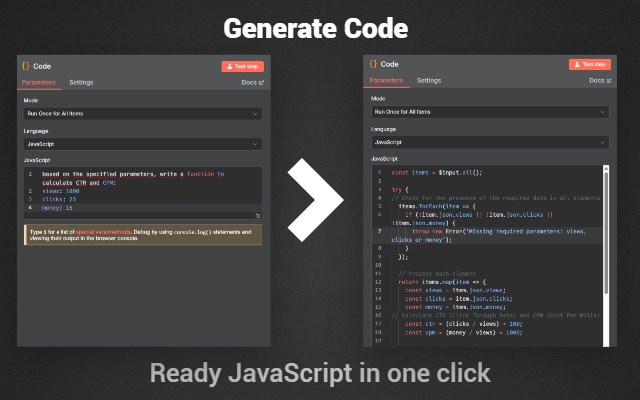
• Generate Code – Writes JavaScript code for CODE nodes based on instructions
• Generate JSON – Converts text descriptions into valid JSON structures
• Generate cURL – Creates a cURL request for HTTP Request nodes based on current settings
• Explain Code – AI-powered explanation of JavaScript code (entire blocks or selected parts)
🤖 Smart AI Assistant
Use natural language commands directly in the chat sidebar to:
• Generate entire workflows from plain-language tasks
e.g. “Create a Telegram bot with an AI agent”
• Analyze existing workflows
Ask: “What does this workflow do?”
• Explain selected nodes to understand individual components step-by-step
🧪 Webhook Output Templates
Inside Webhook nodes, a new Output Templates interface appears:
• Save current output payloads to local cache
• Select and reuse saved templates for testing
• Delete obsolete templates
• Use advanced search and replace across output contents
Ideal for safely testing different incoming parameters without needing external tools.
💎 Premium Features
🔐 Auto Save
Automatically saves your workflow after each change, protecting you from losing progress due to accidental tab closures or crashes.
🔐 Auto Pin HTTP
After a successful test of an HTTP Request node, the response is cached to prevent duplicate requests—ideal for paid APIs.
🔐 Auto Pin AI
Same behavior for AI responses—saving time, reducing API usage, and maintaining consistency.
🔐 Enable History (for self-hosted n8n)
If you use n8n without an Enterprise license, version history is not available by default.
This feature:
• Saves each version locally using the n8n API
• Displays the history in place of the default (disabled) history button
📚 Show Templates
Quick access to almost 300 ready-made templates, which can be copied and used directly in your workflows.
🔄 Node Selector
Adds a selector button to each node, letting you copy nodes with settings from your existing workflows—without opening them in a new tab.
🧠 AI Error Trigger
When a node test fails, the error message and node context (parameters + config) are automatically sent to AI, which responds with a probable cause and fix.
🗂 Local Projects
Activate folders in the sidebar to organize workflows into colored project folders. Move workflows between folders. Requires an n8n API key.
🧾 Local Variables
Redesigns the Variables link in the sidebar:
• Add your own frequently used data like Telegram ID, email, constants
• Copy-paste any item instantly
• Use Ctrl + Shift + V to access variables from any node
💬 Remember Dialog
Each workflow retains its own AI chat context. When switching between workflows, AI remembers the previous conversation related to that project.
🧪 Node Execution Select
In the Output editor, you can now select a specific past execution to use as test input—no need to copy from the Executions tab manually.
🎛 Custom AI Models & Context Settings
• Select any supported model from OpenAI, Anthropic, or OpenRouter
• Configure prompt structures, instructions, or context settings for each command
• Fine-tune generation behavior to your liking
📦 Import & Export Settings
Export your entire extension configuration and import it later or on another device — ideal for backup or team use.
🎯 Who Is It For?
• Developers building automation-heavy projects in n8n
• Automation experts using n8n with external APIs and AI
• Agencies and integrators who manage multiple workflows
• Self-hosted users who want to unlock Pro features without paying for n8n Enterprise
• Anyone who wants to boost productivity and reduce repetitive manual work in n8n
💼 Problems Solved
✅ Wasting time switching between tabs for AI prompt testing
✅ Manually writing repetitive boilerplate code
✅ No output versioning or template reuse
✅ Losing workflow changes due to crashes
✅ Limited AI features in native n8n
✅ No version history for self-hosted users
✅ Needing to copy/paste from external workflows or documentation
🛡️ Privacy & Security
• All API keys are stored locally in your browser
• Extension does not collect or send any data to third parties
• Works entirely within the active n8n session
• No login or account is required
🧪 How to Get Started
• Install the extension
• Open your n8n instance in a new tab (cloud or self-hosted)
• Click the extension icon and open settings
• Add your API key from OpenAI, Anthropic, or OpenRouter
• Start using AI features, templates, and enhancements inside the n8n UI
🛠 Requirements
• An active n8n instance (cloud or local/self-hosted)
• API key from one of the supported AI providers (for AI features)
• Optional: n8n API key for advanced features (e.g. project folders, history)
Take your automation workflows to the next level.
Install n8n Master and build smarter, faster, and with full control — all from inside your browser.