
Picture-in-Picture Shortcut
Extension Actions
- Live on Store
Switch videos to Picture-in-Picture mode with a keyboard shortcut or toolbar button.
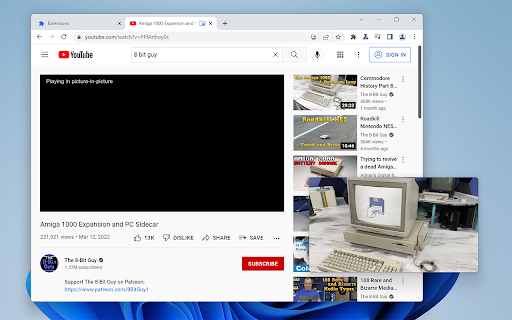
Picture-in-Picture Shortcut adds a keyboard shortcut and toolbar button for switching video players to the Picture-in-Picture mode in web browsers. The default keyboard shortcut is Ctrl+Period (Command+Period on Mac), but it can be changed from the browser settings. The Picture-in-Picture Shortcut extension button in the browser's toolbar can be used to toggle PiP mode.
Google Chrome and other Chromium browsers have a built-in Picture-in-Picture button in the default media controls, but it isn't always available and requires multiple mouse clicks. Picture-in-Picture Shortcut also overrides sites that don't normally allow Picture-in-Picture mode, and attempts to add a play/pause button to the PiP popup. However, this may not always work for sites and players not originally built for PiP mode.
This extension is open-source under the GPLv3 license, the code is available on GitHub: https://github.com/corbindavenport/pip-shortcut
Latest reviews
- RONIT Rajput
- It works pretty well, thanks a lot for creating this 😊
- Weaver
- Yo thanks
- P M
- Not working
- does it really matter
- Working, but missing basic features, like always on top, subtitles and audio control.
- Mwaka Monze
- Doesn't work. I set the shortcut to Alt + P and tried to use it whilst fullscreen on a video I was streaming....nothing happened.
- Nathan Horrigan
- This is great, but Brave really need to push hard on auto PIP just like Arc can do...
- JML E
- Chose this for the sole little reason that I didn't want the official Google extension always putting my PiPs on the bottom-right corner every time anymore. A hooray for the little things!
- Jordan O'Leary
- No flim-flam. Does what is says.
- Văn Long 1
- ok
- Jamal Ahmed
- Best and easy to use. Works as it should. Thank you devs. ♥
- Tobias Schulz
- Works perfectly
- Swiss Vacation
- On mac if you are using brave make sure to remap the extension shortcut even if you are using cmd+ dot because the default binding doesn't seem to register.
- ken
- Cheers mate
- Stephan
- it works!
- Adam Gower
- Thanks, I was going nuts trying to right-click the video in just the right way to get the PiP option!
- Sanket
- awesome "ctrl+." is the shortcut.
- Junoh Moon
- Simple yet effective!
- Owen
- Works well. There's also the extension: [ wipeyy - Controllable "picture in picture". ] In addition to setting a keyboard shortcut to toggle PiP, this extension also allows you to set another 3 keyboard shortcuts to toggle play/pause, and to skip forward / back 10 seconds, which even work outside of Chrome (if you individually set the keyboard shortcuts to "Global" rather than "In Chrome" in "chrome://extensions/shortcuts").
- Renan “plenusred” Bruch
- Fixing a problem FOSS style! Download this and NOT the official Google extension for PiP. Clean code, clean extension, highly recommended.
- Renan “plenusred” Bruch
- Fixing a problem FOSS style! Download this and NOT the official Google extension for PiP. Clean code, clean extension, highly recommended.