
Two-Line Eval Bar for Chess.com
Extension Actions
- Extension status: Featured
- Live on Store
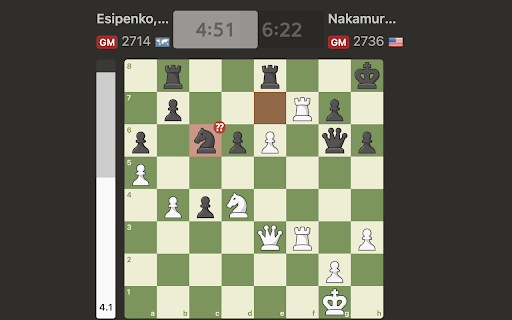
This eval bar shows the difference between the best & second-best line on any move. Perfect for following intense, high-level games!
USAGE NOTES:
Whenever your webpage loads, the analysis bar should reload and buffer - this indicates that the Two-Line Eval is active. You may have to re-toggle the extension on-off-on to ensure it is working. By default, the extension is turned OFF whenever you load into a page, so even if you had toggled it "ON" previously, you will have to toggle it "ON-OFF-ON" again to restart the Two-Line Evaluation.
Depending on the side whose turn it is to move, the bar will load a slightly darker/lighter shaded section for each side, which represents the difference in evaluation between playing the best move and the second-best move. It may take some getting used to, but is fairly intuitive.
The best use-case for this extension is for following classical chess, especially where a high-level player may have to make multiple only-moves in a row in a given position.
Latest reviews
- César Rengifo
- doesnt work