
CodeLens: Extension Source Explorer
Extension Actions
- Live on Store
Unlock the secrets of any browser extension. View source code for Chrome, Firefox, and Opera extensions with a single click.
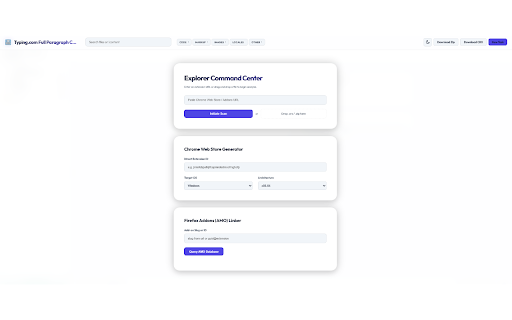
CodeLens: Extension Source Explorer
Unlock the secrets of any browser extension. View source code with a single click.
CodeLens is the ultimate professional toolkit for developers, security researchers, and privacy advocates. It provides a high-performance, premium environment to inspect the source code of any extension from the Chrome Web Store, Firefox Add-ons (AMO), Microsoft Edge Addons, and Opera—no manual downloads or local extraction required.
� INSTANT ANALYSIS
• One-Click Inspection: Open the source code of any extension directly from its store listing.
• Multi-Store Support: Seamlessly switch between Chrome, Firefox, Edge, and Opera extension analysis.
• Context Menu Integration: Right-click any link to a web store page to jump straight into the source.
🎨 PREMIUM DEVELOPER EXPERIENCE
• Modern Aesthetic: A stunning, high-contrast interface featuring glassmorphism, smooth animations, and a focus on visual excellence.
• Intelligent UI: Choose between a sleek, deep Dark Mode or a refined, high-contrast Light Mode.
• Command Palette (Ctrl+P): Find and open files instantly with a powerful, developer-first command interface.
• Professional Highlighting: Native syntax highlighting for JavaScript, HTML, CSS, JSON, and more using an optimized JetBrains Mono typeface.
🔍 DEEP SEARCH & FILTERING
• Smart Filtering: Instantly filter the file tree by category—Code, Markup, Images, Locales, or Miscellaneous.
• Global Regex Search: Powerful text search engine that scans across thousands of files instantly.
• Image Previewer: Built-in support for inspecting icons, illustrations, and SVG assets.
• Manifest Intelligence: Dedicated views for analyzing manifest permissions, content scripts, and background logic.
🛠️ PRO WORKFLOWS
• GitHub Integration: Connect your account and upload any inspected extension source directly to your GitHub repositories for versioning or team collaboration.
• Quality Auditing: Detect risky patterns, permission overreach, and manifest vulnerabilities with a few clicks.
• Local Exports: Download the original CRX/XPI package or export the entire extracted source as a clean .ZIP file.
�️ PRIVACY & SECURITY FIRST
CodeLens is built with a strictly "Client-Side First" architecture. All processing, zip extraction, and code rendering occur locally on your machine.
• No Remote Code: We do not use eval() or external script loading.
• Zero Data Collection: Your analysis history and code remain private on your device.
• Open Transparency: Built by developers for developers, with a focus on trust and auditability.
PERFECT FOR:
• Security Researchers: Vetting extensions for malware or data leaks.
• Web Developers: Learning modern architecture and best practices from top extensions.
• Privacy Advocates: Verifying precisely what an extension does with your browser permissions.
• Students: Exploring the internals of real-world browser applications.
Empower your workflow with CodeLens—the fastest and most beautiful way to explore the extension ecosystem.
---
V2.1.0 - Source by Subhan Haider
CodeLens: Extension Source Explorer
All rights reserved.