
TurboPlay
Extension Actions
- Extension status: Featured
- Live on Store
Power Up Your Videos with Adjustable Playback Speed and Effortless Keyboard Shortcuts
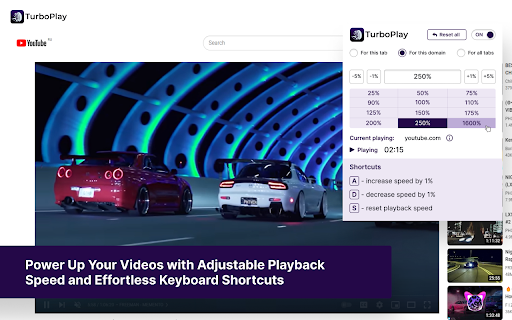
🌟 Elevate Your Video Experience with TurboPlay Video Speed Controller! 🚀
📺 Enjoy customizable playback speed and effortless control with TurboPlay, the ultimate browser extension for video enthusiasts. Compatible with popular platforms like YouTube, Vimeo, and more, as well as generic HTML5 videos, TurboPlay puts you in the driver's seat of your viewing experience.
✨ Features:
✅ Works seamlessly on almost any video, including YouTube, Vimeo, and other platforms, as well as generic HTML5 videos.
🎚️ Set your desired playback speed in percentage, allowing you to watch videos at your preferred pace.
⌨️ Master your video control with intuitive keyboard shortcuts:
➕ Press "A" to increase playback speed by 1%
➖ Press "D" to decrease playback speed by 1%
🔄 Press "S" to reset speed to normal
🔥 Unlock the power of TurboPlay and supercharge your video streaming today! 🎉
🌟 Nâng cao trải nghiệm xem video của bạn với TurboPlay Video Speed Controller! 🚀
📺 Thưởng thức tốc độ phát lại tùy chỉnh và kiểm soát dễ dàng với TurboPlay, tiện ích mở rộng trình duyệt tuyệt vời dành cho những người đam mê video. Tương thích với các nền tảng phổ biến như YouTube, Vimeo và hơn thế nữa, cũng như video HTML5 chung, TurboPlay đặt bạn vào vị trí người điều khiển trải nghiệm xem của bạn.
✨ Tính năng:
✅ Hoạt động mượt mà trên hầu hết mọi video, bao gồm YouTube, Vimeo và các nền tảng khác, cũng như video HTML5 chung.
🎚️ Đặt tốc độ phát lại mong muốn của bạn dưới dạng phần trăm, cho phép bạn xem video theo tốc độ ưa thích.
⌨️ Thống trị việc kiểm soát video của bạn với các phím tắt trực quan:
➕ Nhấn "A" để tăng tốc độ phát lại lên 1%
➖ Nhấn "D" để giảm tốc độ phát lại đi 1%
🔄 Nhấn "S" để đặt lại tốc độ về bình thường
🔥 Mở khóa sức mạnh của TurboPlay và tăng cường trải nghiệm xem video của bạn ngay hôm nay! 🎉
Latest reviews
- Firm Hand
- Brilliant extension. Lost 1 star as turning on this extension disables the ability to select all text on a web page (using Ctrl-A). If you disable the extension, you can select all text again.
- Andi K
- Looks like a fork/copy of extensions "Super Video Speed Controller" and "Video Speed Pro". What are those forks good for besides getting more installs of the same software? This is why have removed an additional star. Works as expected, but has the same weaknesses as the clones: - completely deactivates regular speed controls (e. g. on Youtube) even if switched off - too small hotkey steps for increasing / decreasing (just 1%). Using A/D with greater or user defined steps (1.25, 1.33, 1.5, 1.67, 2 etc.) would be better.
- Devin Smith
- i like keep it up
- Devin Smith
- i like keep it up
- ismet soner عصمة سونر
- when you speed up even only %25 video and voice asynchronied.
- ismet soner عصمة سونر
- when you speed up even only %25 video and voice asynchronied.
- Oscar Ticona Mamani
- Esta extensión es de las mejores que he usado
- Brandon Hardman
- This plugin can both speed up the video and slow it down. Everything is implemented very conveniently. The interface is as simple as possible. Works with all types of online videos.
- Brandon Hardman
- This plugin can both speed up the video and slow it down. Everything is implemented very conveniently. The interface is as simple as possible. Works with all types of online videos.
- Caleb Williams
- I think it makes sense to add options for creating custom acceleration presets. I find the extension useful, especially when used in social networks.
- Caleb Williams
- I think it makes sense to add options for creating custom acceleration presets. I find the extension useful, especially when used in social networks.
- Eva Martinez
- I would implement the interface a little differently. Replacing the buttons with a drop-down list. And if we judge the expansion in general, then it is quite a good video accelerator.
- Eva Martinez
- I would implement the interface a little differently. Replacing the buttons with a drop-down list. And if we judge the expansion in general, then it is quite a good video accelerator.
- Cecilia Anderson
- It's pretty cool, which allows you to play the video in accelerated mode. But I didn't quite understand the meaning of this. I can only evaluate the technical implementation - there are unconditionally 5.
- Cecilia Anderson
- It's pretty cool, which allows you to play the video in accelerated mode. But I didn't quite understand the meaning of this. I can only evaluate the technical implementation - there are unconditionally 5.
- Michael Baker
- Quite an interesting concept of video rewinding. There are a lot of ready-made modes in the form of presets, as well as manual speed change. Very good.
- Michael Baker
- Quite an interesting concept of video rewinding. There are a lot of ready-made modes in the form of presets, as well as manual speed change. Very good.
- James Gilbert
- I will put 5, but with an advance on the fact that the developers will redo the interface. There are too many unnecessary elements. It is better to make the choice of speed in the form of a drop-down list.
- James Gilbert
- I will put 5, but with an advance on the fact that the developers will redo the interface. There are too many unnecessary elements. It is better to make the choice of speed in the form of a drop-down list.
- Caleb Chandter
- Allows you to change the acceleration quite subtly. I always put +3-4% on the video. As far as I can see, it works on all media platforms.
- Caleb Chandter
- Allows you to change the acceleration quite subtly. I always put +3-4% on the video. As far as I can see, it works on all media platforms.
- Alex Babcock
- I tried all the acceleration modes - there are no complaints! Now I use this plugin on all media platforms when I need to speed up viewing a little.
- Alex Babcock
- I tried all the acceleration modes - there are no complaints! Now I use this plugin on all media platforms when I need to speed up viewing a little.
- Nancy White
- When using acceleration, the videos become funny and funny. I certainly advise everyone to try it. A high-quality plugin.
- Nancy White
- When using acceleration, the videos become funny and funny. I certainly advise everyone to try it. A high-quality plugin.
- Michael Austin
- I would recommend this extension to those who regularly watch online videos. Because it significantly expands the basic playback parameters.
- Michael Austin
- I would recommend this extension to those who regularly watch online videos. Because it significantly expands the basic playback parameters.
- Thomas Moore
- It's great that now there is a plugin for fast-forward videos on Youtube. I've been looking for something similar for quite a long time. Most often I use a speed of 250%.
- Martin Moore
- It's great that now there is a plugin for fast-forward videos on Youtube. I've been looking for something similar for quite a long time. Most often I use a speed of 250%.
- Gregory Donovan
- High-quality functionality to speed up video playback in HTML5. It's a pity that it doesn't work with the flash, but in general it doesn't matter. I use it mainly on YouTube.
- Gregory Donovan
- High-quality functionality to speed up video playback in HTML5. It's a pity that it doesn't work with the flash, but in general it doesn't matter. I use it mainly on YouTube.
- Katrin Otter
- I have been using this plugin for a long time when watching videos on different sites. It is very convenient to adjust the speed and other picture settings. I advise everyone!
- Katrin Otter
- I have been using this plugin for a long time when watching videos on different sites. It is very convenient to adjust the speed and other picture settings. I advise everyone!
- Ivan Miller
- After the release of the latest update, acceleration works more stably. I don't see any bugs anymore. Thanks for the high-quality debugging.
- Ivan Miller
- After the release of the latest update, acceleration works more stably. I don't see any bugs anymore. Thanks for the high-quality debugging.
- Daniel Grant
- A large selection of rewind modes and very flexible settings. A cool plugin for rewinding videos in accelerated mode.
- Daniel Grant
- A large selection of rewind modes and very flexible settings. A cool plugin for rewinding videos in accelerated mode.
- Stefan Batler
- It's quite fun to watch videos using this extension. I especially like the +1600% mode. It turns out funny.
- Stefan Batler
- It's quite fun to watch videos using this extension. I especially like the +1600% mode. It turns out funny.
- Kate Hammel
- For video rewinding, playback control is the best plug-in among analogues. It works stably on popular media platforms. I personally tried it myself.
- Kate Hammel
- For video rewinding, playback control is the best plug-in among analogues. It works stably on popular media platforms. I personally tried it myself.
- Robert White
- Quite flexible playback settings. It works on all media platforms, including streaming services. A useful tool, I use it often.
- Robert White
- Quite flexible playback settings. It works on all media platforms, including streaming services. A useful tool, I use it often.
- Gregory Adams
- It works flawlessly on YouTube. I personally checked it myself. A cool plugin for manipulating playback. With very wide possibilities.
- Gregory Adams
- It works flawlessly on YouTube. I personally checked it myself. A cool plugin for manipulating playback. With very wide possibilities.
- Patric Nelson
- Quite a useful application for manipulating the parameters of online video playback. Works with all popular platforms. The functionality is rich and varied.
- Philipp Nelson
- Quite a useful application for manipulating the parameters of online video playback. Works with all popular platforms. The functionality is rich and varied.