
Amazon Review Assistance
Extension Actions
Filter Amazon search results by Reviews, Ratings and type of listing - sponsored or Organic.
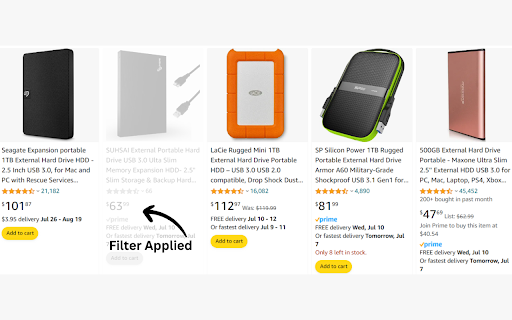
Stop scrolling through hundreds of mediocre products. Find only the best — instantly.
Amazon Review Filter helps you cut through the noise on Amazon search pages. Set your own minimum review count and star rating, and the extension automatically highlights only the products that meet your standards — right on the search results page, with no redirects or extra steps.
✅ What It Does
Smart Product Filtering Set a minimum number of reviews and a minimum star rating. Products that don't meet your criteria are greyed out so you can focus on what matters — without losing the page layout or missing anything.
Three Powerful Modes
🔍 Filters Only — Grey out products that don't meet your review and rating thresholds
🚫 Hide Sponsored Only — Grey out all sponsored/ad placements, including sponsored brand banners and carousels, without affecting organic results
🔍🚫 Hide Sponsored + Apply Filters — Combine both: remove ads AND apply your quality thresholds in one pass
Smart Sponsored Detection Detects and hides all types of Amazon ad placements — individual sponsored product cards, sponsored brand banners, video carousels, and multi-product brand showcases (like the kind Sennheiser or Samsung run in search results).
Context-Aware Toast Notifications The extension shows a relevant, mode-specific notification every time it runs.
It only activates on Amazon search result pages, so it never interferes with product detail pages, your account, or checkout.
🛠 How to Use
Open an Amazon search results page (e.g. search for "laptop")
Click the extension icon in your browser toolbar
Set your Minimum Reviews and Minimum Rating
Choose a Filter Mode and click Apply
Products gets greyed out instantly — qualifying products stay bright and clear
If over 60% of results are filtered, use the Update Filter button in the notification to fine-tune right on the page — no need to reopen the popup
🔒 Privacy
No data is collected. All filtering happens locally in your browser.
No external servers. The extension never sends your search queries, browsing history, or any personal data anywhere.
Settings are saved locally using Chrome's built-in storage.sync and sync only across your own devices.
Latest reviews
- Sean Blair
- It does filter out results, but not only the ones you want it to. I just tested it out by setting the filter to show only results rated 4+ with a minimum of 150 reviews, but it was still filtering out products like one that had a 4.8 rating based on 2,484 reviews.