


KeyWord BookMarks
Extension Actions
- Live on Store
Quickly open a bookmark from the keyboard based on a keyword in the bookmark title.
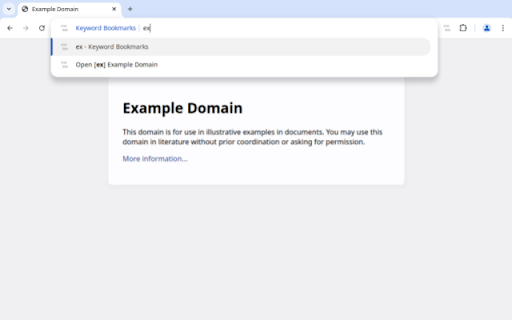
KeyWord BookMarks enables the user to navigate to frequently used sites using only the keyboard.
How To:
• Go to a website. (e.g. http://example.com)
• Bookmark a website. (Ctrl-D)
• Prefix the title with a short name (keyword) in square brackets. (At the far left of the 'Name' field type '[ex]', click 'Done'.)
• Select the omnibox. (Ctrl-L)
• Type 'kw{tab}ex{enter}'. (Voila: You have arrived at http://example.com)
As an additional feature, a suffix may be added to the keyword.
• ':p' : Pin the tab after opening bookmark.
• ':t' : Open the bookmark in a new tab.
• ':w' : Open the bookmark in a new window.
• ':wi' : Open the bookmark in a new incognito window.
This is an updated version of a very old extension: Bookmark Keyword (https://chromewebstore.google.com/detail/bookmark-keyword/jgmmhndnlacimnjmgplphnokhnlbhnmd)
This extension is used every day by the author.
"Nothing done every day should require the mouse."
Latest reviews
- Chop Swords (chopswords)
- It doesn't do what it says it does.
- Robert Smith
- It works perfectly with bookmarks that link to a normal URL and it's a life saver since Chrome changed the way site search works (and effectively killed Firefox-like keywords for Chrome). The only reason I didn't give it 5 stars is because it doesn't open bookmarks to local files (e.g., a bookmark with a link like "file:///C:/some-directory/some-file") and is also a bit hit or miss on bookmarks that link to a Chrome setting (e.g., a bookmark with a link like "chrome://settings/content/all".