
Paywall Label for Facebook, Twitter & Google
Extension Actions
CRX ID
elompmlaepbjbckjcahllcgkpnkmpoln
Status
- Extension status: Featured
- Live on Store
Description from extension meta
Allows you to add a paywall label to Google's search results, Facebook and Twitter feed.
Image from store
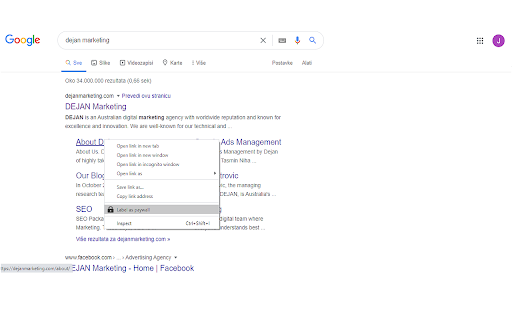
Description from store
How to use:
1. Bring up the context menu on the search result or links from Twitter or Facebook feeds you wish to label.
2. Select "Label as paywall"
3. Small lock icon will now appear next to pages from that domain in the future.
Follow the same process to unlabel a domain. Alternatively click on the extension icon to view the list of labelled domains. Click on "x" next to the domain in the list to remove the label.
Latest reviews
- S P
- Only allows you to add site from Google search but still doesn't nothing in Google news thereby defeating the purpose....
- S P
- Only allows you to add site from Google search but still doesn't nothing in Google news thereby defeating the purpose....
- Rayden de Frydgge
- 100% waste of time. Does nothing. No controls. Doesn't label paywall sites. Removed.
- Rayden de Frydgge
- 100% waste of time. Does nothing. No controls. Doesn't label paywall sites. Removed.
- Gavin White
- Literally does nothing, no option for adding websites to label. Poor
- Gavin White
- Literally does nothing, no option for adding websites to label. Poor
- J S
- Two stars only because I like the idea. One star for implementation. Context menu that allows for creating site lists never materialized. Uninstalled.
- Joe Sytniak
- Two stars only because I like the idea. One star for implementation. Context menu that allows for creating site lists never materialized. Uninstalled.
- Atsushi Endo
- My wish was granted. This addon is great. I don't want to cheat and peek inside the paywall. I wanted to ignore the existence of the media that makes the paywall and save the time opening the link. It would be even better if the settings could be shared with another PC's browser.
- Atsushi Endo
- My wish was granted. This addon is great. I don't want to cheat and peek inside the paywall. I wanted to ignore the existence of the media that makes the paywall and save the time opening the link. It would be even better if the settings could be shared with another PC's browser.
- David Iwanow
- Such a simple option for consuming content that isn't hidden behind a paywall, I would also love to see this available on Twitter links also...
- David Iwanow
- Such a simple option for consuming content that isn't hidden behind a paywall, I would also love to see this available on Twitter links also...