
Spotify Side Lyrics
Extension Actions
CRX ID
emmncipfpdofamnhnekbpfhhmoelpjkn
Status
- Live on Store
Description from extension meta
Enjoy synchronized Spotify Lyrics in your side bar no matter what tab you're on.
Image from store
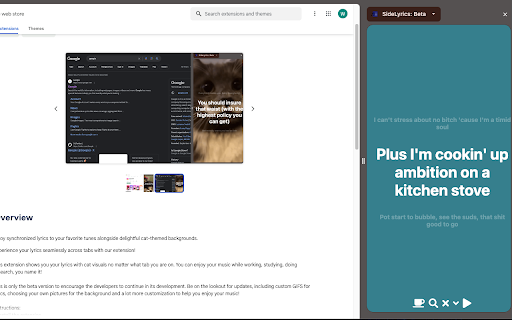
Description from store
Experience your lyrics seamlessly across tabs with our extension!
This extension shows you your lyrics with cat visuals no matter what tab you are on. You can enjoy your music while working, studying, doing research, you name it!
Instructions:
1. Install the extension
2. Open Spotify and click on the extension icon to open up the sidebar
3. Now you can switch tabs with the lyrics.
4.If they don't show, you should refresh the Spotify page (IMPORTANT)
Leave a review or email me to suggest features or report bugs. Enjoy listening!
Latest reviews
- Ryan Rizkiawan
- Not working
- ZACHARY SIMPSON
- Please redo this ive been trying to make it work for 2 weeks now and it shows a white screen on spotify and when im on a new tab doing my assigments i have the dill open and it says no lyrics. it showed it on spotify but not on the side window everey niw and then itll show on spotify but not the side lyrics
- william
- isn't working
- Nazuh
- It's quite finnicky but it works to say the least. If possible, an option to manually offset how ahead or behind the lyrics are would be quite nice as it seems like most of the time the lyrics are always a few seconds ahead.
- Alex
- Please take this down as it does absolutely nothing.
- MXRTN
- not workinnnnn
- Marko Aranda
- never on theright bar or measure :(
- Ifigxi Tf8itititf
- I can not see the lyrics.I only see 3 dots and that is all. I have tried refresing the Spotify page as the instructions says but it did not work. Please if you could fix this would be lovely!
- Benzson Neo
- Not working mate...
- Spaghetti Man
- What happened to the 3rd step? Did you just hastily delete it now that Spotify ruled out premium lyrics?
- Doug Riddler
- just doesn't work.
- whitespace
- Unfortunately not displaying any lyrics
- Chirron Williams
- Doesn't work at all