
VibeX - Instagram Enhanced Controls
Extension Actions
Advanced volume control, video playback features, song recognition, and download capability for Instagram
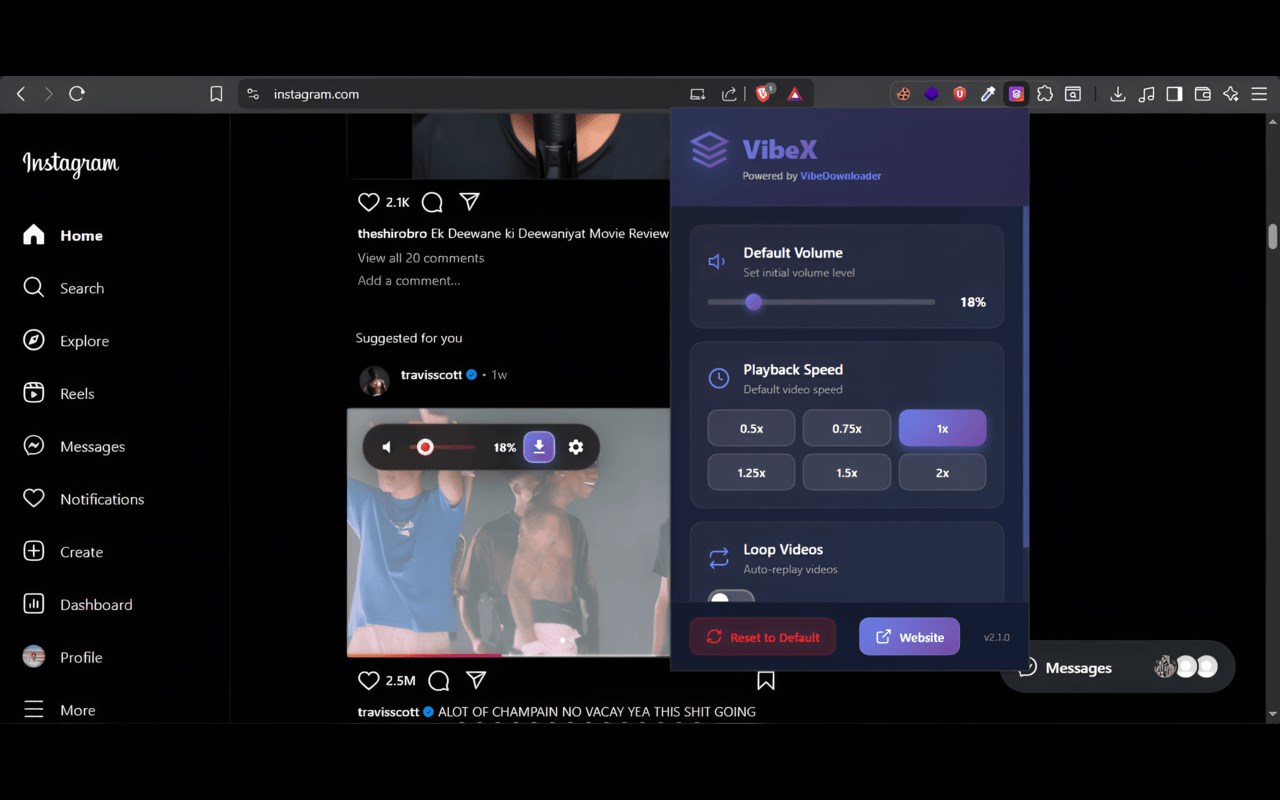
VibeX is a cutting-edge browser extension designed to elevate your Instagram experience by providing advanced video playback controls, seamless song recognition, and easy media downloading directly within your Instagram feed. Perfect for users who enjoy video and audio content on Instagram, VibeX enriches your interaction by allowing precise control over volume, playback speed, and seamless discovery of music tracks embedded in videos—all without leaving the Instagram interface.
This extension adds a sleek, intuitive overlay onto Instagram videos, giving you quick access to volume sliders and playback speed adjustments. No longer are you limited to the default video pace or system-wide volume settings—VibeX empowers you to tailor audio levels and video speed in real time for a fully personalized viewing experience. For music lovers, the built-in song recognition feature leverages the Shazam API to instantly identify any soundtrack playing in Reels or video posts, delivering comprehensive details including artist name, track title, and streaming links.
VibeX goes beyond just enhancing playback controls. It includes a straightforward download button integrated into Instagram’s video players that lets you save videos or extract audio for offline use and easy sharing. The extension also supports an Auto-Scroll feature that continuously plays videos as you scroll through your feed, making binge-watching stories and Reels effortless. Designed with a minimalist overlay, VibeX seamlessly fits into Instagram’s layout, letting you toggle controls visibility for an uncluttered, distraction-free experience. Moreover, smart detection ensures these controls only appear on relevant content, maintaining smooth navigation without interfering with Instagram’s interface or speed.
Upon installation or updating, VibeX offers clear onboarding and changelog pages to help you quickly understand and maximize its powerful capabilities. These guides provide helpful tips and visual walkthroughs for a smooth start. With a strong commitment to user privacy, VibeX does not collect personal data. Its permissions are modular and minimal, and the extension’s open-source components—especially those related to Shazam API integration—guarantee transparency and security while you enjoy the enhanced Instagram experience.
Key Features:
- Custom Volume Controls: Adjust video volume directly inside Instagram independently from your system audio, allowing precise sound control.
- Playback Speed Tuning: Modify video playback speed with a slider, from slow-motion to accelerated speeds, including instant 2× speed boost with the spacebar.
- Song Recognition: Identify songs playing in any video or Reel at the click of a button, powered by the Shazam API, providing detailed track information and streaming links.
- Video & Audio Downloading: Quickly download Instagram videos or extract audio tracks for offline viewing and sharing, all accessible via the integrated download button.
- Auto-Scroll Playback: Enable seamless continuous playback of videos as you scroll through your feed, ideal for uninterrupted viewing sessions.
- Minimalist Overlay Design: Controls are visually integrated without cluttering your Instagram feed; options to show or hide controls maintain a clean user interface.
- Intelligent Integration: Smart detection activates controls only on Instagram video posts and stories, ensuring smooth usability and faster browsing.
How It Works:
1. Install VibeX from your browser’s extension store and refresh your Instagram tab to activate.
2. Open any Instagram video post or story; the VibeX overlay with enhanced controls appears automatically on video players.
3. Use intuitive sliders embedded on video players to adjust volume and playback speed according to your preferences.
4. Click the "Identify" button to trigger song recognition, which analyzes audio and queries the Shazam service; results display in a popup with artist and track details.
5. Press the Download button within the overlay to save the video or audio directly to your device with a single tap.
6. Enable Auto-Scroll from the extension’s settings to enjoy continuous video playback as you scroll through your Instagram feed.
7. Customize visibility of controls, access helpful hints, and review latest feature updates via the welcome and update informational pages.
Privacy: - No personal data collected. VibeX interacts solely with video and audio content on Instagram and communicates with the Shazam API strictly for song identification, without storing or sharing any personal information.
Latest reviews
- Muhammad
- i love the tools its work, but i think identify music seems bugged right now and the format when i download reels/videos always instagram unknown users. I hope these thing can be fixed. Edit: idk why the overlay doesnt appear now (i can only 2x speed with manifest control settings)
- Muhammad
- i love the tools its work, but i think identify music seems bugged right now and the format when i download reels/videos always instagram unknown users. I hope these thing can be fixed
- Tahmid
- I love this