Gmail Inbox Zero by cloudHQ
Extension Actions
Focus mode for Gmail - solution for Inbox Zero
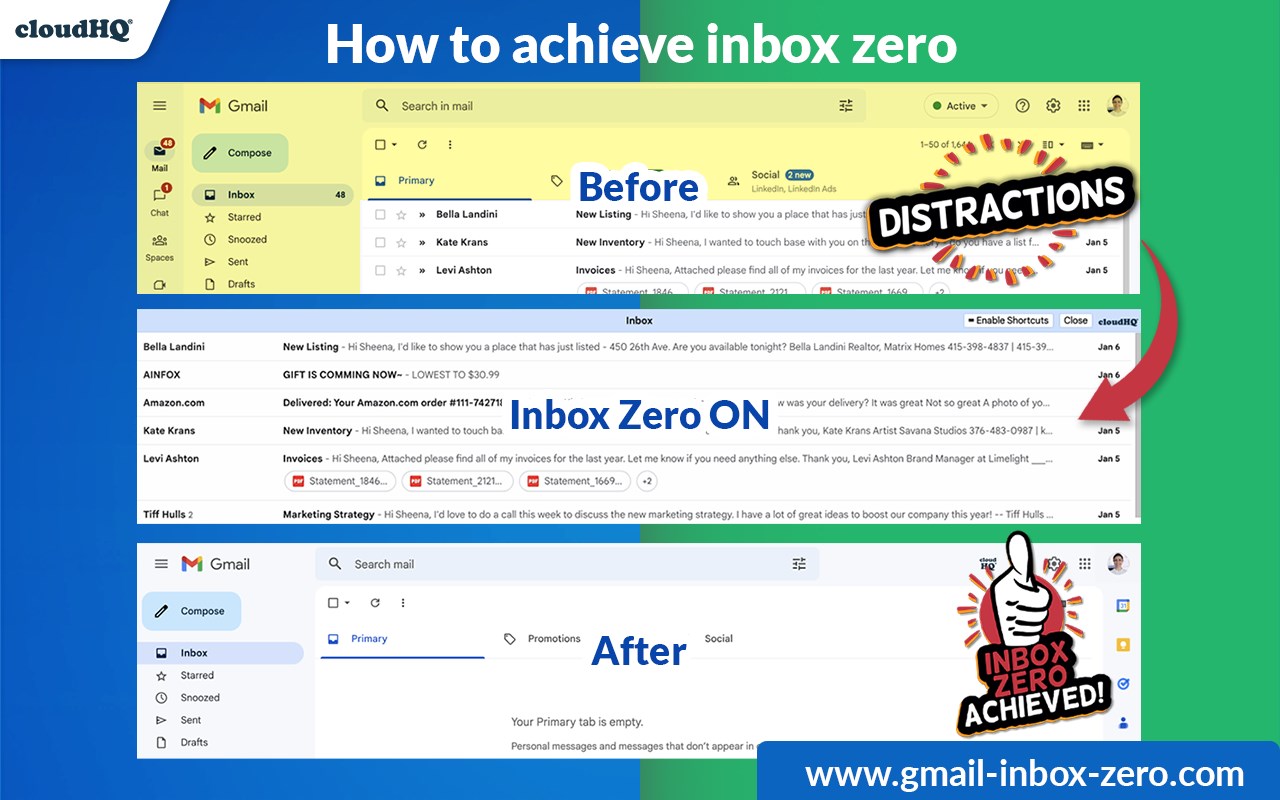
Welcome to our Gmail Inbox Zero extension for Gmail. This simplifies Gmail's interface and allows you to hyper focus on going through your emails to attain the coveted state of "inbox zero" with minimal effort.
By providing tools to manage your high volume of emails received daily, you'll be able to:
✅ Easily best manage high volumes of email
✅ Quickly clean up your inbox
✅ Remove distractions
To use the extension, simply:
1) Click the cloudHQ icon in the upper right corner of your Gmail
2) Select "Turn Inbox Zero ON."
3) When you're finished organizing your inbox, click "Close Inbox Zero."
You'll see that you're done and have no more emails in your inbox!
Now let's go over 5 popular inbox zero categories:
1) Do. If an email demands an action that can be accomplished immediately, take care of it promptly and archive the email afterwards.
2) Respond. If an email can be responded to within a short period, reply to it immediately.
3) Archive. If an email holds information that will be needed in the future, or it does not necessitate a reply, preserve it by archiving it.
4) Delegate. If an email is more appropriate for someone else's attention, forward it, then archive it for your own reference.
5) Defer. If an email requires more time or effort to reply, utilize the snooze function to delay it to a more favorable time, or label it as a task on TODO or Google Tasks.
After managing your inbox, you can proceed to work on emails that have been labeled as TODO or deferred through the snooze feature. With cloudHQ, you'll be able to boost your productivity and achieve that sought-after state of inbox zero with ease.
cloudHQ. Helping your productivity, 1 click at a time.
cloudHQ website: https://www.cloudhq.net/
App website: https://www.gmail-inbox-zero.com/
Pricing: https://www.gmail-inbox-zero.com/pricing
Support page: https://support.cloudhq.net/category/browser-extensions/gmail-inbox-zero/
Blog: https://blog.cloudhq.net
Gmail, Google Calendar, and Google Workspace are trademarks of Google LLC. Use of these trademarks is subject to Google Permissions.
cloudHQ is trademark of cloudHQ LLC. https://www.cloudhq.net/trademark
Latest reviews
- kendra
- This app is one of the best Gmail apps I've used. The simple design makes it perfect for anyone looking to stay focussed in Gmail.
- Grant
- This is fantastic! It's easy to use and keeps me on the task at hand.
- David
- I've been using this app for a few weeks now and it's been a winner for my productivity.
- Alex
- This app makes managing my emails so much easier.
- mimo
- I love how this app simplifies my inbox and helps me find important emails quickly.
- Cordez
- This app is a great way to declutter my inbox and stay focused on what's important.
- Oluwatobi
- I really hate all the extra things that Gmail's user interface forces me to see in my inbox. This helps me focus and keeps me productive.
- Jennifer
- Really simple app, and very useful.
- Allan
- Much cleaner inbox view.
- Kallie
- I really hate all the extra things that Gmail's user interface forces me to see in my inbox. This helps me focus and keeps me productive.
- Senanca
- This app is one of the best Gmail apps I've used. The simple design makes it perfect for anyone looking to stay focussed in Gmail.
- reeves
- This is fantastic! It's easy to use and keeps me on the task at hand.
- krish
- I've been using this app for a few weeks now and it's been a winner for my productivity.
- vera
- This app makes managing my emails so much easier.
- lukas
- I love how this app simplifies my inbox and helps me find important emails quickly
- zabeth
- This app is a great way to declutter my inbox and stay focused on what's important.
- kait
- Focus game changer. It really helps.
- Kathygomez
- Really simple app, and very useful
- David
- I really hate all the extra things that Gmail's user interface forces me to see in my inbox. This helps me focus and keeps me productive
- Mary
- Much cleaner inbox view
- jeff
- I use this to effectively go through my inbox first thing in the morning
- Opeyemi
- I achieved the holy grail of inbox zero! What an organized feeling!
- Elizabeth
- Best app ever!! Thank you for keeping me focussed!