
Super Simple Highlighter
Extension Actions
- Extension status: Featured
Make permanent, private highlights on any web page.
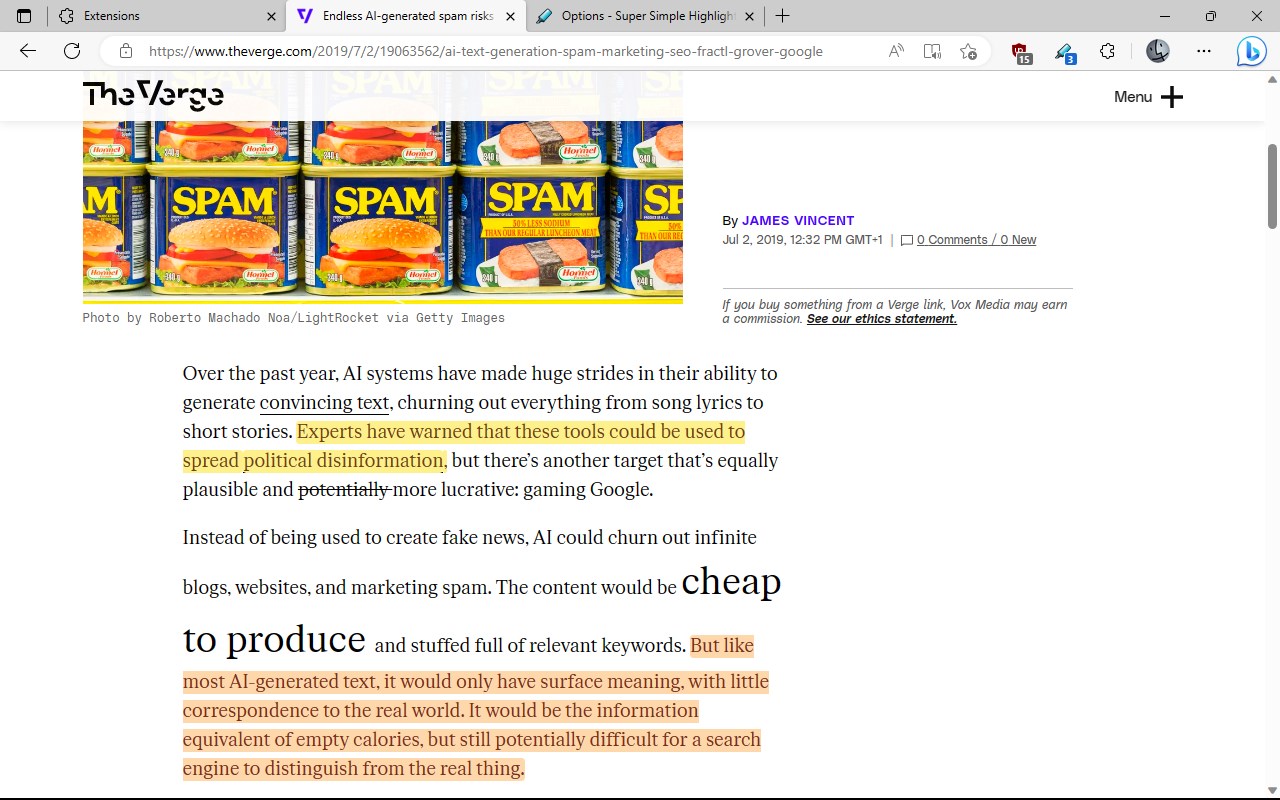
This extension lets you make highlights on any web page, and subsequently attempts to restore those highlights when you revisit the page.
This process is completely private. The location and contents of your highlights never leave your browser.
A variety of highlight styles are available, with built-in styles including basic colors, redaction, blurs etc. Highlights can be made via the mouse or a keyboard shortcut.
The highlights on a single page can be navigated to from a single popup dialog, and a summary of the page's highlights are also available to view, print, or save.
NOTE:
- The extension does *NOT* sync across your devices.
- There are many factors that may cause highlights not to be successfully restored on subsequent visits.
For more details, see the help page.
Latest reviews
- Ron
- Unfortunately, every time you visit a new site and try to highlight something, this extension asks for permission to change the site. This is probably the same permission problem that Roosta reported in his review last month. I sent two emails to the developer asking if he could look into this, but he didn’t respond, which was disappointing. Otherwise, this extension worked okay. Ultimately, I ended up changing to Web Highlights, which, like other highlighter extensions I’ve used, does not have this permission problem.
- meeran
- like the name it is super simple highlighter, i wish i can copy the latex number in readable form .
- k
- Sharon, here’s the easy way to find and use your extensions in Microsoft Edge At the top‑right corner of Edge, look for an icon that looks like a little puzzle piece. That icon is the Extensions button. Click it. A small menu will open showing all the extensions you’ve added. To use any extension, just click on it in that list If not work, search on internet for video "how to use extension on edge"
- Roosta
- i have used this for as long as i can remember totally stable...like the ak47 of highlighter extensions on win 10 i upgraded to win 11 and the Edge Browser web permissions suck *** and im looking for an alternatives - Is there a a fix?
- Sharon
- I am not very good with technology. I know this is an easy question for someone to answer. How do I assign the keyboard shortcuts needed for this highlighter to work? New Dell computer using Microsoft edge. Thanks for your kind help. This is only at a 2 rating because I haven't used it and no instructions.
- Reinn
- It does not work in PPTs in Google Classrooms.
- Mark
- Can you please make it accessible on all sites without having to grant access to every single site?
- turn
- 每個網頁都要要求存取權,有點麻煩
- DAPHNE
- Sempre tem que clicar com o botão direito para destacar a palavra? Não foi funcional.
- Mark
- BEst of the best
- Ezeude,
- Very solid and easy to use extension. You need to assign keyboard shortcuts first, but after that it's smooth sailing.
- Wesley
- It's simple, not too complex, and has a couple of formatting options. The only thing I've experienced so far was (due to the site's layout) the X being barley able to be clicked to remove a magnify effect. Maybe if an effect is double/triple clicked it should get removed?
- Mike
- Simple and works with latest Edge Beta. You have to grant the extension permission but then it works. Would like a blue color added, Cyan is the only thing close to blue which is available. Would be great if you would add blue. Thanks.
- Emaan
- its not working for me
- Saranya
- Loved it
- Isaiah
- Awesome. Didn't think it'd be hard to find a good highlighter but it was. This one does everything right
- WONG
- I think it is underrated
- Nemo
- 想问一下怎么设置插件语言为中文?
- alain
- Super Simple Highlighter ne fonctionne plus depuis une semaine. Si l'on sélectionne du texte et qu'on choisit une couleur, il ne se produit plus rien. Dommage !!
- MARCELO
- unfortunately DOESN'T WORK in Canary for Android
- Kai
- 用着不错哒
- Mohamed
- Thank you
- wm
- The most perfect highlighter extension! CLEAN, USEFULE, SO NICE! HIGHLY RECOMMENDED!
- Kevin
- Perfect! This is what I wanted and works exactly how I want it too.
- Looi
- An excellent add-on. I use it all the time for my personal and work uses. You can easily add and remove highlights, use different colours, and even access a history of it. Props to the dev for a job well done. :) If I may, I'd like to suggest adding a feature for assignable hotkeys to the highlighting action to make it easier and quicker to use. Thanks again!
- CARON
- Une des seules applications pour surligner qui fonctionnent que j'ai trouvé. Un raccourci serait cependant apprecié pour éviter d'utiliser le menu contextuel
- Borbély
- First working extension. Gerat job. Thank You.
- Duarax
- ne marche pas
- dd
- 19:56来自香港,全球互联,8k视频随你看,注册及送永久流量,地址:http://run.weaksharedptr.com/register?share_id=686da3ae-e88d-49ac-aa77-8d448c11e826
- dd
- 13:47来自香港,全球互联,8k视频随你看,注册及送永久流量,地址:http://run.weaksharedptr.com/register?share_id=686da3ae-e88d-49ac-aa77-8d448c11e826
- Deven
- It says simple, but this is the most customizable, and efficient one on the store in my opinion. It can redact, bold, strikethrough, highlight, and more, all edits can be easily undone, all edits can be saved as a convenient text file, and stored away, I hope this highlighter stays around.