
FB Helper Chatbot
Extension Actions
A Facebook chatbot extension
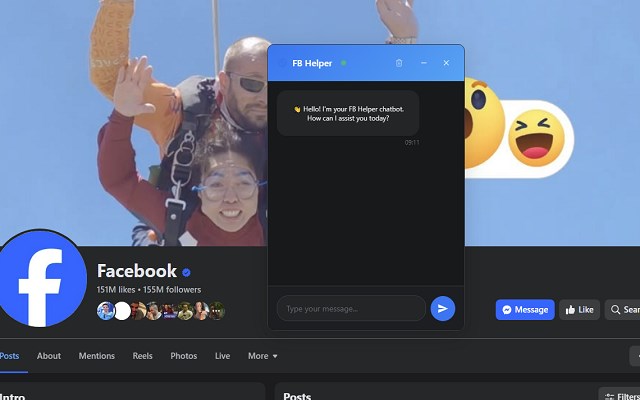
FB Helper Chatbot is a sophisticated browser extension designed to enhance your Facebook experience by integrating an AI-powered chatbot directly into Facebook’s user interface. Tailored specifically for Facebook users, it helps you engage more effectively with group posts, discussion threads, and search results by offering intelligent, automated conversational assistance. Whether you’re participating in group discussions, navigating Facebook search pages, or managing content, this extension streamlines interactions by providing instant answers and content summaries without ever leaving the Facebook site.
At its core, the FB Helper Chatbot reads and understands posts and comments on Facebook pages you visit, especially within groups or search result pages. Instead of manually sifting through countless posts to find relevant information, the chatbot automatically scans the social content around you. It extracts key details and metadata, prepares concise summaries, and proposes helpful responses based on the context—all powered by advanced AI technologies. This makes it ideal for users looking to quickly ask questions relevant to a Facebook group’s content and receive informative, on-topic answers derived from the group’s existing posts.
The extension is designed to integrate effortlessly, injecting a customizable chat window that can be opened or hidden via toolbar icons or floating interface elements. This chat window supports user-friendly controls such as moving, resizing, and remembering your preferred layout settings between sessions, ensuring the chatbot is always accessible yet unobtrusive. It can also be configured to automatically open on specific Facebook pages, such as group feeds or search results, ensuring you never miss an opportunity for engagement.
One of the key technological features of FB Helper Chatbot is its network activity monitoring through an advanced XHR sniffer. This component operates at the browser level, tracking Facebook’s background requests to extract post and comment IDs dynamically. By continuously monitoring these requests, the chatbot maintains real-time insight into the content you’re browsing, enabling rapid contextual responses and enhancing the accuracy of automated suggestions. This capability significantly improves responsiveness when interacting with posts or conversations within groups.
The extension is also built with security and performance in mind. A background service worker manages your settings and synchronizes preferences seamlessly across browser sessions. It ensures efficient communication between your browser and the chatbot backend if configured, while automated safeguards limit message spamming, excessive auto-opening of the chat window, and prevent unnecessary data storage on your device. Input sanitization and message timestamping utilities further improve usability and protect the integrity of your conversations.
Customization options allow you to tailor the chatbot to your specific workflow. You can set preferences for whether the chat window opens automatically, control where it appears on your screen, assign keyboard shortcuts, and define memory limits for conversation history. This flexibility makes FB Helper Chatbot a versatile tool—whether you are a group administrator needing quick management insights or a regular user seeking to boost productivity and comprehension within Facebook.
In short, FB Helper Chatbot transforms the way you interact with Facebook groups and search results by delivering a powerful, privacy-conscious AI assistant embedded right into your browsing experience. It saves time, enhances engagement, and makes navigating social content smarter, faster, and more enjoyable.
Key Features:
- AI-driven chat interface integrated seamlessly atop Facebook, supporting question-and-answer, content summarization, and auto-replies.
- Real-time scanning and analysis of posts and comments on Facebook group pages and search results to extract relevant metadata and generate summaries.
- Powerful network monitoring via XHR sniffer to track live Facebook requests, identifying post and comment IDs for contextual awareness.
- Customizable chatbot user interface with movable, resizable, and auto-open features that remember your settings across sessions.
- Protective automation controls limiting message history size, message length, and auto-open frequency to prevent spam or disruptions.
- Support for floating chat button, toolbar activation, and popup commands for flexible chatbot access.
- Encrypted communication and synchronization of extension settings through a secure background service worker.
- Utility tools for input sanitization, timestamping messages, and enhancing user experience customization.
How It Works:
1. Install the FB Helper Chatbot extension from the browser’s extension store and grant necessary Facebook permissions.
2. Open the chatbot popup via the browser toolbar icon to configure your preferences, including auto-opening behavior, chat window position, and interaction limits.
3. Navigate to Facebook groups or use Facebook Search; the floating chatbot button or auto-opening chat window appears on relevant pages.
4. Type in a question related to the group’s posts or ongoing discussions; the chatbot reads existing posts and comments to generate a contextual, AI-powered answer.
5. As you interact, the extension continuously scans page content and monitors background requests through the XHR sniffer to maintain context awareness and improve response accuracy.
6. Use floating controls to move, resize, or hide the chat window; the interface persists across browsing sessions to maintain your personalized setup.
7. Adjust extension settings anytime through the popup for a tailored user experience, managing conversation history, auto-open parameters, and other customization options.
Privacy: - No personal data collected. All AI processing, contextual reading, and chat automation occur locally or via secure browser-extension communication. No user credentials, browsing history, or private data are stored or transmitted beyond what is essential for chatbot functionality.
Latest reviews
- Imbar
- Great tool! speeds up search time instead of manually looking for answers in posts :)