
Open Comments
Extension Actions
Comments for the whole internet.
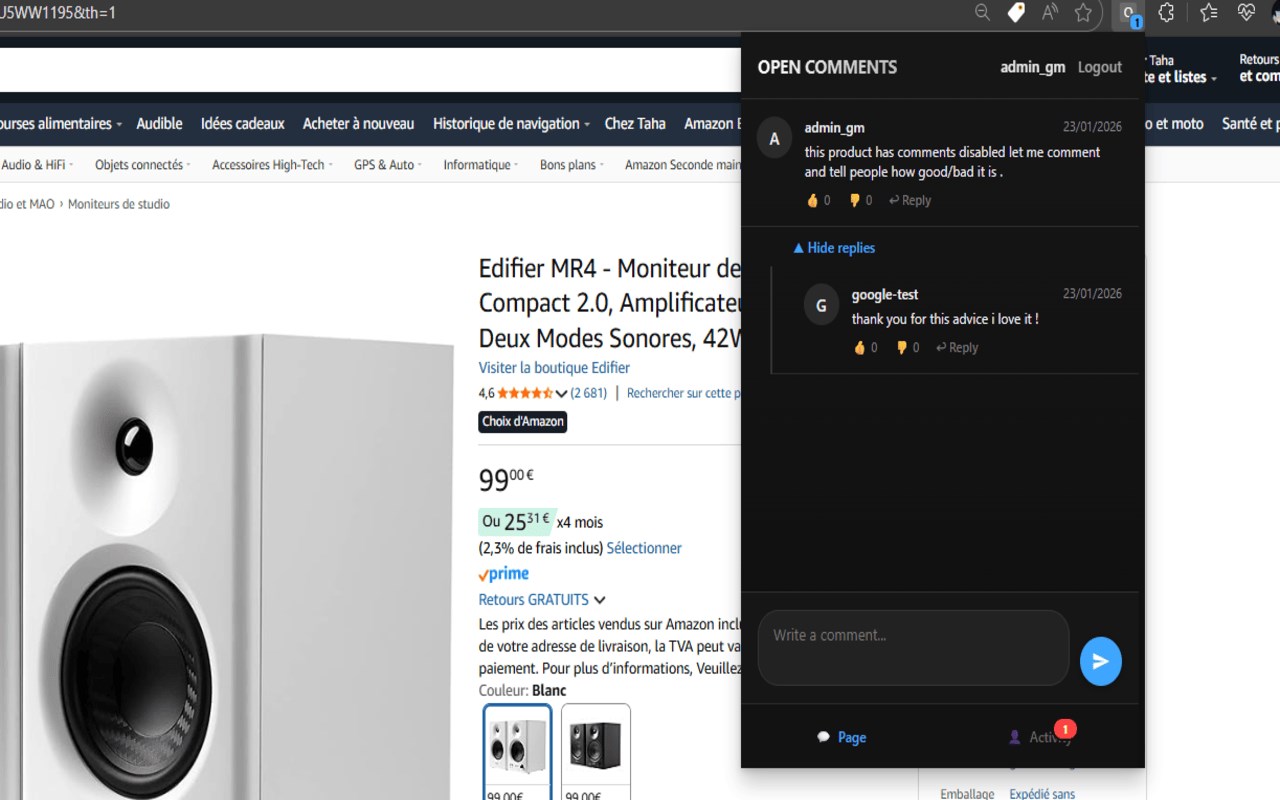
Open Comments: Empowering Free Speech with Universal Commenting Across the Web
Open Comments is a versatile and innovative browser extension designed to give users the freedom to discuss, debate, and share opinions on virtually any webpage—regardless of whether the site’s native comment functionality is available or enabled. Whether you’re browsing YouTube videos, Amazon product pages, news articles, or blogs, Open Comments provides a persistent, independent comment system that lives outside the constraints and moderation policies of host websites. This unique platform enables a truly open, collaborative dialogue by bridging users worldwide through public, persistent comment threads accessible directly within your browser.
One of the key challenges on the internet today is the increasing number of sites and creators disabling their comment sections to avoid negative feedback or controlling conversations. Open Comments returns the power of free expression to users by creating a transparent and secure parallel discussion space that is hosted independently. From censored YouTube videos to silent news sites, the extension unlocks a universal commenting experience that fosters open debate and community building across disparate corners of the web.
Open Comments features a smooth, user-friendly interface that adapts to light and dark modes and is optimized for both desktop and mobile browsing. The extension injects comment threads contextually into supported pages—for example, placing discussion panels directly alongside YouTube videos or embedding threads in relevant spots on other platforms—ensuring the experience feels natural and visually integrated without interfering with site layouts. Threaded conversations support replies, upvoting, and paging through extensive discussions without lag, while an efficient notification system keeps you informed in real time about replies, mentions, or new activity using color-coded badges and popup alerts.
Authentication is streamlined through Google OAuth, allowing users to sign in securely with just one click and eliminating the hassle of managing extra passwords. You can post comments linked to a verified identity or browse anonymously if preferred. The extension also maintains a personal comment history, enabling quick access to your contributions and engagement across the web. This history, along with your preferences and notification states, is saved locally to create a personalized browsing and discussion environment.
Under the hood, Open Comments employs smart technical solutions such as background polling for notifications, in-memory caching to speed up thread loading, and a robust backend API to store and synchronize comments securely. This ensures that your interactions are fast, stable, and seamlessly integrated into your daily internet experience, with minimal resource use and no disruption to your browsing habits.
Ideal for anyone who values open discourse or wishes to break free from closed-site restrictions, Open Comments transforms the web into a more connected and transparent social platform. By offering a universal, independent layer of communication, it broadens the scope for collaboration, critique, and social learning, empowering users to reclaim their voice anywhere online.
Key Features:
- Universal Commenting: Adds persistent comment threads to any webpage (including videos on YouTube and product pages on Amazon) independent of the host site’s own comment system.
- Unlock YouTube: Enables commenting on any YouTube video—even if the official comment section is disabled or heavily moderated.
- Real-Time Notifications: Delivers instant alerts with color-coded badges and popup notifications for replies, mentions, and new messages.
- Full Comment History: Keeps a comprehensive record of your posted comments and discussions accessible from your profile.
- Voting System: Allows upvoting and downvoting of comments to highlight top contributions, sortable by Top, New, or Old.
- Secure Google OAuth Login: Provides quick, easy, and password-free authentication linked to your Google account.
- Seamless Integration: Automatically embeds comment threads contextually on supported domains with adaptive themes matching site appearance.
- Responsive UI: A modern, intuitive interface optimized for both desktop and mobile views with light/dark theme support.
How It Works:
1. Install the Open Comments extension from your browser’s extension store.
2. Navigate to any supported webpage, such as a YouTube video, Amazon product page, or news article indexed by Open Comments.
3. Click the extension icon to open the popup interface, or access the embedded comment sidebar where available.
4. Browse existing comments freely, or sign in securely using Google OAuth to post new comments and reply to others.
5. Receive real-time notifications of interactions via distinctive badge colors and popup alerts.
6. Review your comment history and manage your discussions through an easy-to-access profile pane.
7. Log out or switch accounts anytime without losing access to your comment threads and notification statuses.
Privacy: - We value your privacy. This extension only accesses the active tab’s URL to display relevant discussions and does not store your browsing history or passwords. When logged in via Google OAuth, comments and notification statuses are securely relayed to the Open Comments backend for storage. For full details, please refer to our privacy policy.