
CRX id
ffkhlchalilmdfpfpkngobofpmmnbhnf
ffkhlchalilmdfpfpkngobofpmmnbhnf
Description from extension meta
3DC is the easiest app for designing 3D models to bring your ideas to life.
Image from store
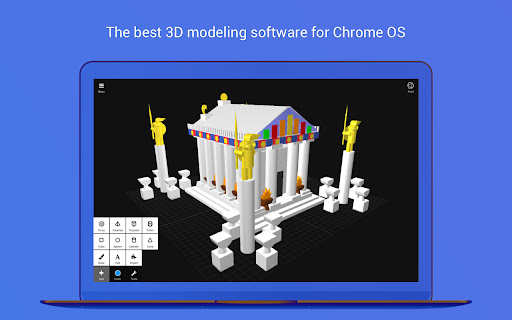
Description from store
3DC.io (3D Creationist) is the easiest app for creating 3D models, delivering the best performance on mobile devices. Anyone can use it!
Build, share and even 3D print your designs.
To see what other people are building, check out https://3dc.io/gallery/
CAD tools have a high learning curve, that make them inaccessible to hobbyists, so we decided to make a modeling tool, that is simple to use.
3DC uses basic shapes (cube, sphere, cylinder, cone etc.) to create any 3D models. From the simplest design to the most complex objects – you can build anything by simply moving, rotating and scaling primitive objects.
Be sure to check out the gallery inside the app and download some cool models!
Getting started:
Add some basic shapes to the stage, for example a cube and a cone.
Tap on shapes to make them active/inactive.
Select a proper tool for what you want to achieve: Move,Rotate,Scale.
Use the arrows around the shape to manipulate the object in the desired direction.
Camera:
- Rotate the camera by dragging your finger around the stage.
- Zoom the camera by pinching with "two" fingers.
- Move the camera by dragging with "three" fingers.
Build something fun, here are a few ideas:
- Plane
- Car
- Fort
- Snowman
- Cartoon characters
- Coffee cup
Future updates:
- More shapes and ready to print models
- Generate 3D text with your desired font
- Undo and Redo operations
- Share video playbacks of your creative process
- Bending objects
- Animating your 3D models
- Draw an outline and we generate a 3D model of it (extrusion)
Here are some examples of how people use our application for:
- Virtual Reality (VR) content
- Home design
- Building toys
- Logos
- Models for games
- Prototypes
- Education
- Sketch
- Stop motion animation
- Cartoon characters
You can export models to various different formats to use in:
Other 3D modelling software (Blender, 3ds Max)
Game engines (Unity, Unreal Engine)
Modding (Minecraft, Tiber, Roblox)
Find us on :
Instagram: https://instagram.com/3dc.io/
Facebook : https://facebook.com/3DC.io/
Twitter: https://twitter.com/3DC_io
Download and get creative :)
Latest reviews
- (2022-06-29) Romeo Sanchez: its good but would be way better if every time you copy more than one peice, it missalighns it
- (2022-03-28) Michael Johnson: THIS IS THE BEST GAME EVER it feels like im making a game
- (2021-04-18) Nico Muehlbauer: 5 out of 5 this was great, I am now a UGC creator on roblox cuz of dis absoloutly love it
- (2021-01-07) Clifford Slocombe: Seems unfinished and remarkably limited. Installed it, tried it, removed it. Sticking with TinkerCAD - easier to use, more fully functional, more accurate.
- (2019-11-25) Intensa Emozine: only thing is please add textures and fix the subtract mode.
- (2019-05-17) RBLX St4rBl1tz (Blamo 756GD): ummm i cant resize shapes i wanted to make a volcano can you possibly tell me how to re size objects?
- (2019-03-20) I LOVE IT
- (2019-02-06) Easton Buhle: I LOVED THE APP SO MUNCH
- (2018-12-01) ayden abrahams: pretty good add texter tho
- (2018-08-25) Ryley Livingston: I downloaded it to see what it could do and then it would not let me sign in with facebook, email or no account at all such a letdown
- (2018-06-21) qwertyASDF47: this is so good wanna know why cuz i can make 3d models or 3d sculptures and the controls for the app is good i rate five which means respect
- (2018-04-10) Kanefe: it makes o sense to use \
- (2018-01-29) nunaaa: cool
- (2018-01-14) Emilia Martinez: it's not bad
- (2017-10-09) Geoffrey Dylan: Its scale ratio is terrible, no texture modeling or UV unwrapping (YUCK!) (Please make this better and I will rate 5 stars.) :) (However, there are some keyboard short cuts: Select all shapes Ctrl + a ( Command + a on macOS ) Deselect all shapes Ctrl + Shift + a ( Command + Shift + a on macOS) Remove selected objects Ctrl + d ( Command + Shift + d on macOS ) Toggle group selected shapes CTRL + g ( Command + g on macOS ) Undo last action Ctrl + z ( Command + z on macOS) Redo last action Ctrl + Shift + z ( Command + Shift + z on macOS ) Along with that, this is not software that will make me single handedly want to break my computer due to lack of efficiency, it is not close to blender worthy. Download it, though and give it a try! :)
- (2017-09-27) Autumn Greene: I came from using blender and this is trash. absolute trash. People should be paid to use this.
- (2017-07-16) JustADudeWhoLikesToDraw !: This item edditor is Awesome!!!!