
Obsidian AI Video Notes & Screenshots (YouTube, Udemy, etc) - HoverNotes
Extension Actions
- Extension status: Featured
- Live on Store
Video Note-taking for YouTube, Udemy, Coursera & more to Obsidian: AI-powered markdown notes with screenshots
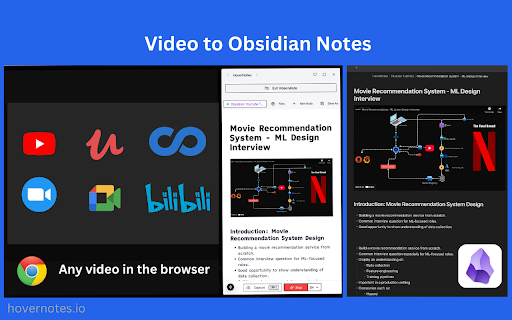
🚀 Gjør videoer om til Obsidian-notater med HoverNotes
✨ Transformer veiledninger, forelesninger eller hvilken som helst video til strukturerte notater som lagres øyeblikkelig i din Obsidian-vault. Ingen opplastinger og ingen skylagring—bare rent lokal og privat notatskriving.
✅ Kompatibel med YouTube, Udemy, Coursera og mer.
✅ Drevet av Gemini 2.0 AI for sanntids, nøyaktig automatisk notatgenerering. (Kjører i skyen)
📥 Installer nå og fang kunnskap uten anstrengelse!
✨ Hvorfor lærende elsker HoverNotes
✅ Ekte lokal-først design: Notater, skjermbilder og utdrag lagres direkte i din Obsidian-vault i markdown—full personvern, full kontroll.
✅ Øyeblikkelig visuell fangst: Ta skjermbilder og tidsstempler—som kodeeksempler eller viktige lysbilder—og koble dem til notatene dine.
✅ Allsidig læring: Fungerer med enhver nettleservideo, fra YouTube-veiledninger til interne opplæringsdokumenter.
✅ AI-drevet effektivitet: Få øyeblikkelige forklaringer og sammendrag, skreddersydd til det du ser på.
✅ AI ser videoen som du gjør: Gemini 2.0 analyserer kode, diagrammer og brukergrensesnitt visuelt (ikke bare transkripsjoner).
🛠️ Hvordan det fungerer
1. Installer utvidelsen (tar 30 sekunder).
2. Velg video og aktiver redigeringsverktøyet
3. Koble det til din lokale Obsidian-vault.
4. Spill av hvilken som helst video.
5. Ta notater, ta skjermbilder eller la AI generere forklaringer—alt lagres lokalt i sanntid.
💡 Nøkkelfunksjoner
• Sanntids AI-notater: Gemini 2.0 analyserer video og lyd, og leverer detaljerte notater og forklaringer øyeblikkelig.
• Delt skjermvisning: Se og ta notater side ved side for en sømløs opplevelse.
• Flerspråklig støtte: Se på ett språk (f.eks. spansk), få notater på et annet (f.eks. engelsk)—støtter 15+ språk.
• Null skyavhengighet: Dataene dine lagres kun på enheten din.
🏗️ Bygget for din kunnskapsbase
• Notater i ren markdown for enkel redigering og organisering.
• Skjermbilder lagres lokalt, innebygd i notatene dine.
• Perfekt integrasjon med Obsidian og andre markdown-verktøy.
• Fungerer med enhver video—teknisk, pedagogisk eller annet.
🌍 FLERSPRÅKLIG STØTTE:
Se veiledninger på hvilket som helst språk, få notater på ditt
• Engelsk, kinesisk, japansk, koreansk
• Spansk, russisk, fransk, tysk
• Og mange flere...
📹 PLATTFORMSTØTTE:
Fungerer sømløst med:
✅ YouTube
✅ Udemy
✅ LinkedIn Learning
✅ Coursera
✅ Bilibili
✅ Enhver video som spilles i nettleseren din
📥 Installer nå og behersk videolæring
Gjør hver video om til en personlig kunnskapsgullgruve. Installer HoverNotes i dag og begynn å bygge din Obsidian-vault med letthet!
💬 KONTAKT OSS:
𝕏 Twitter: https://x.com/hovernotes
✉️ E-post: [email protected]
💡 Discord: https://discord.gg/yN4g5UhTx9
____
❓ OFTE STILTE SPØRSMÅL:
Spørsmål: Hvordan forstår AI videoinnhold?
Svar: I motsetning til verktøy som bare leser transkripsjoner, ser og forstår vår AI (drevet av Gemini 2.0) videoinnhold direkte. Dette betyr at vi kan fange visuelle elementer, diagrammer og interaksjoner som ikke vises i transkripsjoner, noe som gjør notatene dine mer omfattende.
Spørsmål: Hvor lagres notatene mine?
Svar: Notatene dine lagres direkte i din Obsidian-vault, rett på datamaskinen din. Vi bruker rent markdown-format, så notatene dine er alltid tilgjengelige og under din kontroll. Skjermbilder lagres lokalt i vaultens ressursmappe.
Spørsmål: Må jeg manuelt fange alt?
Svar: Nei! Mens du kan ta notater og skjermbilder manuelt, kan vår AI se sammen med deg, hjelpe med å fange nøkkelinformasjon og generere notater. Alt lagres direkte i vaulten din - du bestemmer hvor mye hjelp du ønsker.
Spørsmål: Hva med personvern og sikkerhet?
Svar: Vi tar en ekte lokal-først tilnærming:
- Notater lagres direkte i vaulten din
- Skjermbilder forblir på datamaskinen din
- Ingen skylagring av innholdet ditt
- Behandler kun det du aktivt ser på
- Ingen data beholdes etter behandling
Spørsmål: Hvordan fungerer AI-behandlingen?
Svar: Når du ser en video, behandler vi den i sanntid ved hjelp av Gemini 2.0. Videoinnholdet analyseres for å generere notater, men ingenting lagres på våre servere - alle resultater går rett til vaulten din.
Spørsmål: Vil dette fungere med enhver video?
Svar: Ja! HoverNotes fungerer med enhver video som spilles i nettleseren din, inkludert:
- YouTube-veiledninger
- Nettkurs (Udemy, Coursera, osv.)
- Private opplæringsvideoer
- Intern dokumentasjon
- Konferanseforedrag
Spørsmål: Hvilke språk støttes?
Svar: Vår AI kan generere notater på 15+ språk, inkludert:
- Engelsk
- Japansk
- Koreansk
- Kinesisk
- Tysk
Og mer! Se på hvilket som helst språk, få notater på ditt foretrukne språk.
Spørsmål: Må jeg være online?
Svar: Du trenger internettforbindelse for AI-behandling, men alle notatene og skjermbildene dine lagres lokalt. Du kan alltid få tilgang til notatene dine offline når de er i vaulten din.
------
ⓘ Juridisk merknad:
HoverNotes er en uavhengig Chrome-utvidelse som konverterer videoinnhold til Obsidian-notater.
Mens vi bruker AI-funksjoner for notatgenerering, er HoverNotes ikke tilknyttet, godkjent av eller sponset av noen videoplattformer eller AI-tjenesteleverandører.
Denne utvidelsen opererer uavhengig som et tredjepartsverktøy designet for å forbedre videoopplæringsopplevelsen. Enhver referanse til plattformer, tjenester eller AI-modeller er kun for beskrivende formål.
Personvernmerknad: HoverNotes behandler videoinnhold i sanntid. Ingen videoinnhold eller data lagres eller beholdes etter behandling.
© 2025 HoverNotes LLC. Alle rettigheter forbeholdt.
Latest reviews
- Nour Eldeen
- This extension is honestly next-level — it makes a huge difference in productivity. I’ve also tried it in Arabic, and it was very smooth and convenient. The only downside is that the free limit feels quite restrictive.
- Akiyane Amano
- I started trying HoverNotes today, and it has been truly helpful. I've been spending too much time on work and haven't had much personal time. I wanted to learn new things, but since I didn't have the time to take notes, I used to keep a lot of content I wanted to study open in the background, which led to constant procrastination. The AI note-taking approach allows me to watch videos while working, and then I manually organize and review the notes once I'm finished. This has significantly boosted my efficiency and given me the courage to continue my studies.
- Ying zt
- Hope hovernotes can support podcast soon.
- JacobLi
- This plugin doesn't work well in Bilibili, cause it could not get the right timestamp. Hope next update could solve this problem.
- Rad Rank
- Hover Notes It is hands down the best AI note taking app right now mainly because the AI actually analyzes the visuals on the screen instead of just transcribing audio. That makes a huge difference for coding or math where the context is visual. The split screen is also something I haven't seen elsewhere and it works on any website which is a huge bonus. It understands multiple languages perfectly including Bengali and the direct sync to Obsidian is a big win for privacy. The notes are crisp and accurate plus timestamped PDF exports make reviewing easy. Also the developer support is outstanding as they are very prompt and actually listen to feedback. It really feels like they care about the users so it is unbeatable value for the quality.
- Stewart
- Awesome, works on multiple websites not just youtube so it helps me take notes effectively side by side with the video. Haven't seen any that offers the split screen option which is a huge bonus
- RJ
- Leaving a review so i know i have tested this one and didn't like it for the following reasons. no dark mode, feels laggy resource heavy, cannot quickly timestamp and take note.
- Malumba Derrick Rogers
- Hands down the best AI note-taking app on the market right now. I used this back in university, and the recent updates have been massive. The standout feature is that the AI actually analyzes the visuals in the video, not just the audio. This makes all the difference for coding or math-heavy subjects where context is on-screen rather than spoken. The notes are crisp, accurate, and the Obsidian integration is a huge win for privacy. Plus, having timestamps in the PDF exports makes reviewing specific segments incredibly easy. Unbeatable value for the quality.
- Samuel Bonnard
- Great App ! Helps to convert videos into actual insight that you can use in obsidian !
- Mg Gcp
- Been using for several months now and I'm very happy with HoverNotes. Really lets me focus on concentrating on the lectures while I can take snapshots of the video when I feel the need. As it all goes in to my Obsidian, I can then compile the notes later which is a really good workflow for me. Love it!
- Escrito
- The note-taking is honestly starting to let me down. I'm noticing plenty of critical information being left out, and frequently I'll see a note start just to suddenly end with nothing added. I've gone into settings and added a prompt, stating "Make notes of ALL information spoken by the instructor. Do not leave out information. Write the notes every 10 seconds of video time. Do not cancel a note when you start it, finish writing the notes." If there's some feedback that could help, let me know. I like using this but it sucks to have to restart a section of video multiple times just to still watch it repeat the failure.
- Nahom
- What can I say it's a lifesaver
- Abdul Samad Shahid
- To be honest this is the first time I felt relieved about not taking notes. Really loved this tool
- M
- Life saver!
- Andres Bonifacio
- I really enjoy this tool. As a long-time Obsidian user who takes notes on everything, this tool is powerful. Especially any technology-related videos (cloud, cybersecurity, programming, etc.), this comes in really handy. There are some quirks that I don't prefer, such as the standard formatting of the notes (properties), the databases, and the image folder. Which I don't mind too much. It just takes a little bit of extra work to put the notes and screenshots in the folders I need them in.
- Ry G
- Hey DEV: it's not sending any notes after i click the video and it says "taking your notes" nothing happens, i'm frustrated that this is going on in both my mac and my windows pc. any reason this could be happening?
- Inaya
- awesome had no problems totally useful
- SS VV
- For Obsidian users, this is an absolute must. This app is simple, but so incredibly useful, especially if you're doing any kind of YouTube tutorials that require anything visual: math, UI, any design things. It's really incredible. You can screenshot along the way and be able to catalog someone's entire design process. I love how I'm immediately able to open the files within Obsidian. Great job!
- Simeon Cox
- This is a really cool extension, I love the real time connection between the browser and the Vault. However, before I can really use this, I would need to be able to set a default Vault and folder, instead of browsing for it each time. I'd also need to be able to control the template: the properties, their values and datatypes, as well as text to insert. It's also important to control where screenshots are stored. I keep all my images in a dedicated folder, I don't want to clutter up my Videos folder. I'd also like an easier way to tell if I've already taken notes on a video or not. So if I come back to a video, I can open the video note from the browser and carry on where I left off. Also, the player shortcuts don't work, unless the focus is on the video, which kind of defeats the purpose. I also set my own hotkeys, and they don't seem to work either. With the features above, this would easily be a 5 star extension, and possibly the most useful software I'd ever use.
- Sworo Yoyo
- It's Perfect, it can really help me stay on track with all of my notes and learn a lot of information from my video tutorials
- Andy Bardales
- I really love this extension. It saves me so much time when I have to watch video lectures since pausing and taking notes takes so long for me. Also, the customer support via discord which is super helpful quickly assisted me in solving an issue I had. Overall, I highly recommend this to someone looking for a way to mitigate the time consumption note taking on video lectures can have.
- Ishita Mishra
- It's not working. how can this make notes from Videos?
- Pisces22
- Best extension for sure!! this is has really boosted my learning online and I love the diversity of using my own notes alongside AI notes. I can even study my foreign languages with this! Highly recommend!
- Suraj sah
- Best extension ever!!!!!!
- Wasim Sultani
- This is life Saver! Thank you so much for this. You have no idea how much time i spent looking for this kind of tool. God bless you!
- Tuyet Cao
- Best extension ever!!!!!!
- Eric
- It manages to write one line then just spins up a bunch of "Making your notes.." and never finishes. Also, how is it using offline AI if I didn't download anything?
- Hustle King
- Amazing Tool, I can save my time sooooo much. I remember spending soo much time in taking notes, it used to consume soo much time. This tool is such a great help for all students out there. I love the way the tool is built. Very clean and neat and does the job of taking notes. Thank you sooooo much team for your hard work in making this possible. Love from India students
- Kelvin Yip
- The integration with Obsidian is broken after updating to V1.9.10.
- Roberto Demitri
- This is an incredibly useful application for anyone following video courses. It effectively breaks down language barriers, providing access to countless contents and dramatically speeding up the learning process. The application delivers on its promise of eliminating the need to rewatch videos just to take notes on relevant information. The notes are always accurate and surprisingly comprehensive, capturing even visual elements shown on screen that aren't covered in the audio. In some cases, the notes have proven to be clearer than the original presentations. Occasionally, I've encountered some duplicated sections, likely a consequence of how videos are segmented for AI analysis, but this is certainly preferable to the alternative of risking missing parts of the content. The ability to enhance notes with full-screen screenshots or specific area captures is excellent, as is the option to save notes locally in Obsidian. I've been using the application for over a month and have observed that it's constantly being improved and updated with new features, such as the ability to increase or decrease video playback speed. Perhaps the user interaction could still be refined - for example, the need to select the save vault each time - but if I had to keep only one Chrome extension, I would definitely choose this one. I've also experienced that the customer support is very responsive and helpful.
- Daniel
- Such a cool idea!
- Jacob Laube
- What an amazing app! I use the for all my online studies to help me take notes while I watch. It doesn't just transcribe, it summarises perfectly. Hovernotes isn't too basic in summary, and isn't just transcribing word-for-word but retains the notable points of the video. Not just that, but when something is clearly referenced Hovernotes will often take a 'word-for-word' note of those parts making it truely unique. It ensures that it is accurate in what needs to be referenced for later, and summarises in anecdotal stories or side tangents. Exactly what I needed. Thanks for such a useful study companion!
- Aina Rasolofoson
- I was really impressed by the ai taking notes on the video, although I find it a little annoying to have to specify every time the folder path to my vault Another thing is that, there is no marks on the video afterwards that I already have a note about it , which could confuse me later on I think that adding a marking of a note taken would really be cool Beside that, it is one of the best add-ons for obsidian I could find here
- 哈哈哈哈
- The audio and video are out of sync; after pressing pause, the sound continues.
- Anatoli Kirigwajjo
- Its an awesome tool to be fair!
- Avi's choreo
- awesome extention for not making but AI features are stricted for some minutes, if it's became free this will be a path braking extension a learner can use. Please try to collaberate pitch in with some higher company with this idea so that we can get the AI feature for free, All the best
- Simon Woo
- Thank you for taking the time to create this wonderful Chrome plugin. However, I believe there are some areas where it can be improved. Firstly, after capturing a screenshot, the next entry point for adding a note is not centered, which requires me to take my hand off the keyboard to scroll to the next note. Secondly, when I enter "Video Mode," I receive an error message stating, "This video is unavailable. Error code: 4." If you could address these issues, the plugin would be almost perfect. Thank you, Simon
- Ayushman Krishna
- very helpful taking notes.
- Yasmin Smith
- Incredible! This extension is an absolute game changer for being able to concentrate on watching a video for learning, with the good faith that the transcription is spot on!
- Coc Fun
- This is absolutely perfect for taking notes and amazing work done by developers.
- Eduardo PKM
- Simply amazing.
- Luca
- HoverNotes has genuinely changed the way I learn from coding tutorials. I spend a lot of time watching videos on YouTube and Udemy, and this tool makes everything so much easier. Instead of constantly pausing or rewinding to jot things down, HoverNotes automatically generates clean, well-organized notes in real time—complete with syntax-highlighted code snippets and helpful screenshots. It feels like having a smart study partner sitting next to me. The split-view mode is one of my favorite features. Being able to watch the video and see my notes side by side keeps me focused and saves a ton of time. It’s especially great for technical content where switching between windows can be a pain. The interface is clean, intuitive, and clearly built with developers and learners in mind. What really sets HoverNotes apart is how intelligently it captures context. It doesn’t just rely on transcripts—it actually “watches” the video with you and picks up on diagrams, code examples, and even handwritten notes on screen. The AI-generated notes are impressively accurate and easy to review later, especially when you add a few screenshots to give it more context. I also really appreciate the flexibility of how it stores notes. You can access everything in the cloud, or connect it with Obsidian if you prefer to keep things local and private. Whether you're a student, a developer, or just someone who learns best from video content, I can’t recommend HoverNotes enough. I’ve tried a bunch of note-taking tools, but this one is on another level.
- Derrick
- Forget other note-taking apps, HoverNotes is in a league of its own. As someone who’s lazy when it comes to taking notes, I had tried a bunch of paid and free extensions, but nothing compares to HoverNotes. The AI-Notes feature is my favorite, letting me focus on what truly matters: learning. For developers, it’s even better. What stands out is that it doesn’t just use transcripts; it actually watches the video with you. This makes it powerful for understanding code, diagrams, sketches, and anything referenced in the video. The notes are well-formatted, with all code, commands, and key details neatly organized. Just take a few screenshots if needed, and you’ll get detailed notes for review. It works on almost all websites, offers cloud storage, and you can always access your notes online. But the integration with Obsidian is perfect for those who prefer a private and local note-keeping option. Highly recommended for developers and students alike!
- Abdallah Mtavya
- HoverNotes is an absolute game-changer for developers and learners! As someone who frequently watches coding tutorials on platforms like YouTube and Udemy, I found this tool to be incredibly efficient and intuitive. The real-time AI-powered notes, complete with syntax-highlighted code snippets and screenshots, have saved me so much time—no more rewinding videos to catch details! The split-view mode is a brilliant addition, allowing me to watch and take notes simultaneously. It’s made my learning process smoother and more productive. Highly recommend HoverNotes to anyone looking to streamline their learning experience—it’s truly exceptional!
- Paul
- This is a must-have for anyone who watches video tutorials and needs efficient note-taking without constantly rewinding to see what they missed. It automatically generates structured summaries, capturing key points without requiring you to pause and write things down manually. Obviously nothing will ever take away the joy of manual note-taking but this complements it and makes it more efficient and time saving. The integration with YouTube and other video platforms is seamless, and the ability to export notes makes it even more convenient. This tool is a game-changer for students and professionals looking to save time and stay organized. I was really impressed on the first try and since then I've looked nowhere else. Looking forward to more diverse applications beyond coding tutorials.