
GitHub AI Wiki Switcher
Extension Actions
Jump from the current GitHub repository to CodeWiki, Zread.ai, or DeepWiki.
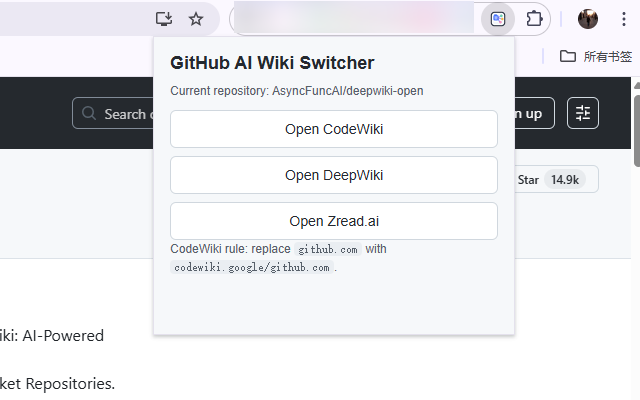
GitHub AI Wiki Switcher 是一个轻量浏览器扩展,帮助你在浏览 GitHub 仓库时,快速跳转到对应的 AI 文档与代码解读页面。
支持一键跳转到:
CodeWiki
DeepWiki
Zread.ai
使用方式很简单:
打开任意 GitHub 仓库页面
点击浏览器工具栏中的扩展图标
选择要跳转的目标站点
当前支持的跳转规则:
CodeWiki:将 github.com 替换为 codewiki.google/github.com
DeepWiki:跳转到 deepwiki.com/{owner}/{repo}
Zread.ai:跳转到 zread.ai/{owner}/{repo}
功能特点:
仅在 GitHub 仓库页面使用
操作简单,点击即可跳转
无账号要求
无数据收集
权限精简
适合人群:
阅读开源项目文档的开发者
需要快速理解仓库结构的工程师
希望借助 AI 工具辅助读代码的用户
----------------
Short description
Quickly jump from any GitHub repository page to CodeWiki, DeepWiki, or Zread.ai.
Full description
GitHub AI Wiki Switcher is a lightweight browser extension that helps you open AI-powered documentation and code-reading pages for the current GitHub repository.
With one click, you can jump to:
CodeWiki
DeepWiki
Zread.ai
How it works:
Open any GitHub repository page
Click the extension icon
Choose the destination you want to open
Supported URL rules:
CodeWiki: replaces github.com with codewiki.google/github.com
DeepWiki: opens deepwiki.com/{owner}/{repo}
Zread.ai: opens zread.ai/{owner}/{repo}
Key features:
Works on GitHub repository pages
Simple one-click navigation
No account required
No user data collection
Minimal permissions
This extension is useful for developers who want faster access to AI-generated documentation and repository summaries.