
COOKIE BOSS DETECTOR
Extension Actions
Shows the ip, country and tracking info of the current website.
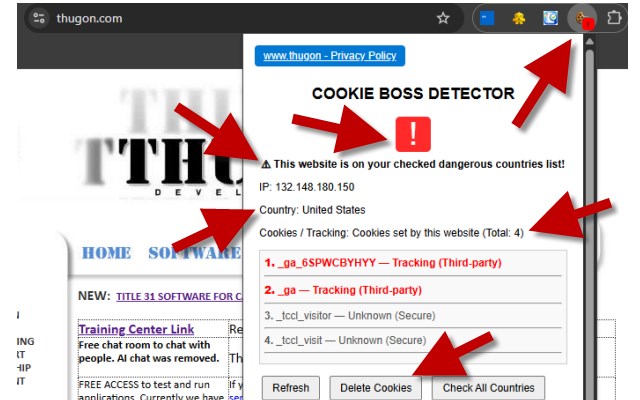
COOKIE BOSS DETECTOR (Dangerous Website Detector V2.4) (“the Extension”) is a browser extension designed to help users identify potentially risky websites by displaying the website’s IP address, country of origin, and cookie/tracking activity.
The Extension operates entirely on the user’s local computer and does not collect, transmit, store remotely, or sell any personal information.
This Extension is provided free forever, as-is, and where-is. By using it, you assume all risks and liabilities and release the developer from all claims.
Information Collection
No information is collected.
No personal data
No browsing history
No identifiers
No analytics
No telemetry
Local Data Processing
The Extension processes the following data strictly on your local machine:
Website IP address
Website country (derived from IP address)
Cookies set by the current website
Cookie categories (Tracking, Analytics, Essential, Unknown)
User-selected dangerous country preferences
This data is displayed only to you and never transmitted externally.
Cookies & Tracking Detection
Displays cookies set by the current website
Highlights potential tracking cookies
Allows deletion of cookies per website or tab
Does not inject, create, or modify cookies itself
Exporting Data
When you choose to export data:
Files are saved only to your local PC
Export format is plain text (.txt)
No data is sent to any server
No copies are retained by the developer
Country Detection
The Extension retrieves a website’s IP address and maps it to a country for informational and warning purposes only. This process does not identify users or track browsing behavior.
Dangerous Country Alerts
User-defined dangerous country list
Option to enable all countries and exclude specific ones
Visual warnings via toolbar badge and popup indicators
All preferences are stored locally using Chrome’s local storage.
Data Storage
Local browser storage only
No cloud storage
No external databases
Removing the extension deletes all stored data
Third Parties
The Extension does not:
Share data with third parties
Use advertising networks
Include trackers or beacons
Use third-party analytics services
Children’s Privacy
The Extension does not collect any data and therefore does not collect information from children under 13.
Security
Because all data stays on your computer, there are no external servers, no accounts, and no remote attack surfaces related to stored data.
Disclaimer
This software is provided as-is, without warranties of any kind. The user assumes all responsibility for use and releases the developer from any liability.
https://www.thugon.com/privacypolicy_dangerouswebsitedetector.html