
Tab Notes: Simple Notepad
Extension Actions
- Extension status: Featured
- Live on Store
A clean, distraction-free notepad with rich text formatting, task lists, keyboard shortcuts, save with sync, themes, and more.
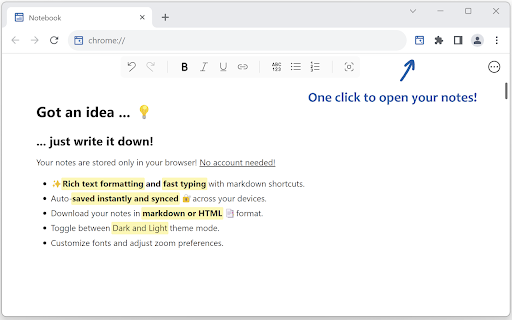
Capture your ideas instantly! Your notes are saved and synced by your browser as you type—perfect for reminders, to-dos, or long-form writing, all on one page.
✨ Format text with markdown and shortcuts.
✅ Create and manage task lists with checkboxes.
🔄 Synced and auto-saved across devices.
✂️ Copied text is beautifully formatted.
📝 Export notes as Markdown, HTML, or plain text.
🖨️ Print your notes or save them as a PDF.
🔍 Customize fonts and zoom preferences.
🌓 Toggle between Dark and Light themes.
🛡️ Fully private, no third-party servers involved.
Make the Most of It:
👉 In the settings, you can change the font type and size, set the writing area to full width or centered, and enable spelling suggestions.
👉 Use headings to quickly navigate through your notes.
Got an idea... 💡Just one click and you're ready to write it down!
Happy typing!
Latest reviews
- Kallista Espiritu
- I use this whenever my child have google class. It works great!
- Call me guy
- Its a notepad
- DemolizerTNT
- Works perfectly!
- Stefan Schirra
- Excellent tool, but markdown-level should be github, that means markdown checkboxes, tec...
- Clara Winslow
- Exactly what I needed, a great notepad that syncs with my two devices.
- cthasika cthasika
- Amazing extension. Thanks a lot! It has all I would like and more. The only real drawback is that it's not open source.
- Andrew Thomas
- Very useful and accessible across all my devices whenever I log in to my Google browser. Easy to use and I like that it has a lot of useful features for writing.
- Ethan Brown
- Just love it, its simple, syncs notes across my devices and its fully customizable. Best text editor I've found so far!