
Adjust Page Brightness - Control Tab Brightness🔅
Extension Actions
- Extension status: Featured
Customize webpage brightness with advanced features including auto-adjustment, site-specific settings, and night mode filter.
## Adjust Page Brightness - Control Tab Brightness 🔅
Customize your browsing experience with precise brightness control and advanced features for every website you visit.
### Adjust Page Brightness Key Features:
- 🔘 Global On/Off Toggle
- 🎚️ Precise brightness control (1% to 200%)
- 🌓 Automatic day/night mode
- 🎯 Site-specific settings
- 🌙 Night mode filter with customizable color
- 📊 Usage statistics and analytics
- ⌨️ Keyboard shortcuts (Ctrl+Shift+↑/↓)
- 🖱️ Quick access via right-click menu
- 💾 Export settings and statistics
### How It Works:
1. Click the extension icon to open the control panel
2. Use the slider to adjust brightness
3. Enable auto-mode for automatic day/night adjustments
4. Save site-specific settings for your favorite websites
5. Right-click anywhere on a webpage to quickly add it to your managed sites
6. Monitor usage with built-in analytics
### Easy Access Options:
- Extension popup for detailed controls
- Right-click context menu for quick site addition
- Keyboard shortcuts for instant adjustments
- Badge showing current brightness level
### 🎯 Perfect For:
- 👀 Reducing eye strain
- 💻 Late night browsing
- 📱 Different lighting conditions
- 🎮 Gaming websites
- 📖 Reading articles
### Privacy & Performance:
- No data collection
- Works offline
- Minimal resource usage
- No external dependencies
### 🆘 Screen Dimmer Support:
For support or feature requests, please visit our GitHub repository or contact us through the Chrome Web Store.
Contact E-mail: [email protected]
--------------------------------------------------------------------------------------------------------------------------------------------------
🚀 New Updates v1.8.3 - 🌍 06.05.2025
✅ Site Settings Improvements:
🔧 Fixed issue where settings were saved immediately when you clicked the "Edit settings" button
🌐 You can now see and manage ALL your registered sites instead of just the last 4
🔍 Added search functionality so you can search through your registered sites
🎛️ Improved Editing Experience:
📝 New editing mode - Now you can clearly see which site you are working on
💾 New "Save Site Changes" button - You can consciously save your changes
🔄 Your site settings have been saved and loaded more reliably
🌍 Language Support:
🌐 Multi-language support infrastructure added
🇬🇧 English language package prepared
🔤 The plugin will now be able to automatically display its content according to your browser language
------------------------------------------------------------------------------------------------------------------------------------------
🎉 New Update: v1.8.1 Update Notes 🌍 24.04.2025
What's New
🔘 Global On/Off Toggle
Turn the extension on/off for all sites at once!
🌓 Enhanced Mode Compatibility
Auto Brightness & Night Filter now work together seamlessly
⚠️ Improved Error Handling
No more "Error getting tab" messages
⚡ Performance Optimizations
Faster response times & lower resource usage
🎨 User Interface Improvements
Clearer controls & better status indicators
🔔 Smart Notification System
Helpful alerts about feature interactions
🌐 Enhanced Site Management
Easier site list control with favicons
🛠️ Bug Fixes & Stability
Overall reliability improvements
Latest reviews
- Cre8ionz
- Doesn't work - UI only white - after install & deletion redirection to: "https://secure.westcoastautoauction.com/" - Reported !
- Abdulghafuur Ahmed
- Nice. Does what it says, nothing more.
- Marc Fearby
- If you want to disable the brightness for a particular site, there is no button to just "disable for current site", you have to add the URL in the sites tab (which doesn't seem to detect sub-domains -e.g., mycompany.altassian.net is not covered if you just enter atlassian.net). A bit too fiddly for me.
- Hazel Allison
- Works fine on some sites, but the whole reason I added was to dull the blinding white hell of having to work on google docs late at night, and it does absolutely nothing over there.
- Zach Aldrich
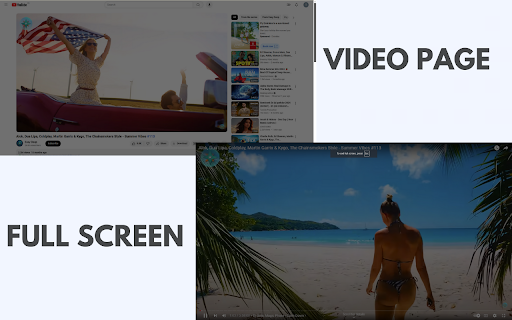
- I would like it to be able to dim my screen when I go into full screen but overall it is pretty good.
- Albert Caleb
- This is an essential tool for anyone who spends long hours in front of screens. The advanced brightness control and auto-adjustment feature make it perfect for any situation. Whether I’m working in dim light or bright sunlight, my comfort is prioritized. Love it
- Nicolas Betty
- I can’t believe I browsing without this extension before! It’s amazing how simple adjustments can make such a big difference. The blend of night mode and the ability to set preferences for individual sites is fantastic. My eyes thank me every day
- Dominic Jenner
- I was always struggling with harsh screen brightness, but this extension is a game changer. The ability to control tab brightness with just a click is super convenient. Plus, the auto-adjustment means I never have to fiddle with settings manually. Just perfect.
- Castro William
- I spend hours online, both for work and leisure, and this extension has made that experience so much more pleasant.
- Ibrahim Hassan
- I can't stress enough how much I love the night mode filter! It reduces eye strain considerably when I’m browsing late at night.
- Vice
- Good but this extension need an On-Off toggle.
- Ahmed Nas
- This extension has transformed my online experience! The ability to tweak brightness for each website makes reading and viewing so much more comfortable.
- Bernard Austin
- I absolutely love this brightness control extension! The auto-adjustment feature perfectly adapts the brightness based on the time of day, and the site-specific settings allow me to customize each website for optimal viewing.
- Thankgod Smith
- Exceptional tool!!
- Elisha Regina
- This extension is an incredible tool to use for my working activities. Thanks to the developer!!
- SAM GAB
- It does exactly what it says.
- Samej Gaming
- Nice tool!
- Vaughn Plummer
- The extension's interface is clean and intuitive. A simple slider allows for precise brightness adjustments, and the changes are applied instantly.
- Jesse Gray
- Good balance between simplicity and function.
- Lisa Patrick
- This is exactly what I needed for those long online sessions
- Kathy Moser
- I’m impressed by the auto-adjustment; it changes seamlessly depending on the time of day. It feels like my device adapts to my needs.
- Matthias Paulette
- I’m impressed by the auto-adjustment; it changes seamlessly depending on the time of day. It feels like my device adapts to my needs.
- Fowosherebanky
- I love the ability to adjust page brightness for different tasks. I use it for work during the day and switch to night mode when winding down.
- Jane Verthein
- The auto-adjustment feature is just what I needed for my workspace. It makes my work environment so much more comfortable.
- Elite growth
- I want to give a big shout out to the developers of this great extension!
- Samuel Ejeh
- Amazing experience using Adjust Page Brightness tool
- Doris Davis
- I’ve noticed a significant decrease in my screen fatigue since using this tool. The customization is great for all my browsing needs.
- Pro Davex
- I didn’t realize how much I needed this tool until I tried it. The automatic brightness change based on the time of day is so convenient!
- Iko-ojo Ej
- This is exactly what I needed for those long online sessions. The site-specific settings make it easier to find the perfect balance.
- George Rands
- I advice everyone that needs a well brightening tool should use this.
- Sam Gab
- Kudos to the developers of this great extension!
- Mike Edwin
- This plugin is highly recommended.
- DESIGN PRO
- A friend told me about this extension and it has been a game changer for me.
- Sam Iko-ojo
- Simply the best.
- Andy Bent
- I love the effectiveness of this tool!
- Jeff Anderson
- Working beyond my expectations!! I love it.
- Unai dvyokre
- With this tool I've been able to take charge of my brightness level on the web.
- Elite Digital Promotion
- Ever since I started using this tool it has to easy and fast to use.
- Ryan Elvis
- I’m someone who loves browsing at night, and the night mode filter is a complete game-changer. It’s perfect!
- Savvy
- The auto-adjustment feature is just what I needed for my workspace. It makes my work environment so much more comfortable.
- More Dollars
- I don’t get headaches anymore after long screen sessions. Truly a lifesaver.
- Victoria Sunday
- I never realized how bright websites were until I tried this! Now, I can comfortably read without worrying about my eyes.
- Vicky Denilson
- The night mode is so soothing. I don’t get headaches anymore after long screen sessions. Truly a lifesaver!
- Toyib Solutions
- Being able to control the brightness with such precision is fantastic! I use it every day for work and leisure.
- The pro Samik
- I can’t believe how much better my screen is on my eyes now. This feature adjusts automatically and works perfectly.
- Audu Peter
- Auto-adjustment is a game changer! No more squinting when switching between websites with different brightness levels. Great feature!
- Apex Team
- The night mode filter has made such a difference for my eyes at night. It's so easy to switch on, and it instantly feels better.
- Anita Brooks
- I love how I can customize the brightness of each website individually! It really helps me stay comfortable when browsing for long hours.
- Kazuya
- 5 stars if there were 0% 1% 2% 3% 4% 5% 6% 7% 8% 9% I would rate this more and support it.