
Cards & Colors
Extension Actions
CRX ID
gaifepagmjpnjklffdfcpmcojjliacge
Status
- Live on Store
Description from extension meta
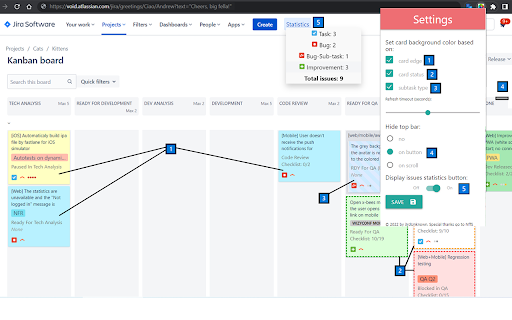
Extension enhances visibility to issues and cards on Jira Agile boards based on colored edges and statuses
Image from store
Description from store
Boost the visibility of issues on your cloud Jira agile boards by adding colors based on:
- colored edges for cards ("Board settings - Card colors" settings that added colored edges for cards based on selected method (JQL queries, etc)
- issue status (for example "Ready For QA", "Fixes Needed", "Blocked in QA")
- issue type (for example Bug-sub-task)
Also, the extension adds a button "Statistics" in the top menu, which displays the number of issues on board summarized by issue type.
Requires a Jira Software Cloud.
Latest reviews
- Kamil S
- A very useful extension, it helps you see the details you need more easily, especially when you have a lot of tasks and need to get a quick overview.
- Tamaki Kotatsu
- “Food tastes best when you don’t have to work for it.”