
Salesforce Tool Suite
Extension Actions
Compare Salesforce Metadata, Generate Metadata Excel Reports, Monitor Debug Logs, Explore Schema, & Bulk DML on Salesforce Metadata
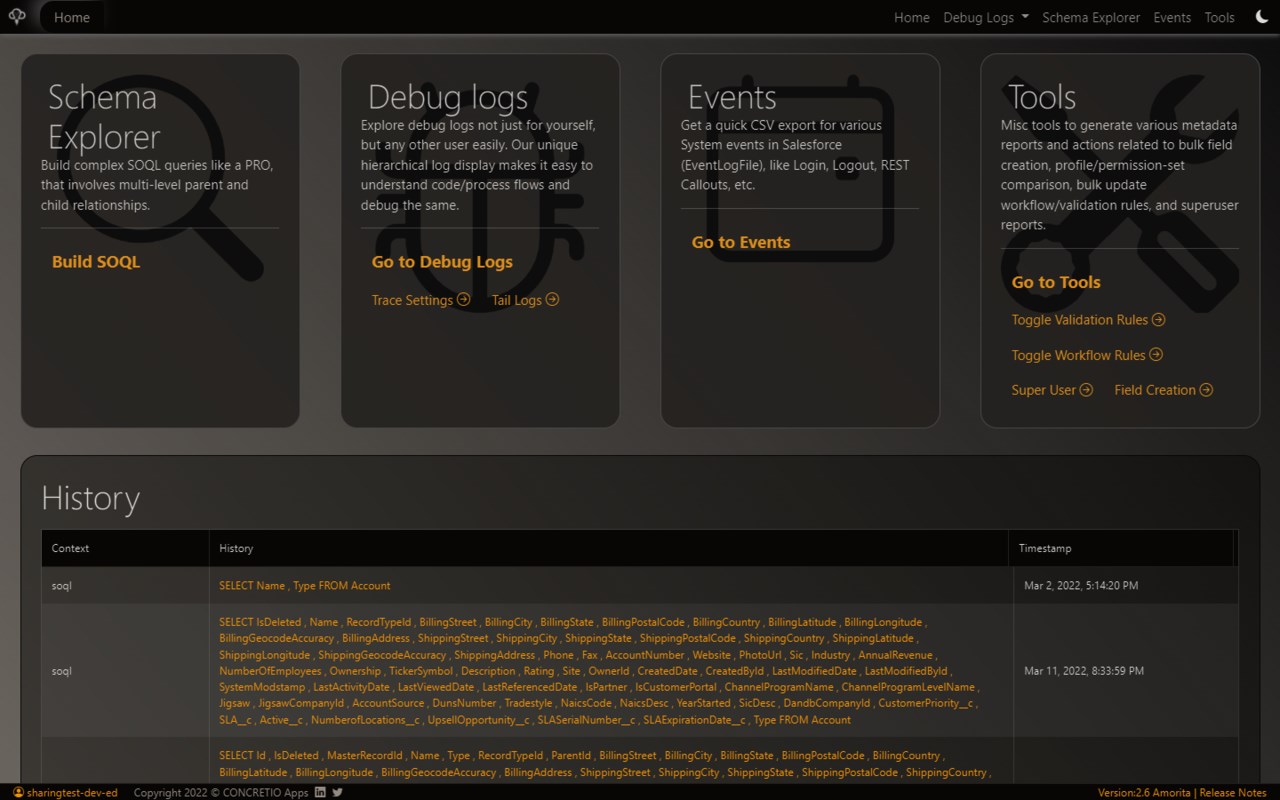
Boost Your Salesforce Productivity with Powerful Metadata Management and Reporting
Unlock a new level of efficiency in managing your Salesforce orgs with the Salesforce Tool Suite. This comprehensive browser extension is designed for administrators, developers, architects, and consultants who want to accelerate daily tasks and gain deeper insights into their Salesforce environment. By integrating directly into your browser, it provides seamless access to advanced tools for metadata comparison, rich report generation, debug log monitoring, schema exploration, and bulk data operations, all with your data securely stored locally.
No more jumping between multiple tools or struggling with complex UIs. Salesforce Tool Suite streamlines your workflows, letting you focus on what matters most: delivering quality Salesforce solutions faster and smarter. Whether you’re auditing permissions, troubleshooting errors, or documenting your org, this toolkit gives you professional-grade results in seconds.
Key Features:
- Metadata Comparison: Quickly compare profiles, permission sets, objects, Apex classes, triggers, LWCs, and more between Salesforce orgs. Identify changes and inconsistencies to ensure smooth deployments and security compliance.
- Rich Excel & HTML Reports: Export detailed and beautifully formatted reports covering metadata components like classes, flows, validation rules, and approval processes. Reports come with built-in Bootstrap styling and syntax highlighting for easy review and sharing.
- Debug Log Monitoring: Access real-time debug logs with an intuitive viewer, manage trace flags and debug levels, and monitor specific users’ debug sessions without additional setup. Stay informed of system behavior and troubleshoot effectively.
- Schema Explorer & SOQL Builder: Navigate your Salesforce schema effortlessly. Explore objects, fields, relationships, and generate complex SOQL queries using an interactive, user-friendly interface designed for admins and developers.
- Bulk DML Operations: Manage Salesforce metadata in bulk, create, update, delete fields or objects with guided prompts that minimize errors and maximize efficiency. Suitable for large-scale org maintenance and data management.
- Permission Set and Security Analysis: Review and audit permission sets, field-level security, and user access quickly to identify potential vulnerabilities and ensure compliance.
- Event Monitoring & Advanced Tools: Monitor over 50 critical Salesforce events and use exclusive API access to gain insights beyond standard Salesforce capabilities.
- Apex & LWC Documentation: Generate comprehensive reports documenting your Apex classes, triggers, and Lightning Web Components for easier code reviews and technical documentation.
- Secure Authentication Handling: The extension securely connects through your browser’s active Salesforce session, keeping all interactions safe and private with no personal data collected or transmitted externally.
How It Works:
1. Install the Salesforce Tool Suite extension in your browser and log into a Salesforce org tab.
2. Open the extension popup; it authenticates automatically using your current Salesforce session.
3. Choose your task: compare metadata, generate reports, monitor debug logs, explore schemas, perform bulk operations, or audit permissions.
4. The extension fetches relevant metadata and logs using Salesforce APIs, processes data locally with no external data sharing.
5. View generated reports and comparisons in rich, customizable HTML or Excel formats complete with syntax highlighting and visual diffs.
6. Download or export your reports, logs, or comparison results with one click for easy sharing or archival.
7. For bulk DML tasks, follow guided prompts to select actions, input data, and monitor the progress seamlessly within the extension interface.
Privacy: - No personal data collected. All operations occur securely within your browser session, ensuring your Salesforce org data stays private and safe.
With Salesforce Tool Suite, unlock unparalleled insight and control over your Salesforce metadata and processes, all in a single, easy-to-use browser extension built for professionals who demand speed, accuracy, and security. Enhance your Salesforce workflows today and see the difference expertise and automation can make.
Release Notes : https://github.com/concretios/salesforce-tool-suite-wiki/blob/main/release-notes.md
Latest reviews
- Nourie,
- Finally, an extension that allows me to compare permission sets and profiles --- and works!
- Vinh
- How can i uss Delete Salesforce fields in bulk. This extension can't get list of custom field in the object.
- Devin
- I love this plugin. Fantastic soql query builder. Probably the best one I have used. Turning on logs for users is so much easier than in the platform. Once you turn the log on you just have to click the recycle button to turn it back on. Lots of great features for bulk editing record types and other configuration objects.
- Kadam,DP,Dhananjay,QJA3
- The tool is extremely good. But can you please add the object details as well in Process Builder and Flow metadata export?