
SpaceMouse Driver for SketchUp Web
Extension Actions
CRX ID
ggjjgcdhnigahiokgcknccnkcddgjknf
Status
- Extension status: Featured
- Live on Store
Description from extension meta
Use your SpaceMouse inside the SketchUp Web app
Image from store
Description from store
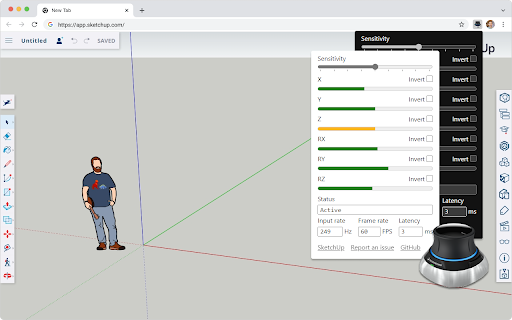
This extension brings your 3DConnexion SpaceMouse to the SketchUp Web app. Once installed, it auto-activates and gives you 5 degrees of freedom for direct manipulation.
- Move Up/Down, Left/Right, Back/Forward
- Pitch Up/Down
- Yaw Clockwise/Counterclockwise
You can also customize the overall sensitivity and invert individual axis.
This project is free and open source. You can learn more about the project, report a bug, or suggest an idea on GitHub: https://github.com/chuanqisun/spacemouse-anywhere
**Disclaimer**
This project is not endorsed by Trimble or 3Dconnexion, though I'm happy to collaborate with both companies to improve the user experience.
Latest reviews
- Alex Murfey
- Added the extension to Chrome and Sketchup Web version detected it immediately. Using the Spacemouse Pro wireless. The navigation features seem to be working fine so far. Haven't tested the button functionality yet.
- learn korean casually learn korean casually
- Thank you so much! I love it!
- Jeffrey Nichols
- Wow! Thank you!
- David Yanez
- It works awesome for all axis except for the Z-axis, it skips while zooming in or out. Still, major props to the author for releasing this extension to the public. 3DConnexion should be working on releasing an official extension.
- Alister McPherson
- Once I inverted most axis it works great!!
- Pascal Lou
- I have a spacemousse with cable and a chromebook. Unfortunately it doesn't work.
- Pascal Lou
- I have a spacemousse with cable and a chromebook. Unfortunately it doesn't work.
- Matt Andrews
- A for effort. This had to be a massive undertaking and it's definitely better than I was expecting. Smoothness is a bit of an issue, especially on zooming and the z-axis, but I have full confidence that can be worked on with time. Note: I originally gave this 3 stars because I was an idiot who didn't look at the screenshots to see that you could adjust sensitivity and inversion. My mistake.
- Matt Andrews
- A for effort. This had to be a massive undertaking and it's definitely better than I was expecting. Smoothness is a bit of an issue, especially on zooming and the z-axis, but I have full confidence that can be worked on with time. Note: I originally gave this 3 stars because I was an idiot who didn't look at the screenshots to see that you could adjust sensitivity and inversion. My mistake.