
CRX id
gkcekiikabjdbemokddmnnggmppiappj
gkcekiikabjdbemokddmnnggmppiappj
Description from extension meta
Copy scores from CSV files or spreadsheet to web application for Triam Udom Suksa School
Image from store
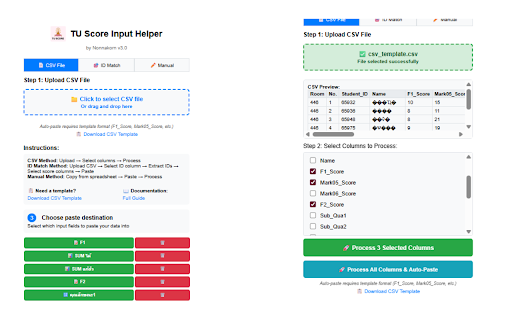
Description from store
TU Score Input Helper is an educational tool designed specifically for Triam Udom Suksa School teachers to streamline the grading process. This extension allows you to quickly copy numerical scores from Google Sheets or other spreadsheets and paste them directly into the school's web-based grading system.
Key Features:
- Copy scores from any spreadsheet (Google Sheets, Excel, etc.)
- Paste to multiple input field types with dedicated buttons
- Support for TU grading categories: F1, F2, SUM scores, คุณลักษณะ 1-10, and ปลายภาค
- Individual clear buttons for each input type
- Simple 3-step process: Copy → Process → Paste
- Compact interface with Thai language support
- No data collection - all processing happens locally
Perfect for Triam Udom Suksa School:
- Teachers entering student scores into the school's grading system
- Streamlined workflow for score input
- Reduced manual data entry errors
- Support for all TU score categories
Privacy & Security:
- No personal data collection
- All data stays on your device
- Temporary local storage only
Developed by Nonnakorn for TU educational use.
Latest reviews
- (2025-08-18) Amornrat Aphichokchai: It's very helpful. Thank you for saving my life. hahaha