
PSN Export Transaction History
Extension Actions
- Live on Store
This extension allows to export your transaction history from Sony PlayStation Network to the CSV file
This extension add to Chrome DevTools a new PSN Transactions panel that allows you to export your transaction history to the CSV file
Why?
Because Sony did not provide the ability to export data by regular means.
Is this legal?
It uses the same http requests as the website, the extension catches the site's requests and repeats them several times until all the data is received,
so most likely yes, it is legal.
How to use?
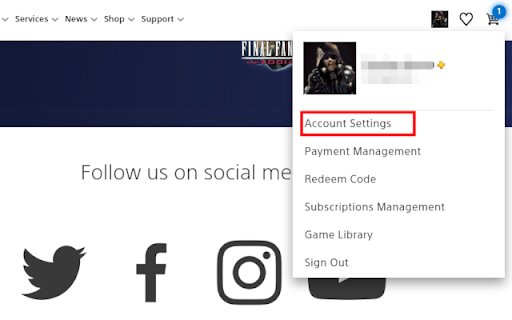
Log in to your account on the PlayStation site (https://www.playstation.com/), click on "Account Settings" link in the user menu, open Developer Tools in your Chrome, click on the "PSN Transactions" tab, go to "Transaction History" of your account settings, after downloading the data (may take several minutes), a button for downloading CSV file will appear on the Developer Tools panel. Click on the button to download the history of your transaction history.
Latest reviews
- Marcelo Pereira Rodrigues
- It doesn't work anymore. At least for now, "rb4.app PSN Library Exporter" is the only one working.
- JP Tetreault
- Could you post the source code on github please ? I would like to use this extension but it seems it does not work anymore .. I could fix it if on github ;)
- Diego Alvarez Aguilera
- Not working
- Diego Alvarez Aguilera
- Not working
- Jordi Arbos Marchante
- It doesn't work properly anymore.
- Jordi Arbos Marchante
- It doesn't work properly anymore.
- Lout Clercx
- Does not work anymore because you get transferred to another page, please fix it :(
- Lout Clercx
- Does not work anymore because you get transferred to another page, please fix it :(
- Vladyslav Rogalskyi
- Nice tool, many thanks!
- Vladyslav Rogalskyi
- Nice tool, many thanks!